The Aztec Code is a type of two-dimensional barcode that encodes information in a compact, square format, capable of encoding a wide range of data types such as text, numeric data, bytes of data, and even structured data like URLs and contact information. Central to understanding the Aztec Code is its mode message, a crucial component that governs how the encoded data is structured and interpreted. |

|
Overview of the Mode Message in Aztec Code |
The mode message in an Aztec Code serves several fundamental purposes: |
1.Encoding Structure Identification: It identifies the encoding structure used within the Aztec Code, distinguishing between different formats such as compact and full codes. 2.Layer and Data Codeword Information: It communicates essential parameters like the number of layers (L) and the number of data codewords (D), which are crucial for decoding the actual data. 3.Error Correction Setup: It specifies the configuration for error correction, including the size and number of Reed-Solomon codewords used to ensure data integrity. |
|
Structure and Components of the Mode Message |
1. Encoding Modes |
Aztec Codes can operate in two primary encoding modes: Compact Mode: Used when space efficiency is crucial. It uses a smaller mode word and fewer layers. Full Mode: Allows for larger data capacity by utilizing more layers and larger mode word sizes. |
2. Mode Word Size |
The mode word size varies based on whether the Aztec Code is compact or full: |
Compact Aztec Code: Number of layers (L): Encoded using 2 bits. Number of data codewords (D): Encoded using 6 bits. Mode word size: 8 bits (2 bits for L and 6 bits for D). Full Aztec Code: Number of layers (L): Encoded using 5 bits. Number of data codewords (D): Encoded using 11 bits. Mode word size: 16 bits (5 bits for L and 11 bits for D). |
3. Composition of the Mode Message |
Once the mode word is determined based on the encoding mode, it undergoes further processing: |
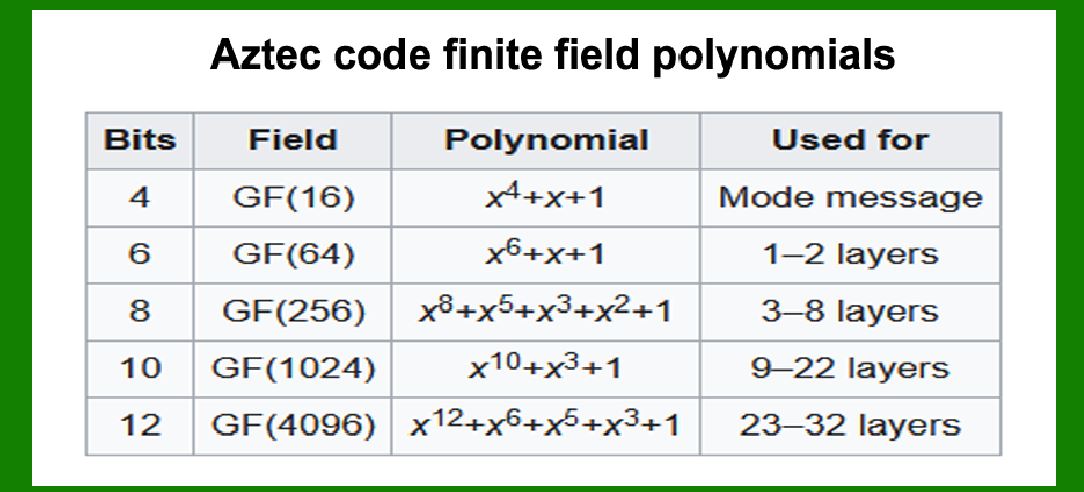
Breaking into Codewords: The mode word is divided into 4-bit codewords, typically in GF(16) (Galois Field of 16 elements), ensuring robust error detection and correction capabilities. Adding Reed-Solomon Codewords: After breaking down the mode word, additional Reed-Solomon codewords are appended. The number of Reed-Solomon codewords added depends on the specific requirements dictated by the number of layers (L) and the encoding mode. |
4. Layer Considerations |
The number of layers (L) plays a critical role in determining the overall capacity and robustness of the Aztec Code: |
Compact Codes: Can range from 1 to 32 layers, with varying capacities and sizes. Full Codes: Typically range from 1 to 151 layers, offering higher data capacities but requiring more space. |
5. Error Correction |
Error correction in Aztec Codes is managed by Reed-Solomon codewords. The size of these codewords depends directly on the number of layers (L): |
For compact codes: Reed-Solomon codewords typically range from 6 to 12 bits. For full codes: The size of Reed-Solomon codewords can vary based on the complexity and size of the encoded data. |

|
Implementation and Usage |
Compact vs Full Codes |
Compact Codes: Ideal for situations where space is limited but a reasonable amount of data needs to be encoded. They use fewer layers and smaller mode words. Full Codes: Used when larger amounts of data need to be stored or when higher fault tolerance and error correction capabilities are required. Full codes can accommodate more layers and larger mode words. |
Error Correction Optimization |
The choice of the number of layers (L) directly impacts the error correction capability of the Aztec Code: |
More Layers (L): Allow for greater redundancy and thus higher error correction capabilities. Fewer Layers (L): Result in more compact codes but with reduced error correction capabilities. |
Practical Considerations |
Data Capacity: Determined by the number of layers and the size of data codewords. Error Resilience: Influenced by the number and size of Reed-Solomon codewords appended. Encoding Efficiency: Balances between compactness (for space efficiency) and data integrity (through error correction). |

|
Conclusion |
The mode message in an Aztec Code is a vital component that governs how data is structured and interpreted. It encapsulates critical information such as the number of layers, the number of data codewords, and the error correction strategy used. Understanding the mode message helps in optimizing the encoding process for different applications, balancing between data capacity, error resilience, and space efficiency. As technology advances, the versatility and robustness of Aztec Codes continue to make them a preferred choice for encoding various types of data in both compact and full formats. |
 cs@easiersoft.com