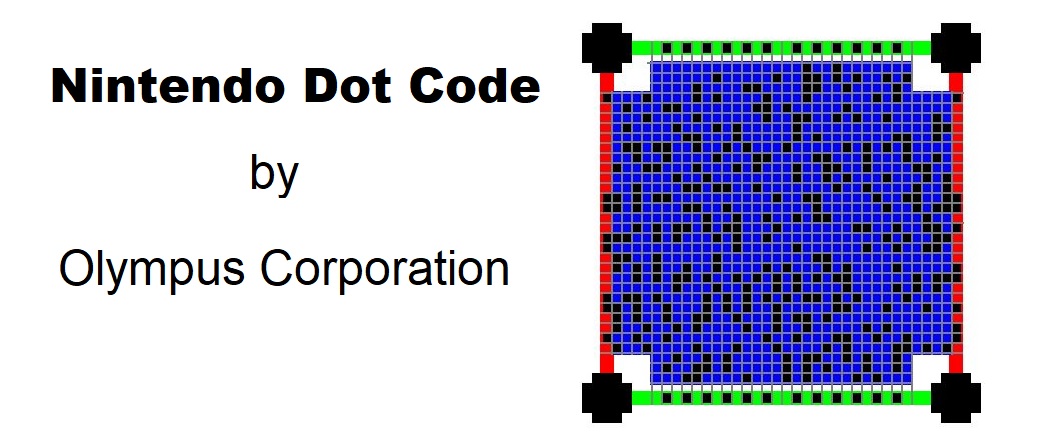
The Nintendo Dot Code is an intriguing technology developed by Olympus Corporation in collaboration with Nintendo, specifically designed to store and retrieve digital content such as songs, images, and mini-games for the Game Boy Advance (GBA) system. |
This innovation was primarily implemented on Pokémon trading cards, enhancing the interactive and multimedia experience associated with the Pokémon franchise during the early 2000s. |
|
Introduction to Nintendo Dot Code |
The Nintendo Dot Code represents a fusion of traditional trading card collectibles with digital interactivity, leveraging advanced optical encoding techniques to embed data within the visual patterns of trading cards. This technology enabled users to unlock and access digital content directly on their Game Boy Advance consoles by scanning these specially encoded cards. Developed amidst the rise of portable gaming and the Pokémon phenomenon, the Nintendo Dot Code aimed to enrich gameplay experiences and expand the utility of physical collectibles beyond mere trading purposes. |

|
Historical Context and Development |
Collaboration and Innovation |
In the late 1990s and early 2000s, Nintendo sought innovative ways to integrate digital content with physical merchandise, aiming to enhance user engagement and extend the lifespan of its gaming products. Partnering with Olympus Corporation, known for its expertise in imaging and optical technologies, Nintendo explored the concept of embedding data within the visual patterns of trading cards. This collaboration led to the development of the Nintendo Dot Code, a proprietary encoding method that utilized high-density dot patterns to store digital information. |
Application in Pokémon Trading Cards |
Pokémon, a globally popular franchise encompassing video games, trading cards, and various merchandise, served as an ideal platform for showcasing the capabilities of the Nintendo Dot Code. Olympus and Nintendo strategically implemented this technology in Pokémon trading cards, which were already widely collected and traded among enthusiasts. By embedding exclusive content such as songs, images, and mini-games within these cards, Nintendo aimed to provide a novel and interactive experience for players and collectors alike. |

|
Technology Overview |
Encoding Mechanism |
The Nintendo Dot Code relies on a specialized encoding mechanism based on high-density dot patterns. These patterns are strategically placed within the visual design of trading cards, using a combination of visible and invisible ink to encode binary data. The encoding process involves precise placement and calibration of dots, ensuring optimal readability and data integrity during scanning. |
Data Capacity and Format |
The capacity of the Nintendo Dot Code varies depending on the specific application and card design. Typically, it can store several kilobytes of digital data, including audio files, images, and simple interactive games programmed for the Game Boy Advance platform. Data is encoded in a format optimized for quick retrieval and seamless integration with compatible gaming consoles, facilitating instant access to additional content without the need for internet connectivity or external storage devices. |
Optical Recognition and Scanning |
To access the embedded content, users employ a Game Boy Advance console equipped with a compatible scanning device. This device utilizes optical sensors to capture and decode the dot patterns printed on Pokémon trading cards. The scanning process involves aligning the console's sensor with the encoded Dot Code on the card's surface, enabling the console to interpret and execute the corresponding digital content stored within the code. |

|
Integration with Game Boy Advance |
Interactive Multimedia Experience |
Upon successful scanning, the Game Boy Advance console retrieves and displays the embedded content on its screen. This content may include exclusive Pokémon-related multimedia such as animated sprites, soundtracks, character profiles, and interactive mini-games. By seamlessly integrating physical trading cards with digital gameplay elements, the Nintendo Dot Code enhances the overall gaming experience, encouraging active engagement and prolonged interaction with Pokémon-themed merchandise. |
User Interface and Navigation |
Nintendo developed intuitive user interfaces tailored for navigating and interacting with the digital content accessed via the Nintendo Dot Code. Users can browse through menus, select desired options, and enjoy multimedia features directly on their Game Boy Advance consoles. The interface design prioritizes ease of use and responsiveness, ensuring a smooth transition between physical card scanning and digital content consumption. |

|
Market Impact and Reception |
Consumer Appeal and Engagement |
The introduction of the Nintendo Dot Code significantly enhanced the appeal of Pokémon trading cards among fans and collectors. By offering exclusive digital rewards and interactive experiences, Nintendo effectively bridged the gap between physical merchandise and digital entertainment, thereby attracting a broader audience interested in both gaming and collectible card culture. The innovative use of optical encoding technology further cemented Nintendo's reputation as a pioneer in integrating digital interactivity with traditional gaming products. |
Cultural Significance and Legacy |
The Nintendo Dot Code's cultural impact extends beyond its technical achievements, influencing future developments in augmented reality (AR) and mixed-reality gaming experiences. This technology laid the groundwork for subsequent innovations in interactive merchandise and digital content distribution within the gaming industry. Its legacy continues to resonate among nostalgic gamers and collectors who fondly recall the era of Pokémon trading cards enhanced by digital capabilities. |

|
Conclusion |
The Nintendo Dot Code represents a groundbreaking technological achievement that revolutionized the intersection of physical collectibles and digital gaming experiences. Developed by Olympus Corporation in collaboration with Nintendo, this proprietary encoding method enabled the storage and retrieval of songs, images, and mini-games on Pokémon trading cards for the Game Boy Advance platform. By embedding high-density dot patterns within the visual designs of trading cards, Nintendo expanded the interactive potential of its merchandise, captivating audiences with immersive multimedia content and fostering lasting engagement with the Pokémon franchise. |
 cs@easiersoft.com