PDF417 barcode technology plays a crucial role in modern postal services, particularly in facilitating efficient mail management and tracking systems. Among various postal services worldwide, the United States Postal Service (USPS) utilizes PDF417 barcodes extensively for printing postage labels and managing the logistics of mail delivery. This technology enables the encoding of a substantial amount of data related to sender information, recipient details, package weight, destination ZIP code, and other relevant shipping particulars. The integration of PDF417 barcodes enhances the speed, accuracy, and reliability of sorting processes while also supporting advanced tracking services that provide customers with real-time updates on the status and location of their parcels. |
|
Introduction to PDF417 Barcode Technology |
PDF417 (Portable Data File 417) is a stacked linear barcode symbol format used in a variety of applications, including identification cards, inventory management, and particularly in logistics and postal services. Unlike traditional linear barcodes that encode limited information, PDF417 is capable of encoding large amounts of data, making it highly suitable for applications where extensive data storage and retrieval are required. |

|
Structure and Encoding Capacity |
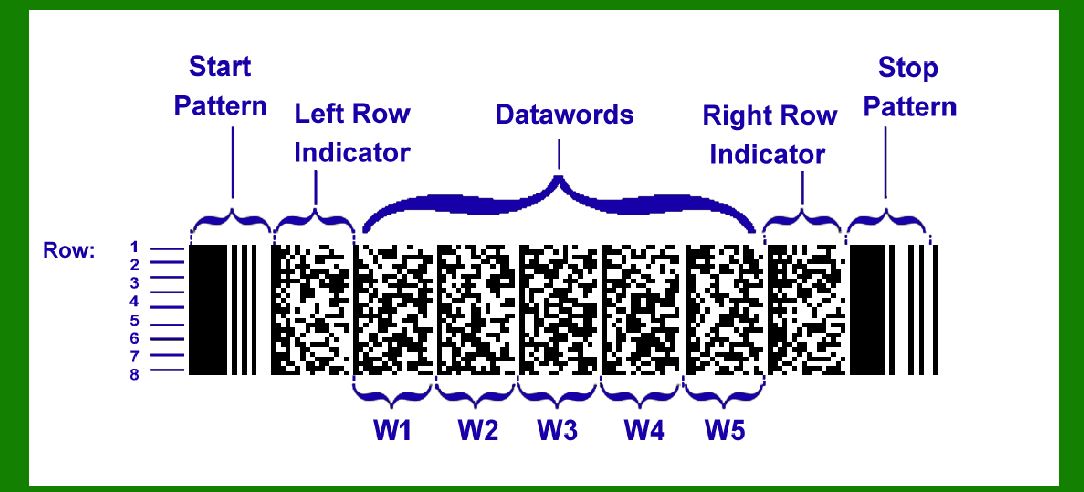
PDF417 barcodes consist of multiple rows of linear barcodes stacked on top of each other. The symbol is composed of a start pattern, rows of codewords, error correction codewords, and a stop pattern. The number of rows and columns in a PDF417 symbol can vary, allowing for flexibility in data storage capacity. Typically, PDF417 barcodes can encode up to 1.1 kilobytes of data, or approximately 1850 text characters, which is significantly more than traditional linear barcodes. |

|
Applications in Postal Services |
In postal services, PDF417 barcodes are used primarily for printing postage labels and managing package tracking information. The USPS, as a prominent example, leverages PDF417 technology extensively to encode critical shipment details directly onto postage labels. These details include: |
1.Sender Information: Name, address, and contact details of the sender. 2.Recipient Information: Name, address, and contact details of the recipient. 3.Package Details: Weight of the package, dimensions (if applicable), and any special handling instructions. 4.Shipping Details: Origin and destination ZIP codes, shipping class (e.g., priority, standard), and estimated delivery date. |

|
Functionality in Mail Sorting and Delivery |
1. Enhanced Sorting Efficiency PDF417 barcodes significantly enhance the efficiency of mail sorting operations. Postal workers can scan the barcode on each package quickly, allowing automated sorting systems to route packages to their correct destinations based on the encoded ZIP code and other sorting criteria. This automation reduces manual handling errors and speeds up the sorting process, thereby improving overall operational efficiency. |
2. Tracking and Visibility One of the key advantages of PDF417 barcodes in postal services is their ability to facilitate advanced tracking and visibility for both postal operators and customers. Each barcode contains a unique identifier linked to the package's tracking number or shipping label. Postal workers can scan these barcodes at various points in the delivery process, updating the package's status in real-time within the postal service's tracking system. Customers can access this information through online portals or mobile apps, allowing them to track their parcels from dispatch to delivery. |
3. Error Reduction and Accuracy By automating data capture through barcode scanning, PDF417 technology helps reduce errors that can occur during manual data entry processes. The encoded data is read electronically, minimizing the risk of transcription errors and ensuring that accurate information flows through the postal service's logistics chain. This accuracy not only improves delivery times but also enhances customer satisfaction by providing reliable tracking information. |

|
Implementation in USPS Operations |
The USPS integrates PDF417 barcodes into its operations across various service levels, from standard mail to priority and express shipments. Here's how PDF417 technology is implemented within USPS operations: |
1. Postage Label Generation When a sender prepares a package for shipment using USPS services, they typically print a postage label that includes a PDF417 barcode. This barcode contains all essential shipment details required for processing and delivery. |
2. Sorting and Routing As packages enter USPS processing facilities, automated sorting machines scan the PDF417 barcodes to determine each package's destination. The barcode data directs the sorting equipment to route packages to the correct bins or conveyors based on ZIP code, delivery route, or other specified criteria. |
3. Tracking Services Once a package is in transit, USPS scanners at various checkpoints (sorting facilities, transportation hubs, local post offices) scan the PDF417 barcode to update the package's status in the USPS tracking system. This system provides real-time updates on the package's location and estimated delivery date, which customers can access through the USPS website or mobile app. |
4. Customer Convenience PDF417 barcodes enhance the overall customer experience by providing convenient tracking capabilities. Customers can track their packages online, receive notifications of delivery status changes, and even request special delivery instructions or rerouting options based on the real-time tracking information provided by the PDF417 barcode system. |

|
Advantages of PDF417 Barcodes in Postal Services |
1.Data Capacity: PDF417 barcodes can store significantly more data than traditional barcodes, accommodating detailed shipment information in a compact format. 2.Efficiency: Automating data capture and sorting processes improves operational efficiency, reduces costs, and speeds up delivery times. 3.Accuracy: Reduced manual handling and data entry errors enhance the accuracy of shipment processing and tracking information. 4.Customer Satisfaction: Real-time tracking capabilities and reliable delivery updates enhance customer satisfaction and confidence in postal services. |

|
Challenges and Considerations |
While PDF417 barcode technology offers numerous advantages, there are some considerations for its implementation in postal services: |
1.Infrastructure Requirements: Postal operators need adequate infrastructure, including barcode scanners and data processing systems, to fully leverage PDF417 technology. 2.Standardization: Ensuring barcode readability across different scanning devices and environments requires adherence to industry standards and best practices. 3.Integration: Seamless integration of PDF417 barcode systems with existing postal service operations and IT systems is crucial for maximizing efficiency and effectiveness. |

|
Future Trends and Innovations |
Looking ahead, PDF417 barcode technology in postal services is likely to continue evolving with advancements in barcode scanning technology, data analytics, and customer interface capabilities. Potential future trends include: |
1.Mobile Integration: Increasing use of mobile devices for barcode scanning and package tracking by postal workers and customers alike. 2.Enhanced Data Analytics: Utilizing barcode data for predictive analytics to optimize delivery routes, resource allocation, and customer service. 3.IoT Integration: Integration with Internet of Things (IoT) devices for real-time package monitoring and environmental condition tracking. |

|
Conclusion |
PDF417 barcode technology plays a vital role in modern postal services, particularly in enhancing the efficiency, accuracy, and customer satisfaction of mail management and tracking systems. Through its ability to encode extensive shipment details and facilitate real-time tracking capabilities, PDF417 barcodes enable postal operators like the USPS to streamline operations, reduce costs, and deliver a superior customer experience. As technology continues to advance, PDF417 barcodes are poised to remain a cornerstone of innovation in the logistics and postal industries, supporting the ongoing evolution of efficient mail management and delivery services worldwide. |
 cs@easiersoft.com