Introduction to PDF417 Barcode |
PDF417 is a versatile barcode format known for its high data capacity and robustness. Unlike traditional linear barcodes that encode data horizontally, PDF417 utilizes a stacked format, allowing it to store significant amounts of information vertically. This characteristic makes it suitable for various applications ranging from transport and identification cards to inventory management and beyond. |
|
Historical Context and Development |
The PDF417 symbology was developed by Dr. Ynjiun P. Wang at Symbol Technologies in 1991. Symbol Technologies, now part of Zebra Technologies, has been a pioneer in barcode technology and played a crucial role in the evolution of barcode standards and applications. |
The name 'PDF417' itself carries specific meaning: |
PDF: Stands for Portable Data File, indicating the format's ability to store diverse types of data in a compact form. 417: Refers to the structure of the barcode, where each codeword consists of 4 bars and spaces in a pattern that spans 17 units (modules) in length. |

|
Technical Specifications |
PDF417 is formally defined in ISO/IEC 15438, which outlines its detailed specifications including: |
Data Capacity: PDF417 can encode up to 1850 text characters, 1108 binary data bytes, or 2710 numeric digits per symbol. Error Correction: PDF417 supports robust error correction capabilities, allowing data to be reconstructed even if parts of the barcode are damaged or obscured. Symbol Dimensions: The physical dimensions of a PDF417 symbol can vary based on the application requirements, with the number of rows and columns affecting the total data capacity. Encoding Modes: PDF417 supports different encoding modes for various types of data, including text, numeric, byte, and structured append, which allows splitting large amounts of data across multiple symbols. |

|
Structure of PDF417 Barcode |
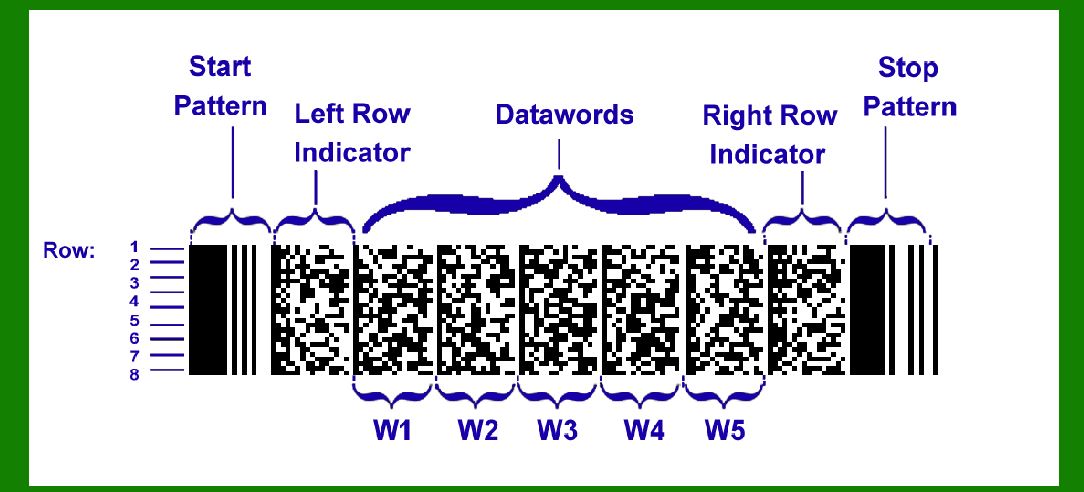
The PDF417 symbol consists of multiple rows of stacked linear barcodes, each containing: |
Start Pattern: Indicates the beginning of a PDF417 symbol. Codewords: Data encoded within the barcode, which includes information about the type of data and its content. Error Correction Codewords: Additional codewords used to reconstruct data if the symbol is damaged. Stop Pattern: Marks the end of the barcode. |
The arrangement of codewords in PDF417 is such that it facilitates both vertical and horizontal error correction, enhancing reliability in data retrieval even under adverse conditions. |

|
Applications of PDF417 Barcode |
PDF417 is widely used across diverse industries and applications due to its unique capabilities: |
Transportation: Used for encoding information on airline tickets, boarding passes, and shipping labels. PDF417 can store passenger information, flight details, and other relevant data in a compact format. Identification Cards: Employed in driving licenses, national ID cards, and employee badges to store personal information securely. Inventory Management: Utilized in warehouse operations, PDF417 can encode product details, serial numbers, and batch information, facilitating efficient inventory tracking and management. Healthcare: Applied in medical institutions for patient identification, medication management, and tracking medical records. Retail: Used for electronic ticketing, couponing, and loyalty programs where large amounts of data need to be encoded in a limited space. |

|
Advantages of PDF417 Barcode |
PDF417 offers several advantages over traditional barcode formats: |
High Data Capacity: Capable of storing large amounts of data, making it suitable for applications requiring extensive information to be encoded. Error Correction: Robust error correction ensures data integrity, even if parts of the barcode are damaged or unreadable. Compact Size: Despite its high data capacity, PDF417 symbols can be printed at a relatively small size, conserving space on documents and products. Versatility: Supports various data types and encoding modes, accommodating different application requirements. |

|
Implementing PDF417 Barcode |
Implementing PDF417 barcode technology involves several key considerations: |
Software and Hardware Support: Ensure that the scanning equipment and software used can decode PDF417 symbols, adhering to ISO standards for compatibility. Data Encoding: Determine the appropriate encoding mode based on the type of data to be stored (text, numeric, binary), and consider using structured append for large datasets. Printing and Scanning Requirements: Use high-quality printers capable of producing clear and precise PDF417 symbols. Ensure scanners are capable of reading small barcodes and are properly calibrated for accurate data capture. Integration: Integrate PDF417 encoding and decoding capabilities into existing systems or applications, ensuring seamless data interchange and compatibility across platforms. |

|
Future Trends and Innovations |
As technology continues to evolve, PDF417 barcode technology is also likely to see advancements: |
Mobile Integration: Increasing use of mobile devices for scanning PDF417 barcodes, leveraging smartphone apps for ticketing, access control, and inventory management. Security Enhancements: Integration of encryption and digital signatures to enhance the security of data stored within PDF417 symbols, particularly in sensitive applications such as healthcare and government. Internet of Things (IoT): Integration of PDF417 barcodes with IoT devices for real-time tracking and monitoring of assets, enabling enhanced supply chain visibility and logistics management. |

|
Conclusion |
PDF417 barcode technology has proven to be a robust solution for storing and transmitting large amounts of data across various industries and applications. Its high data capacity, compact size, and robust error correction capabilities make it indispensable in environments where reliability and efficiency are paramount. As technology advances, PDF417 is expected to continue evolving, adapting to new challenges and applications while maintaining its position as a cornerstone of modern barcode technology. |
 cs@easiersoft.com