PDF417 barcodes represent a significant advancement in the realm of retail and inventory management, offering substantial advantages over traditional 1D barcodes due to their enhanced data capacity and versatility. This detailed exploration will delve into the specific roles and applications of PDF417 barcodes in both retail environments and inventory management systems. |
|
Understanding PDF417 Barcodes |
PDF417 (Portable Data File 417) is a two-dimensional barcode symbology capable of encoding large amounts of data within a compact space. Unlike linear barcodes that encode data in one direction, PDF417 uses multiple rows and columns to store information vertically and horizontally, significantly increasing its data storage capacity. This makes PDF417 ideal for applications requiring extensive data capture, such as detailed product information, batch numbers, expiry dates, and more. |

|
Applications in Retail |
In retail settings, PDF417 barcodes are primarily utilized on product labels to encode comprehensive details about individual items. Here's how PDF417 enhances retail operations: |
1.Product Information Encoding: PDF417 barcodes can store data beyond simple product identifiers. They encode information such as item descriptions, pricing, SKU numbers, manufacturer details, and other specifics relevant to retail operations. This detailed encoding facilitates accurate inventory management, as each product can be uniquely identified and tracked throughout its lifecycle-from receiving at the warehouse to sale at the point of purchase. |
2.Inventory Management: Retailers benefit from PDF417 barcodes by efficiently managing stock levels. Inventory systems can automatically update quantities, track sales, and alert staff to reorder when stock levels are low. The barcode's ability to encode batch numbers and expiry dates is crucial for managing perishable goods, ensuring older stock is sold first to minimize waste. |
3.Efficient Point-of-Sale (POS) Transactions: At checkout, PDF417 barcodes expedite the scanning process. Since they store more data than traditional barcodes, they reduce the need for manual entry of product details, speeding up transactions and improving customer satisfaction. |
4.Anti-counterfeiting Measures: PDF417 barcodes can include encrypted information or verification codes that help retailers authenticate products and combat counterfeit goods. This is especially important for high-value or branded items prone to counterfeit. |

|
Applications in Inventory Management |
Beyond retail, PDF417 barcodes play a crucial role in warehouse management and logistics. Their capabilities extend to: |
1.Shipping and Receiving: PDF417 barcodes are used on shipping labels to encode comprehensive shipment details. This includes sender and recipient addresses, carrier information, package contents, weight, dimensions, and handling instructions. Automated scanning of PDF417 barcodes during shipping and receiving processes ensures accurate tracking and reduces errors associated with manual data entry. |
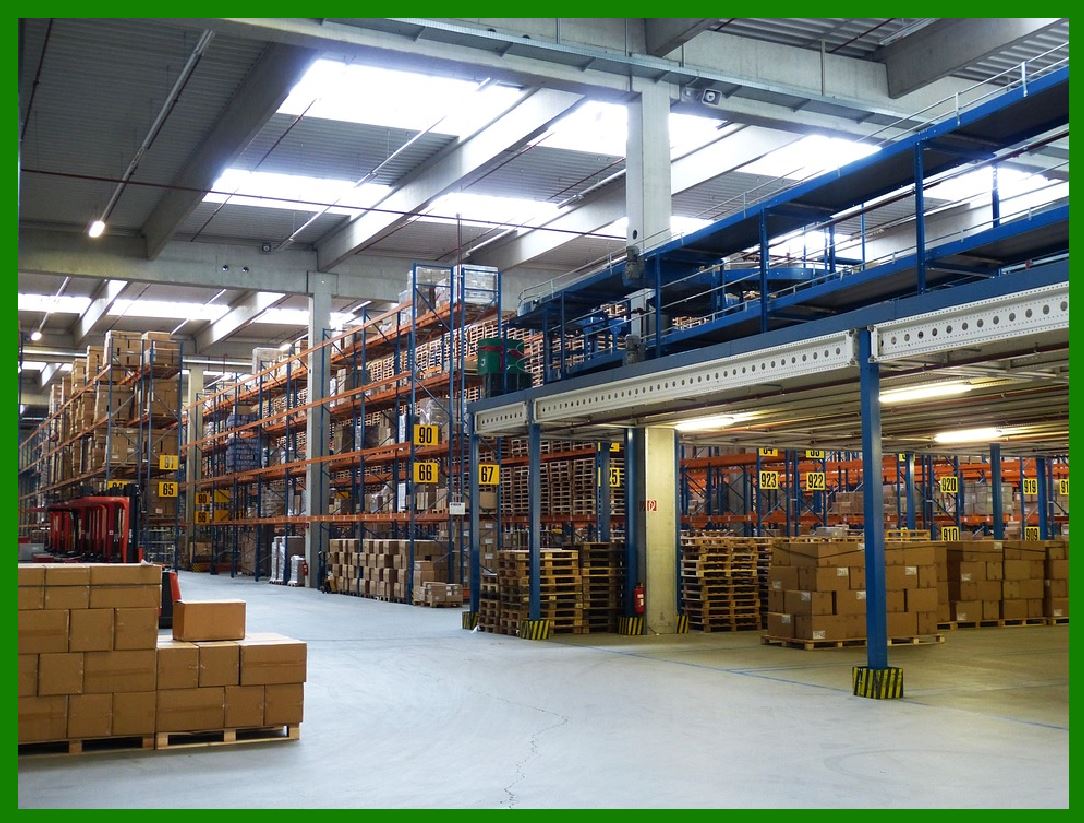
2.Inventory Tracking: In warehouse environments, PDF417 barcodes are affixed to inventory bins, shelves, and individual items. This allows for real-time tracking of inventory movements, improving accuracy in stock counts and reducing instances of misplaced items. RFID (Radio Frequency Identification) tags are sometimes used in conjunction with PDF417 to enable both barcode scanning and RFID reading for enhanced inventory visibility. |
3.Integration with ERP Systems: PDF417 barcodes seamlessly integrate with Enterprise Resource Planning (ERP) systems and other supply chain management software. This integration ensures that inventory data is synchronized across all operational units, enabling efficient resource allocation and demand forecasting. |
4.Batch and Lot Tracking: Industries such as pharmaceuticals and food manufacturing rely on PDF417 barcodes for tracking batch and lot numbers. This enables swift recalls and enhances traceability in case of quality issues or product recalls. |

|
Technical Aspects of PDF417 Barcodes |
Structure and Encoding |
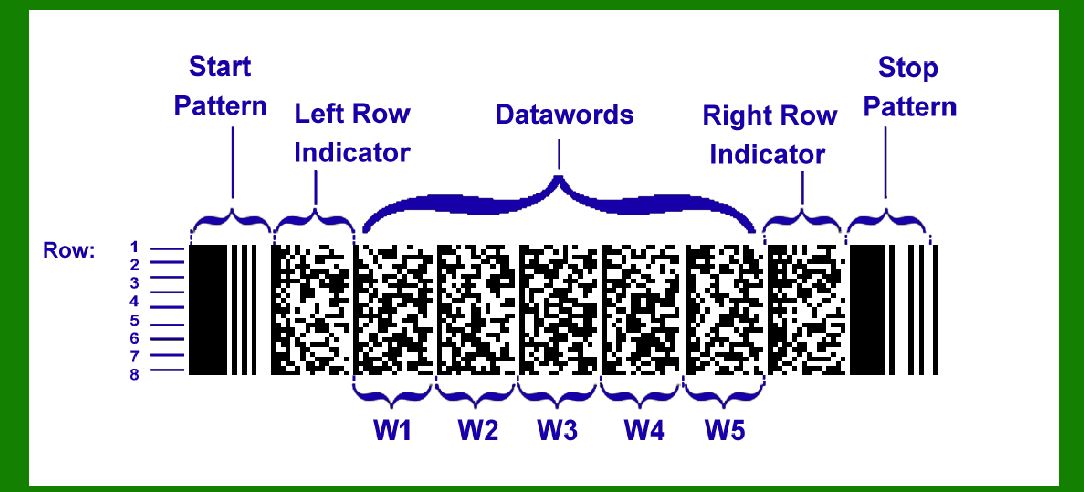
PDF417 barcodes consist of stacked rows of data cells, each containing multiple bars and spaces that encode information. The barcode structure includes: |
Rows and Columns: PDF417 can accommodate up to 30 rows of data, with each row capable of encoding up to 30 codewords. Error Correction: Built-in error correction ensures data integrity, even if the barcode is partially damaged or obscured during scanning. Data Formats: PDF417 supports different modes for encoding data, including numeric, alphanumeric, byte, and text modes, allowing flexibility in the types of information that can be stored. |
Reading and Scanning |
PDF417 barcodes require specialized imaging scanners capable of capturing the entire barcode matrix. These scanners decode the barcode by analyzing the pattern of bars and spaces in each row, reconstructing the encoded information. |
Scanner Compatibility: Most modern barcode scanners are equipped to read PDF417 barcodes. These scanners use image processing techniques to interpret the barcode pattern accurately. Application Programming Interfaces (APIs): APIs for barcode scanning and decoding facilitate integration with various software applications, enabling seamless data transfer between barcode scanners and inventory management systems. |

|
Implementation Challenges and Considerations |
Label Design and Printing |
Effective use of PDF417 barcodes in retail and inventory management hinges on proper label design and printing practices: |
Barcode Size and Placement: Adequate space around the barcode ensures it can be scanned without obstruction. Barcode size should be proportional to the amount of data encoded to maintain scanning accuracy. Printing Quality: High-resolution printing is essential to produce clear barcode images that scanners can read reliably. Factors such as ink contrast, substrate material, and barcode orientation affect scanning performance. |
Integration with Software Systems |
Successful implementation of PDF417 barcodes requires integration with existing software systems: |
ERP and Inventory Management Software: Ensure compatibility between barcode scanning devices and software platforms used for inventory tracking, order management, and customer relationship management. Data Validation and Error Handling: Implement validation checks to ensure scanned data matches the expected format. Error handling protocols should address discrepancies and prevent data corruption. |
Training and User Adoption |
Training staff on proper barcode scanning techniques and system usage is critical: |
User Training: Educate employees on how to scan PDF417 barcodes correctly to minimize errors and maximize operational efficiency. Maintenance and Support: Establish procedures for barcode scanner maintenance and troubleshooting to minimize downtime and ensure continuous system operation. |
|
Case Studies and Real-World Applications |
Retail Case Study: Grocery Store Chain |
A regional grocery store chain implemented PDF417 barcodes on product labels to enhance inventory management and customer service: |
Inventory Accuracy: PDF417 barcodes improved stock accuracy by enabling real-time updates on product movements and expiration dates. Checkout Efficiency: Faster scanning at checkout reduced waiting times, enhancing the overall shopping experience for customers. Supplier Relations: Enhanced visibility into product demand facilitated better supplier negotiations and inventory replenishment strategies. |
Logistics Case Study: Distribution Center |
A large distribution center deployed PDF417 barcodes on shipping labels to streamline operations: |
Accuracy in Shipping: PDF417 barcodes reduced shipping errors by automating data entry and verification processes. Warehouse Efficiency: Real-time inventory tracking enabled efficient allocation of resources and reduced operational costs. Customer Satisfaction: Faster order fulfillment and accurate delivery tracking improved customer satisfaction and loyalty. |

|
Future Trends and Innovations |
Enhanced Data Security |
As cyber threats evolve, PDF417 barcodes may incorporate encryption and authentication features to enhance data security: |
Secure Encoding: Advanced encryption algorithms protect sensitive information encoded in PDF417 barcodes, safeguarding against unauthorized access. Blockchain Integration: Integration with blockchain technology enables secure tracking of supply chain transactions and product authenticity verification. |
IoT and Real-Time Data Analytics |
Integration of PDF417 barcodes with Internet of Things (IoT) devices allows real-time data capture and analysis: |
Smart Sensors: IoT-enabled barcode scanners transmit data to centralized systems for real-time analytics, enabling proactive decision-making and operational adjustments. Predictive Analytics: Data insights from PDF417 barcodes support predictive maintenance and demand forecasting, optimizing inventory management and resource allocation. |

|
Conclusion |
PDF417 barcodes represent a cornerstone technology in modern retail and inventory management systems, offering unparalleled data storage capacity and versatility. From retail operations to warehouse logistics, PDF417 barcodes facilitate efficient stock control, accurate inventory tracking, and seamless integration with ERP systems. As industries continue to digitize and automate processes, PDF417 barcodes are poised to play an increasingly vital role in enhancing operational efficiency, customer satisfaction, and supply chain transparency. Embracing this technology equips businesses with the tools needed to thrive in a competitive marketplace, ensuring streamlined operations and informed decision-making. |
 cs@easiersoft.com