Barcode Technology

Barcode History

Barcode Label Paper

Barcode Printer

Barcode Application

Inventory Management

AI Barcode QRCode

Barcode Scanner

Barcode Software

Barcode Software B

Barcode Software C

Barcode Software D

Barcode Software E

New Technology A

New Technology B

Robot Technology

Barcode Types

Barcode Types B

Barcode Types C

Barcode Types D

Barcode Types E

Barcode Types F

Electronic Technology

Psychology at Work

Barcode Technology and Barcode Software Related   <<< Back to Directory <<<

QR Code Credit card functionality

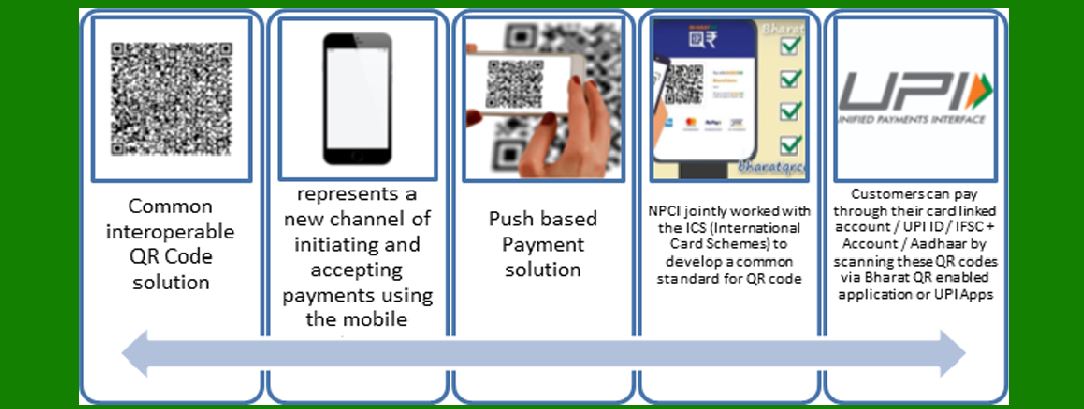
In September 2016, the Reserve Bank of India (RBI) launched the eponymously named Bharat QR, a common QR code jointly developed by all the four major card payment companies - National Payments Corporation of India that runs RuPay cards along with MasterCard, Visa and American Express. It will also have the capability of accepting payments on the unified payments interface (UPI) platform.

In September 2016, the Reserve Bank of India (RBI) introduced Bharat QR, a standardized QR code designed to streamline digital payments.

This initiative represents a collaborative effort among the four major card payment companies: the National Payments Corporation of India (NPCI), which operates RuPay cards, along with MasterCard, Visa, and American Express.

Detailed Breakdown:

1. Introduction to Bharat QR:

Bharat QR was launched to create a unified payment system that simplifies the process of digital transactions for both consumers and merchants. It is designed to reduce the dependence on physical point-of-sale (POS) terminals and enable more widespread acceptance of digital payments.

2. Development and Collaboration:

National Payments Corporation of India (NPCI): Operates the RuPay card network and is a key player in India's digital payment ecosystem.

MasterCard: A global payment technology company that provides card-based payment systems.

Visa: Another leading global payments technology company facilitating electronic funds transfers.

American Express: A multinational financial services corporation known for its credit card, charge card, and travel-related services.

The collaboration among these major players ensured that Bharat QR would be widely accepted and integrated across various platforms, making it a robust solution for digital payments.

3. Functionality of Bharat QR:

Unified QR Code: Unlike previous systems where different merchants might use different QR codes (depending on the payment provider), Bharat QR provides a single, interoperable QR code. This means a merchant only needs one QR code to accept payments from any of the participating card networks.

Seamless Payments: Consumers can make payments by scanning the Bharat QR code with their smartphone's banking app or any supported payment application. The process is quick, secure, and convenient.

Merchant Benefits: Merchants benefit from lower transaction costs and the ability to accept digital payments without investing in expensive POS terminals. This is especially advantageous for small and medium-sized businesses.

4. Integration with Unified Payments Interface (UPI):

Bharat QR is designed to be compatible with the Unified Payments Interface (UPI), a real-time payment system developed by NPCI. UPI allows users to transfer money between bank accounts instantly using a mobile device.

This integration means that Bharat QR can accept payments not only from credit and debit cards but also directly from bank accounts through UPI. This provides consumers with multiple payment options using a single QR code.

5. Advantages of Bharat QR:

Interoperability: The unified QR code system ensures compatibility across different payment networks, enhancing user convenience and merchant acceptance.

Security: Transactions via Bharat QR are secure, as they typically require two-factor authentication, reducing the risk of fraud.

Convenience: Consumers can use their existing banking apps or mobile wallets to make payments, eliminating the need for carrying physical cards.

Cost-Effective: Reduces the need for expensive POS infrastructure for merchants, making it cost-effective for small businesses to accept digital payments.

Conclusion:

The launch of Bharat QR in 2016 marked a significant step towards achieving a cashless economy in India. By standardizing QR code payments and integrating with the UPI platform, Bharat QR has facilitated more accessible, secure, and convenient digital transactions, benefiting both consumers and merchants. This initiative by the RBI, supported by major payment networks, underscores the collaborative effort to enhance India's digital payment infrastructure.


EasierSoft Barcode Label Design & Bulk Printing Software

---- Use Excel Data to Batch Print Barcodes on Label Sheets or Roll Labels  

---- How to use this barcode software

Download:  Free Barcode Software + Barcode Label Designer

Download Free Barcode Software at Softonic

     Download at CNET

Once you obtain a GS1/UPC/EAN barcode, or other barcode type and QR code, you can use our free software to batch print barcode labels onto Roll label paper using a professional label printer, or to batch print barcodes onto Avery 5160 label sheets using a regular laser or inkjet printer. Our software has free and paid versions.

The free version fully meets your needs for batch printing GS1/UPC/EAN barcodes. The paid version can import data from Excel and databases to batch print barcode labels with different values.

How to Start

Input Data

Import Excel Data

Print Barcode

Barcode Format

Label Designer

All Screen Shot

Export Barcode Image

Save Template

Output Word Excel

How to Use & FAQ:

Export barcodes to Excel

Export barcodes to Word

Add ascii key to barcode

Auto calculate barcode size (Std)

Make barcode by command line

Export barcode image files

Barcode text font setting

Generate ISBN barcode

Predefined label templates

Printing setup

Save settings

Serial number generator

The supported barcode types

Load Excel data (pro)

Manually copy data from Excel files

Filter some data for printing

Edit imported barcode data

Input data (Pro)

Label Designer

Edit data in Label designer

Label Designer - Add new label

Label Designer - Printing

Set the barcode label format to be printed

Other Barcode Label Format Settings

Barcode types supported by this program

Barcode Label Font Settings

Configuring the Barcode Print Rotation

Text Alignment for Barcode Labels

Automatically Adjusting Barcode Width

Text Beneath the Barcode

Configuring Barcode Size

Auto Calculate the Barcode Size

Export Barcode images

Export Barcode Image Format

File Names for Exported Barcode

Resolution of Exported Barcode Images

Fixed Folder for Exporting Barcode

Default Barcode Image Export Format

Print bulk barcodes quickly

Print barcodes to Avery 5160 label

How to bulk Barcode Printing

Sample - Avery 5162 (2x7) Label Sheet

Example: Print barcodes to 5*3cm roll

Example: Print barcodes to 5161 label

Example: Print barcodes to 5162 label

Example: Print barcodes to 5163 label

Example: Print barcodes to 5164 label

Example: Print portrait orientation 5164

Example: Print barcodes to 5167 label

Example: Print barcodes to 5168 label

Highlights

Excel integration: Import data directly from Excel to generate and print barcodes in bulk.

Label designer: Create complex labels with multiple barcodes, text, logos, and shapes.

Batch printing: Print thousands of barcodes at once using standard inkjet/laser printers or professional barcode printers.


Flexible editions:

Standard Edition: Simple batch printing with Excel data.

Professional Edition: Adds command-line automation for workflow integration.

Label Designer Edition: Advanced design features for complex labels.


Why Choose Our Barcode Solutions?

Cost-effective: Free online generator and permanent free desktop version available.

Easy to use: No technical expertise required—just input data and print.

Versatile: Supports nearly all 1D and 2D barcode types, including QR codes.

Trusted: Recommended by CNET and widely downloaded by users worldwide.


Suitable Use Cases

Small businesses and startups needing quick barcode labels for products.

Retailers and online sellers managing inventory with batch barcode printing.

Manufacturers requiring sequential or custom barcode labels for packaging.

Educational and testing environments where barcodes are used for tracking.


CONTACT

cs@easiersoft.com

If you have any question, please feel free to email us.


https://free-barcode.com


<<< Back to Directory <<<     Barcode Generator     Barcode Freeware     Privacy Policy