Barcode Technology

Barcode History

Barcode Label Paper

Barcode Printer

Barcode Application

Inventory Management

AI Barcode QRCode

Barcode Scanner

Barcode Software

Barcode Software B

Barcode Software C

Barcode Software D

Barcode Software E

New Technology A

New Technology B

Robot Technology

Barcode Types

Barcode Types B

Barcode Types C

Barcode Types D

Barcode Types E

Barcode Types F

Electronic Technology

Psychology at Work

Barcode Technology and Barcode Software Related   <<< Back to Directory <<<

QR Code payment in China

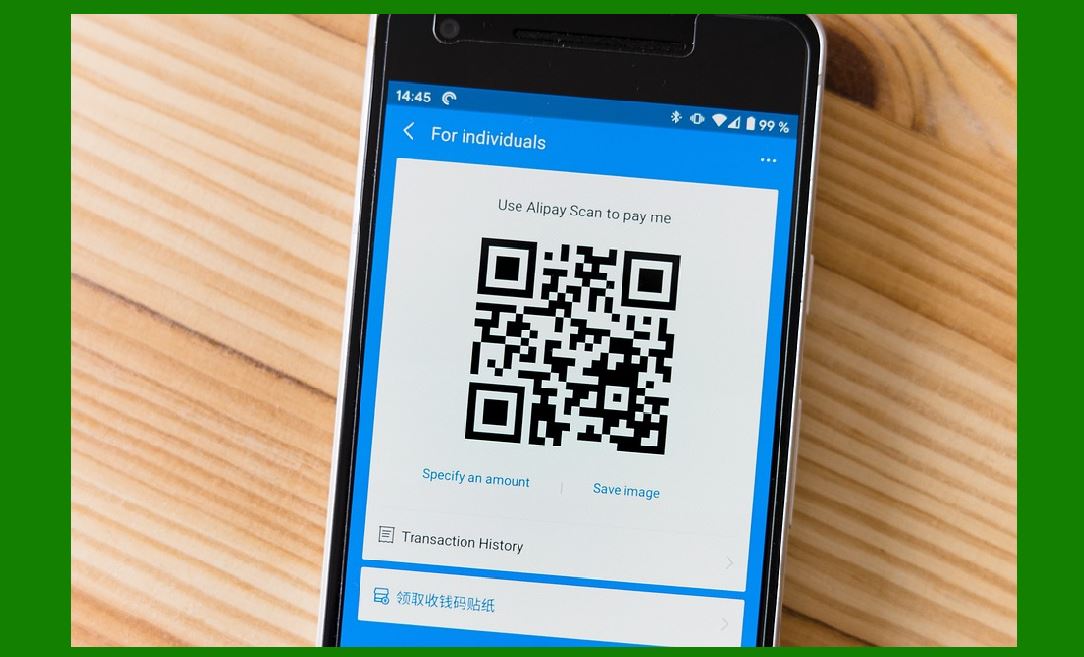
The first mobile wallet app for cryptocurrency Bitcoin featured the ability to send and receive payments with QR codes in March 2011. In 2011, Chinese company Alipay designed a QR code payment method which allowed partnering offline stores to accept payment by scanning an individual's QR code in Alipay Wallet.

In China, QR code payments have revolutionized the way people conduct transactions, making mobile payments ubiquitous and convenient across various aspects of daily life. The introduction of QR code payment systems by companies like Alipay and WeChat has played a pivotal role in shaping this landscape.

Evolution and Adoption

1.Early Adoption and Development:

Alipay, developed by Alibaba Group, was among the pioneers in integrating QR code payments into their mobile wallet app. This innovation allowed users to pay by simply scanning a merchant's QR code using their smartphone camera. This method was initially introduced in 2011, marking a significant advancement in payment technology.

2.WeChat's Entry:

Tencent's WeChat, a popular messaging app in China with extensive user engagement, followed suit in 2014 by integrating QR code payments into its platform. This move leveraged its vast user base to quickly establish itself as a major player in the mobile payment market.

3.Ubiquity of QR Code Payments:

By leveraging the widespread adoption of smartphones and the internet infrastructure in China, QR code payments quickly became the preferred method for transactions. This method is not only convenient but also versatile, allowing payments to be made at various types of merchants, including shops, restaurants, street vendors, and even public transportation services like metro systems, buses, and taxis.

4.Market Dominance:

As of 2018, mobile payments accounted for a substantial majority (83%) of all transactions in China. This dominance is largely attributed to the ease of use and widespread acceptance of QR code payment methods provided by Alipay, WeChat Pay, and other services like Cloud QuickPass.

Implementation and Usage

User Experience: To make a payment using QR codes, a customer typically opens their mobile wallet app (Alipay or WeChat Pay), selects the option to 'Scan QR Code,' and then uses their smartphone camera to scan the merchant's QR code displayed at the point of sale.

Merchant Adoption: QR code payments are widely adopted by merchants due to minimal setup costs-often just requiring a printed QR code. This simplicity has encouraged adoption across a broad spectrum of businesses, from small street vendors to large retailers.

Integration with Public Services: Beyond retail, QR code payments are integrated into public services such as transportation systems. This integration facilitates seamless travel experiences where passengers can use their mobile wallets to pay for fares.

Impact on Society

Cashless Society: QR code payments have played a significant role in China's transition toward a cashless society. They have reduced the reliance on cash transactions, offering greater convenience and efficiency in daily transactions.

Financial Inclusion: Mobile payment systems have also contributed to financial inclusion by providing easier access to digital financial services for individuals who may not have had traditional banking relationships.

Conclusion

In summary, QR code payments in China, pioneered by Alipay and subsequently adopted by WeChat Pay and others, have transformed the landscape of everyday transactions. They have become integral to daily life, enabling fast, secure, and convenient payments across a wide range of merchants and services. This evolution underscores China's leadership in mobile payment technology and serves as a model for digital payment innovations globally.


EasierSoft Barcode Label Design & Bulk Printing Software

---- Use Excel Data to Batch Print Barcodes on Label Sheets or Roll Labels  

---- How to use this barcode software

Download:  Free Barcode Software + Barcode Label Designer

Download Free Barcode Software at Softonic

     Download at CNET

Once you obtain a GS1/UPC/EAN barcode, or other barcode type and QR code, you can use our free software to batch print barcode labels onto Roll label paper using a professional label printer, or to batch print barcodes onto Avery 5160 label sheets using a regular laser or inkjet printer. Our software has free and paid versions.

The free version fully meets your needs for batch printing GS1/UPC/EAN barcodes. The paid version can import data from Excel and databases to batch print barcode labels with different values.

How to Start

Input Data

Import Excel Data

Print Barcode

Barcode Format

Label Designer

All Screen Shot

Export Barcode Image

Save Template

Output Word Excel

How to Use & FAQ:

Text Alignment for Barcode Labels

Automatically Adjusting Barcode Width

Text Beneath the Barcode

Configuring Barcode Size

Auto Calculate the Barcode Size

Export Barcode images

Export Barcode Image Format

File Names for Exported Barcode

Resolution of Exported Barcode Images

Fixed Folder for Exporting Barcode

Default Barcode Image Export Format

Print bulk barcodes quickly

Print barcodes to Avery 5160 label

How to bulk Barcode Printing

Sample - Avery 5162 (2x7) Label Sheet

Example: Print barcodes to 5*3cm roll

Example: Print barcodes to 5161 label

Example: Print barcodes to 5162 label

Example: Print barcodes to 5163 label

Example: Print barcodes to 5164 label

Example: Print portrait orientation 5164

Example: Print barcodes to 5167 label

Example: Print barcodes to 5168 label

Example: Print portrait orientation 5168

Example: Print barcodes to 5169 label

Example: Print barcodes to 5660 label

Example: Print barcodes to 5661 label

Example: Print barcodes to 5662 label

Example: Print barcodes to 5663 label

Example: Print barcodes to 5664 label

Example: Print portrait orientation 5664

Example: Print barcodes to 5873 label

Example: Print barcodes to 5874 label

Two ways to import Excel data

Import Excel Data - Pro Edition

Import Excel Data - Std Edition

Import Data from Excel - Detail

Load Data From Excel File

Data Editing Table

Copy Data From Excel

Four ways to input barcode data

Add ASCII Key E

Input Multiple Lines of Text for Barcodes

Generates Sequential Serial Numbers

Import or copy data from Excel sheets

Special sequence number generation

Std Details: Simple Input Form

Std Details: Multiple Line Text Input

Details: Sequence Barcode Generator

Examples: Sequence Barcode Generator

Highlights

Excel integration: Import data directly from Excel to generate and print barcodes in bulk.

Label designer: Create complex labels with multiple barcodes, text, logos, and shapes.

Batch printing: Print thousands of barcodes at once using standard inkjet/laser printers or professional barcode printers.


Flexible editions:

Standard Edition: Simple batch printing with Excel data.

Professional Edition: Adds command-line automation for workflow integration.

Label Designer Edition: Advanced design features for complex labels.


Why Choose Our Barcode Solutions?

Cost-effective: Free online generator and permanent free desktop version available.

Easy to use: No technical expertise required—just input data and print.

Versatile: Supports nearly all 1D and 2D barcode types, including QR codes.

Trusted: Recommended by CNET and widely downloaded by users worldwide.


Suitable Use Cases

Small businesses and startups needing quick barcode labels for products.

Retailers and online sellers managing inventory with batch barcode printing.

Manufacturers requiring sequential or custom barcode labels for packaging.

Educational and testing environments where barcodes are used for tracking.


CONTACT

cs@easiersoft.com

If you have any question, please feel free to email us.


https://free-barcode.com


<<< Back to Directory <<<     Barcode Generator     Barcode Freeware     Privacy Policy