Barcode Technology

Barcode History

Barcode Label Paper

Barcode Printer

Barcode Application

Inventory Management

AI Barcode QRCode

Barcode Scanner

Barcode Software

Barcode Software B

Barcode Software C

Barcode Software D

Barcode Software E

New Technology A

New Technology B

Robot Technology

Barcode Types

Barcode Types B

Barcode Types C

Barcode Types D

Barcode Types E

Barcode Types F

Electronic Technology

Psychology at Work

Barcode Technology and Barcode Software Related   <<< Back to Directory <<<

Several standards for QR code

QR codes (Quick Response codes) are a type of matrix barcode that encode data for quick readability by digital devices.

There are several standards that govern the encoding of data as QR codes, ensuring their consistent generation and interpretation across different platforms and applications.

Here are some key standards:

1. ISO/IEC 18004

The primary international standard for QR codes is ISO/IEC 18004. This standard specifies the QR code model and its characteristics, including:

QR Code Model 1 and Model 2: Model 1 was the original specification, while Model 2 is an enhanced version that offers improved error correction and increased data capacity. Model 2 is the most commonly used version today.

Data Encoding: Defines how different types of data (numeric, alphanumeric, byte/binary, and Kanji) are encoded within a QR code.

Error Correction: Uses Reed-Solomon error correction to enable the reconstruction of missing or corrupted data. QR codes can include error correction levels L, M, Q, and H, which correspond to 7%, 15%, 25%, and 30% error correction capability, respectively.

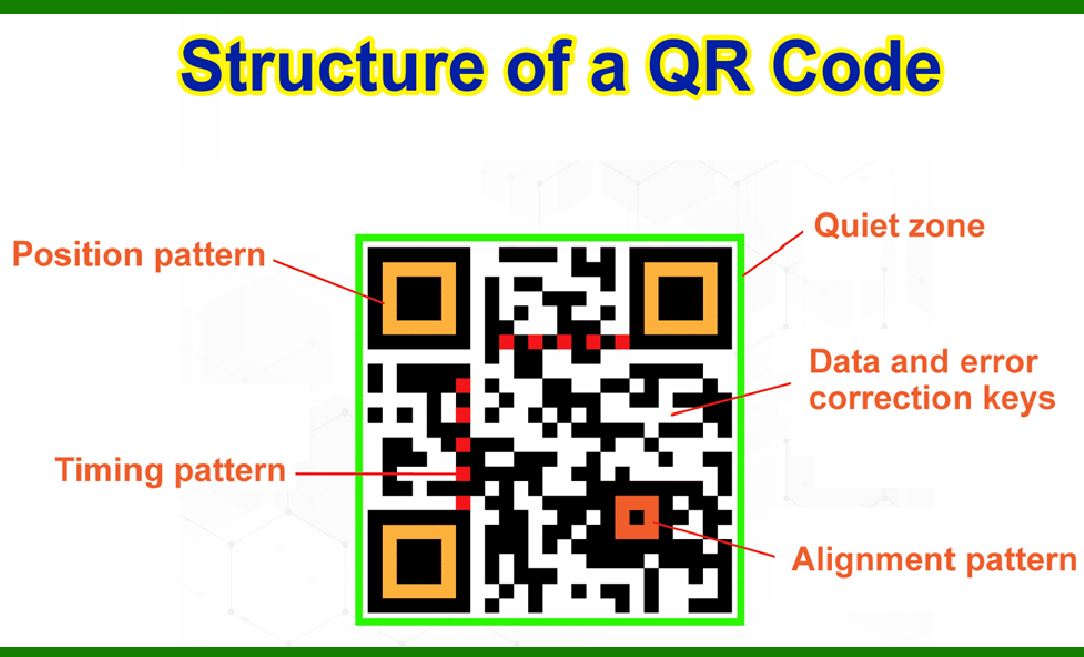
Structure and Format: Specifies the structure of QR codes, including finder patterns, alignment patterns, timing patterns, and version information.

2. ISO/IEC 15420

This standard, while primarily focused on linear barcodes (such as the EAN/UPC barcodes), provides some general guidelines applicable to 2D barcodes like QR codes. It outlines the symbology specifications and requirements for barcode readability and quality.

3. ISO/IEC 15424

This standard specifies the unique identification and data capture techniques for barcodes and other automatic identification and data capture (AIDC) technologies. It includes guidance on the use of data identifiers and application identifiers, which are essential for encoding structured data in QR codes.

4. GS1 QR Code

GS1 is an organization that develops and maintains global standards for business communication. The GS1 QR Code standard incorporates ISO/IEC 18004 but extends it to meet specific business needs. It defines the use of Application Identifiers (AIs) to encode additional data like product information, serial numbers, and batch numbers in a structured manner. GS1 QR Codes are widely used in retail, logistics, and healthcare.

5. JIS X 0510

The Japanese Industrial Standard (JIS) X 0510 is the Japanese counterpart to ISO/IEC 18004. It defines the same specifications for QR codes and ensures compatibility with the international standard. Given that QR codes were invented in Japan, this standard is particularly significant in the context of their widespread use in Japanese industry and commerce.

6. ISO/IEC 24778

This standard, known as 'Information technology - Automatic identification and data capture techniques - Aztec Code bar code symbology specification,' includes specifications for the Aztec Code, which is another 2D barcode symbology. While it is not specific to QR codes, it shares some common principles in terms of encoding and error correction techniques used in 2D barcodes.

7. ISO/IEC 29158 (AIM DPM)

This standard, also known as the Direct Part Marking (DPM) Quality Guideline, provides guidelines for assessing the quality of barcodes that are directly marked on items, including QR codes. It ensures that such codes can be reliably read even when marked on difficult surfaces.

Summary

QR codes are governed by several standards that ensure their consistent encoding, decoding, and application across various industries and use cases. The primary standard, ISO/IEC 18004, outlines the core specifications for QR codes, including their structure, data encoding methods, and error correction capabilities. Other related standards and guidelines, such as those from GS1 and JIS, provide additional frameworks for specific applications and regional compatibility. These standards collectively ensure that QR codes remain a versatile and reliable tool for data encoding and retrieval in diverse contexts.


EasierSoft Barcode Label Design & Bulk Printing Software

---- Use Excel Data to Batch Print Barcodes on Label Sheets or Roll Labels  

---- How to use this barcode software

Download:  Free Barcode Software + Barcode Label Designer

Download Free Barcode Software at Softonic

     Download at CNET

Once you obtain a GS1/UPC/EAN barcode, or other barcode type and QR code, you can use our free software to batch print barcode labels onto Roll label paper using a professional label printer, or to batch print barcodes onto Avery 5160 label sheets using a regular laser or inkjet printer. Our software has free and paid versions.

The free version fully meets your needs for batch printing GS1/UPC/EAN barcodes. The paid version can import data from Excel and databases to batch print barcode labels with different values.

How to Start

Input Data

Import Excel Data

Print Barcode

Barcode Format

Label Designer

All Screen Shot

Export Barcode Image

Save Template

Output Word Excel

How to Use & FAQ:

Save settings

Serial number generator

The supported barcode types

Load Excel data (pro)

Manually copy data from Excel files

Filter some data for printing

Edit imported barcode data

Input data (Pro)

Label Designer

Edit data in Label designer

Label Designer - Add new label

Label Designer - Printing

Set the barcode label format to be printed

Other Barcode Label Format Settings

Barcode types supported by this program

Barcode Label Font Settings

Configuring the Barcode Print Rotation

Text Alignment for Barcode Labels

Automatically Adjusting Barcode Width

Text Beneath the Barcode

Configuring Barcode Size

Auto Calculate the Barcode Size

Export Barcode images

Export Barcode Image Format

File Names for Exported Barcode

Resolution of Exported Barcode Images

Fixed Folder for Exporting Barcode

Default Barcode Image Export Format

Print bulk barcodes quickly

Print barcodes to Avery 5160 label

How to bulk Barcode Printing

Sample - Avery 5162 (2x7) Label Sheet

Example: Print barcodes to 5*3cm roll

Example: Print barcodes to 5161 label

Example: Print barcodes to 5162 label

Example: Print barcodes to 5163 label

Example: Print barcodes to 5164 label

Example: Print portrait orientation 5164

Example: Print barcodes to 5167 label

Example: Print barcodes to 5168 label

Example: Print portrait orientation 5168

Example: Print barcodes to 5169 label

Example: Print barcodes to 5660 label

Example: Print barcodes to 5661 label

Example: Print barcodes to 5662 label

Example: Print barcodes to 5663 label

Example: Print barcodes to 5664 label

Example: Print portrait orientation 5664

Example: Print barcodes to 5873 label

Example: Print barcodes to 5874 label

Highlights

Excel integration: Import data directly from Excel to generate and print barcodes in bulk.

Label designer: Create complex labels with multiple barcodes, text, logos, and shapes.

Batch printing: Print thousands of barcodes at once using standard inkjet/laser printers or professional barcode printers.


Flexible editions:

Standard Edition: Simple batch printing with Excel data.

Professional Edition: Adds command-line automation for workflow integration.

Label Designer Edition: Advanced design features for complex labels.


Why Choose Our Barcode Solutions?

Cost-effective: Free online generator and permanent free desktop version available.

Easy to use: No technical expertise required—just input data and print.

Versatile: Supports nearly all 1D and 2D barcode types, including QR codes.

Trusted: Recommended by CNET and widely downloaded by users worldwide.


Suitable Use Cases

Small businesses and startups needing quick barcode labels for products.

Retailers and online sellers managing inventory with batch barcode printing.

Manufacturers requiring sequential or custom barcode labels for packaging.

Educational and testing environments where barcodes are used for tracking.


CONTACT

cs@easiersoft.com

If you have any question, please feel free to email us.


https://free-barcode.com


<<< Back to Directory <<<     Barcode Generator     Barcode Freeware     Privacy Policy