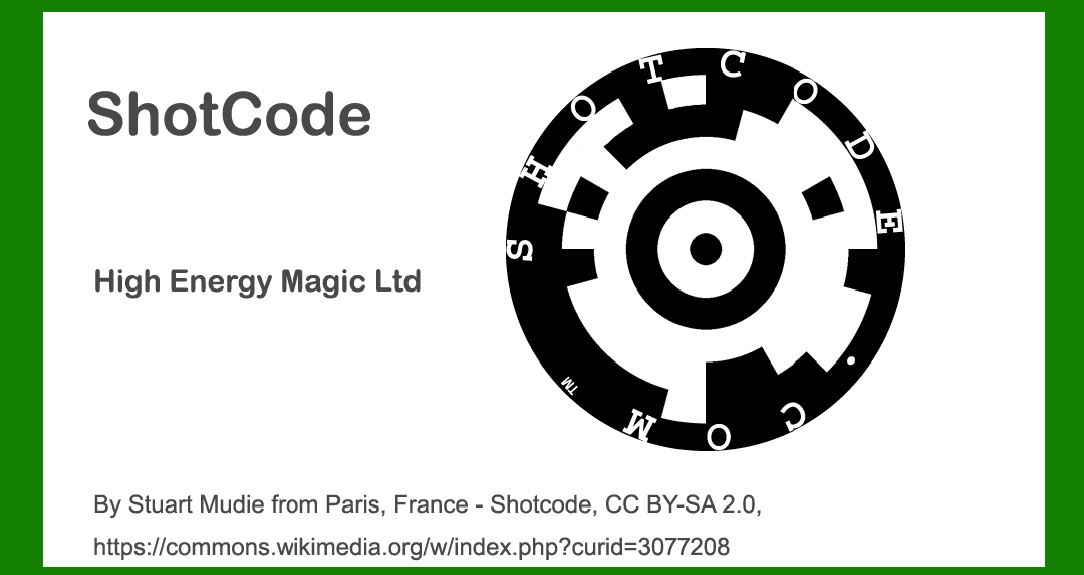
ShotCode, originally known as Spotcode and possibly referred to earlier as TRIPCode, represents a pioneering advancement in visual barcode technology designed specifically for camera phones. |
Developed by High Energy Magic Ltd., this circular pattern code leverages the ubiquity of camera-enabled mobile devices to enable rapid and accurate data capture. This comprehensive exploration will delve into the technology, history, applications, encoding principles, decoding methods, and the impact of ShotCode on various industries. |
|
Introduction to ShotCode |
ShotCode emerged during a transformative period when mobile phones began incorporating cameras as standard features. The need for efficient data transfer and access via mobile devices spurred innovation in barcode technology, leading to the development of ShotCode. Unlike traditional linear barcodes or QR codes, ShotCode features a circular arrangement of patterns, optimized for quick scanning by camera phones. This unique design facilitates seamless integration with mobile applications, making it suitable for diverse applications ranging from advertising and marketing to logistics and consumer engagement. |

|
History and Development |
The roots of ShotCode trace back to High Energy Magic Ltd. of Cambridge University, a company focused on harnessing mobile technology for innovative applications. Originally conceptualized as Spotcode, the technology underwent iterations and refinements before its commercial introduction. The term TRIPCode also surfaces in discussions, potentially indicating earlier stages of development or alternative naming conventions during research and development phases. |

|
Technology Overview |
Design and Structure |
ShotCode's design centers on a circular format, comprising concentric rings and distinct patterns arranged in a systematic layout. This circular arrangement enhances the code's visibility and scanning efficiency when captured by camera phones. The patterns encode data through variations in spatial arrangement, contrasts, and other visual cues intelligible to decoding software. |
Encoding Principles |
ShotCode employs encoding principles that optimize data density while ensuring robust error correction capabilities. The circular layout allows for efficient data representation, accommodating alphanumeric characters, URLs, and other forms of digital content. Encoding techniques involve spatial modulation, where data bits are mapped onto specific positions within the circular pattern, ensuring reliable decoding even under challenging conditions. |
Decoding Methods |
Decoding ShotCode involves image processing algorithms capable of recognizing and interpreting the circular pattern. Software applications on mobile devices analyze captured images, identifying the unique layout and decoding embedded data. Advanced algorithms facilitate real-time scanning, enabling instantaneous retrieval of encoded information such as URLs for web access, contact details for networking, or promotional content for marketing campaigns. |

|
Applications of ShotCode |
Marketing and Advertising |
ShotCode revolutionized mobile marketing by enabling interactive campaigns where consumers scan codes to access promotional offers, product information, or multimedia content. Brands leverage ShotCode to engage audiences through dynamic experiences, fostering direct interaction and enhancing brand visibility across digital platforms. |
Consumer Engagement |
In retail and consumer goods sectors, ShotCode facilitates product authentication, warranty registration, and customer feedback initiatives. By embedding codes on packaging or product labels, manufacturers empower consumers to access relevant information instantly, enhancing product transparency and consumer trust. |
Logistics and Supply Chain Management |
ShotCode finds applications in logistics and supply chain management, where it serves as a digital identifier for tracking parcels, inventory management, and asset tracking. The code's resilience to environmental factors and its compatibility with mobile devices streamline operations, improving efficiency and traceability in complex distribution networks. |
Education and Information Access |
In educational settings, ShotCode supports interactive learning experiences by linking physical materials such as textbooks or posters to supplementary online resources. Students scan codes to access multimedia content, quizzes, or instructional videos, enriching learning environments and promoting digital literacy. |

|
Technical Specifications and Standards |
Data Capacity and Error Correction |
ShotCode's circular format accommodates varying data capacities depending on size and configuration. Error correction algorithms embedded within encoding schemes ensure data integrity and reliability during scanning, minimizing decoding errors and optimizing performance across different mobile platforms. |
Compatibility and Integration |
ShotCode's compatibility with camera phones across diverse operating systems underscores its versatility and widespread adoption. Integration with mobile applications and web services enhances user accessibility, supporting seamless navigation from physical to digital environments. |

|
Future Trends and Innovations |
Enhanced Security Features |
Future iterations of ShotCode may incorporate enhanced security features such as encrypted data transmission and authentication protocols. These advancements bolster privacy protections and safeguard sensitive information in digital transactions and identity verification processes. |
IoT Integration |
ShotCode's potential integration with Internet of Things (IoT) devices expands its utility in smart environments, enabling device-to-device communication and data exchange. Applications in smart home automation, healthcare monitoring, and industrial IoT systems demonstrate ShotCode's adaptability to emerging technological ecosystems. |
Augmented Reality (AR) Enhancements |
Combining ShotCode with augmented reality technologies enhances interactive experiences by overlaying digital content onto physical environments. AR-enabled applications leverage ShotCode's spatial recognition capabilities to deliver immersive storytelling, virtual tours, or interactive gaming experiences. |

|
Conclusion |
ShotCode, born out of innovation and propelled by the proliferation of camera phones, represents a pivotal advancement in visual barcode technology. Its circular design, encoding principles, and applications across diverse industries underscore its transformative impact on mobile communications, marketing strategies, and operational efficiencies. As technology continues to evolve, ShotCode's adaptive capabilities and integration potential position it as a cornerstone in the digital landscape, driving innovation and enhancing user experiences in an increasingly interconnected world. |
 cs@easiersoft.com