Barcode Technology

Barcode History

Barcode Label Paper

Barcode Printer

Barcode Application

Inventory Management

AI Barcode QRCode

Barcode Scanner

Barcode Software

Barcode Software B

Barcode Software C

Barcode Software D

Barcode Software E

New Technology A

New Technology B

Robot Technology

Barcode Types

Barcode Types B

Barcode Types C

Barcode Types D

Barcode Types E

Barcode Types F

Electronic Technology

Psychology at Work

Barcode Technology and Barcode Software Related   <<< Back to Directory <<<

Standards of DotCode

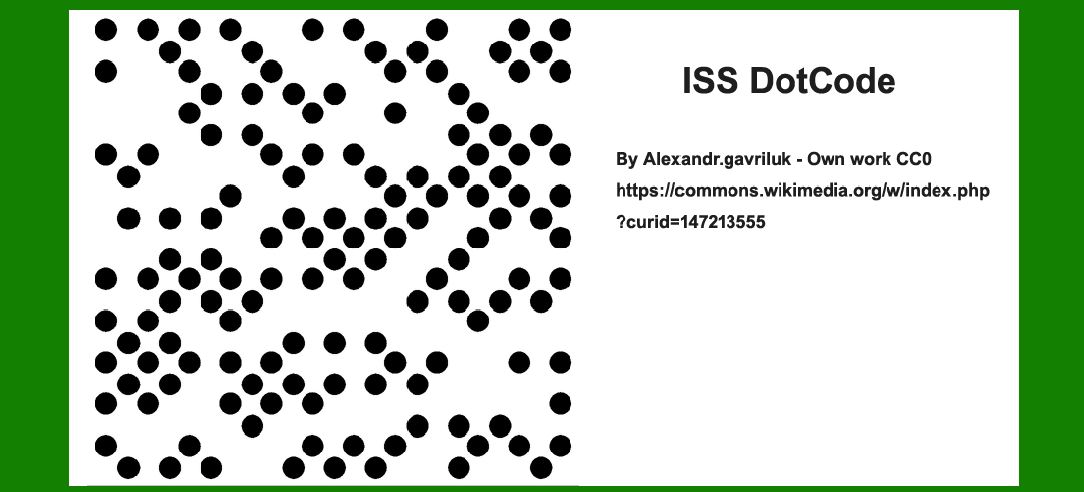
DotCode is a 2D barcode symbology designed for high-speed marking and scanning applications.

Here's a detailed overview of its standards and related patents:

Standards of DotCode

DotCode was initially developed by Dr. Andrew Longacre Jr. from Hand Held Products (now part of Honeywell) around 2008. It was subsequently standardized by AIM (Association for Automatic Identification and Mobility) in 2009 as 'Bar code symbology specification - DotCode.' The standardization aimed to establish guidelines for the creation, printing, and scanning of DotCode symbols to ensure interoperability across different systems and applications.

In 2019, the DotCode symbology was reviewed and updated, resulting in the 'ISS DotCode Symbology Specification 4.0.' This update likely refined certain technical aspects or added new features to enhance its usability and performance in modern barcode applications.

Key features and characteristics of DotCode include:

1.Circular Pattern of Dots: DotCode symbols consist of a grid of small, circular dots arranged in a specific pattern. The arrangement allows for high-density encoding and decoding.

2.Scalability: DotCode symbols can be printed at various sizes while maintaining readability, making them versatile for different packaging sizes and materials.

3.Error Correction: DotCode supports robust error correction capabilities, which help ensure accurate data retrieval even if the symbol is partially damaged or obscured.

4.High-Speed Printing and Scanning: Designed for applications requiring rapid marking and scanning, DotCode can be printed quickly and scanned efficiently, even at high speeds typical in production environments.

Patents Related to DotCode Encoding and Decoding

Several patents are associated with the encoding and decoding techniques used in DotCode symbols. Here are a few notable patents:

1.United States Patent US20090200386A1 by Hand Held Products Inc.: Titled 'Machine readable 2D symbology printable on demand,' this patent likely covers aspects related to the creation and printing of DotCode symbols, possibly including methods for generating DotCode patterns and optimizing their print quality.

2.United States Patent US20090200386A1 by Datalogic IP Tech SRL: This patent, also titled 'System and method for extracting bitstream data in two-dimensional optical codes,' likely focuses on techniques for efficiently extracting data from DotCode symbols during the scanning process. It may involve algorithms for fast and accurate decoding.

3.Chinese Patent CN113297872A by Fuzhou Symbol Information Technology Co. Ltd: Titled 'Dotcode identification method and equipment,' this patent likely pertains to specific methods and devices used for identifying and reading DotCode symbols, potentially covering hardware and software solutions for robust DotCode scanning.

These patents illustrate the technological innovations and intellectual property protections involved in the development and implementation of DotCode as a reliable 2D barcode symbology. They underline the ongoing evolution and refinement of DotCode technology to meet the demands of modern barcode applications, especially in industries requiring high-speed and high-density data encoding and decoding capabilities.


EasierSoft Barcode Label Design & Bulk Printing Software

---- Use Excel Data to Batch Print Barcodes on Label Sheets or Roll Labels  

---- How to use this barcode software

Download:  Free Barcode Software + Barcode Label Designer

Download Free Barcode Software at Softonic

     Download at CNET

Once you obtain a GS1/UPC/EAN barcode, or other barcode type and QR code, you can use our free software to batch print barcode labels onto Roll label paper using a professional label printer, or to batch print barcodes onto Avery 5160 label sheets using a regular laser or inkjet printer. Our software has free and paid versions.

The free version fully meets your needs for batch printing GS1/UPC/EAN barcodes. The paid version can import data from Excel and databases to batch print barcode labels with different values.

How to Start

Input Data

Import Excel Data

Print Barcode

Barcode Format

Label Designer

All Screen Shot

Export Barcode Image

Save Template

Output Word Excel

How to Use & FAQ:

Serial number generator

The supported barcode types

Load Excel data (pro)

Manually copy data from Excel files

Filter some data for printing

Edit imported barcode data

Input data (Pro)

Label Designer

Edit data in Label designer

Label Designer - Add new label

Label Designer - Printing

Set the barcode label format to be printed

Other Barcode Label Format Settings

Barcode types supported by this program

Barcode Label Font Settings

Configuring the Barcode Print Rotation

Text Alignment for Barcode Labels

Automatically Adjusting Barcode Width

Text Beneath the Barcode

Configuring Barcode Size

Auto Calculate the Barcode Size

Export Barcode images

Export Barcode Image Format

File Names for Exported Barcode

Resolution of Exported Barcode Images

Fixed Folder for Exporting Barcode

Default Barcode Image Export Format

Print bulk barcodes quickly

Print barcodes to Avery 5160 label

How to bulk Barcode Printing

Sample - Avery 5162 (2x7) Label Sheet

Example: Print barcodes to 5*3cm roll

Example: Print barcodes to 5161 label

Example: Print barcodes to 5162 label

Example: Print barcodes to 5163 label

Example: Print barcodes to 5164 label

Example: Print portrait orientation 5164

Example: Print barcodes to 5167 label

Example: Print barcodes to 5168 label

Example: Print portrait orientation 5168

Example: Print barcodes to 5169 label

Example: Print barcodes to 5660 label

Example: Print barcodes to 5661 label

Example: Print barcodes to 5662 label

Example: Print barcodes to 5663 label

Example: Print barcodes to 5664 label

Example: Print portrait orientation 5664

Example: Print barcodes to 5873 label

Example: Print barcodes to 5874 label

Two ways to import Excel data

Highlights

Excel integration: Import data directly from Excel to generate and print barcodes in bulk.

Label designer: Create complex labels with multiple barcodes, text, logos, and shapes.

Batch printing: Print thousands of barcodes at once using standard inkjet/laser printers or professional barcode printers.


Flexible editions:

Standard Edition: Simple batch printing with Excel data.

Professional Edition: Adds command-line automation for workflow integration.

Label Designer Edition: Advanced design features for complex labels.


Why Choose Our Barcode Solutions?

Cost-effective: Free online generator and permanent free desktop version available.

Easy to use: No technical expertise required—just input data and print.

Versatile: Supports nearly all 1D and 2D barcode types, including QR codes.

Trusted: Recommended by CNET and widely downloaded by users worldwide.


Suitable Use Cases

Small businesses and startups needing quick barcode labels for products.

Retailers and online sellers managing inventory with batch barcode printing.

Manufacturers requiring sequential or custom barcode labels for packaging.

Educational and testing environments where barcodes are used for tracking.


CONTACT

cs@easiersoft.com

If you have any question, please feel free to email us.


https://free-barcode.com


<<< Back to Directory <<<     Barcode Generator     Barcode Freeware     Privacy Policy