A Code 93 barcode is a type of linear barcode that allows for encoding various characters using a combination of bars and spaces of varying widths. It is an improvement over its predecessor, Code 39, offering higher data density and reliability. Understanding its structure involves delving into its components, encoding rules, and the significance of each element. |
|
1. Start Character (*) |
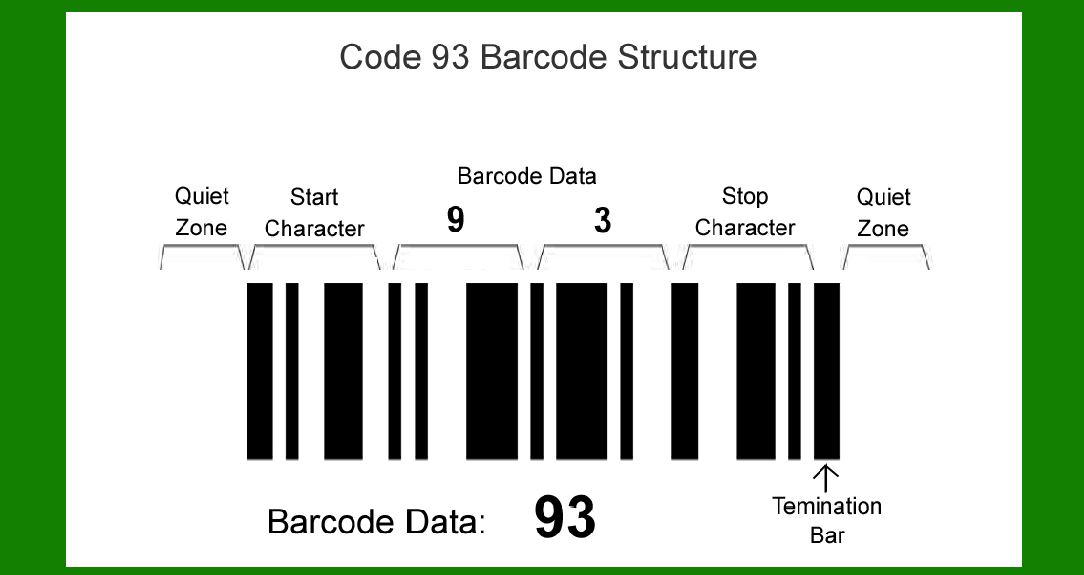
The Code 93 barcode begins with a start character represented by an asterisk (*). This character serves as a visual indicator to scanners and decoding software that the beginning of the barcode data is imminent. The start character is essential for initializing the reading process and distinguishing the barcode from any surrounding elements or backgrounds. |
2. Encoded Message |
Following the start character is the encoded message itself. This segment comprises a series of bars and spaces arranged according to specific rules defined by the Code 93 standard. Unlike simpler barcode types that may only encode numeric digits or limited alphabetic characters, Code 93 can encode the full ASCII character set, making it versatile for various applications. |
Character Set and Encoding Rules |
ASCII Support: Code 93 supports the full ASCII character set, allowing encoding of alphanumeric characters, special symbols, and control characters. Character Mapping: Each character in the message is mapped to a unique pattern of bars and spaces defined by the Code 93 standard. This mapping ensures that every character is distinguishable during scanning. |

|
3. First Modulo-47 Check Character ('C') |
Following the encoded message, the Code 93 barcode includes two modulo-47 check characters. These characters are used to verify the accuracy of the decoded data and enhance the barcode's error detection capabilities. |
Modulo-47 Calculation |
Purpose: The modulo-47 check characters ('C' and 'K') are calculated based on the weighted sum of the values of the characters in the encoded message. Weighting: Each character in the message is assigned a specific weight. The first check character ('C') is calculated using a weighted sum modulo 47. This calculation involves multiplying each character's position value by its weight and summing these products. Modulo Operation: After computing the weighted sum, the result is divided by 47, and the remainder (modulo) determines the numeric value of the check character 'C'. |
4. Second Modulo-47 Check Character ('K') |
After calculating the first check character ('C'), the process is repeated to compute the second check character ('K'). This ensures an additional layer of verification for the barcode data. |
Verification Process |
Error Detection: During scanning, the scanner recalculates the check characters based on the received barcode data. If the recalculated check characters do not match the ones encoded in the barcode, an error is flagged, indicating potential data corruption or misreading. |

|
5. Stop Character (*) |
After the second check character, the Code 93 barcode concludes with another asterisk (*) as a stop character. Similar to the start character, the stop character signals the end of the encoded data. It helps scanners accurately determine where the barcode data ends, preventing any misinterpretation or truncation of the encoded message. |
6. Termination Bar |
Following the stop character, a termination bar is often included in Code 93 barcodes. This is an additional wide bar that visually marks the end of the barcode. It ensures that scanners recognize the definitive end of the barcode data, especially useful in environments where barcodes are printed close to each other or where there might be potential interference. |

|
Advantages of Code 93 Barcode |
High Data Density: Code 93 allows for efficient use of space, enabling the encoding of more information in a smaller area compared to some other barcode types. Full ASCII Support: Its ability to encode the full ASCII character set makes it suitable for encoding a wide range of characters beyond just numbers. Error Detection: The inclusion of check characters enhances reliability by detecting and potentially correcting errors during scanning. |
Applications |
Code 93 barcodes find applications in various industries and scenarios: |
Inventory Management: Tracking products and components in warehouses and retail settings. Shipping and Logistics: Managing shipments and tracking packages throughout transit. Document Management: Encoding document identifiers for efficient archival and retrieval. Healthcare: Patient identification wristbands and medical equipment tracking. |

|
Usage Guidelines |
To ensure optimal readability and reliability of Code 93 barcodes: |
Printing Quality: Barcodes should be printed clearly with sufficient contrast between bars and spaces. Size and Scaling: Ensure barcodes are printed at appropriate sizes to maintain readability by scanners. Environment Considerations: Minimize exposure to conditions that could degrade barcode quality, such as smudging, tearing, or fading. |

|
Conclusion |
In summary, the structure of a Code 93 barcode is defined by a sequence of elements that collectively encode alphanumeric data with high density and reliability. From the distinctive start and stop characters to the crucial check characters and termination bar, each component plays a vital role in ensuring accurate data capture and decoding. As technology evolves, barcodes like Code 93 continue to provide essential solutions for data management and automation across diverse industries, reaffirming their significance in modern logistics and information systems. |
 cs@easiersoft.com