The Aztec Code is a two-dimensional barcode symbology that efficiently encodes data in a compact and versatile format. Developed by Andrew Longacre at Welch Allyn (now Honeywell Scanning & Mobility), it was designed to overcome limitations of existing barcode technologies by offering high data capacity, robust error correction, and flexibility in application. This detailed description explores the structure, encoding principles, and decoding process of the Aztec Code. |
|
Structure of the Aztec Code |
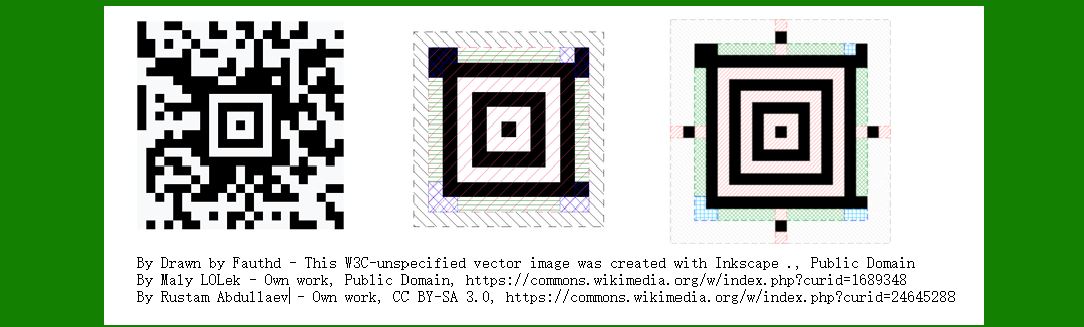
The Aztec Code is constructed on a square grid, which serves as the fundamental layout for encoding data. At the center of this grid is a bull's-eye pattern, which functions as a locator for identifying the code within a scanning environment. Data is encoded in concentric square rings around this bull's-eye, creating a layered structure that allows for scalable data capacity. |
1.Central Bull's-Eye: The central bull's-eye typically measures 9x9 or 13x13 pixels, providing a distinct starting point for decoding the code. Surrounding this bull's-eye is a border of pixels that encode basic parameters and configurations of the code, forming what is termed the 'core' of the Aztec Code. The core itself occupies an area of 11x11 or 15x15 squares, depending on the size of the central bull's-eye. |
2.Data Layers: Data is added to the Aztec Code in layers, each consisting of two additional rings of pixels beyond the core. This layering process allows for the expansion of the code's size and data capacity. Common sizes include 15x15, 19x19, 23x23, and so forth, each increasing by 4 squares per side beyond the core. |
3.Orientation Marks: Crucially, the corners of the core include orientation marks. These marks facilitate the correct reading of the code even if it is rotated or reflected during scanning. Decoding typically begins at a specific corner identified by three black pixels, proceeding clockwise to corners marked by two, one, and finally zero black pixels. This systematic approach ensures that the orientation of the Aztec Code can be accurately determined during scanning, which is essential for reliable data extraction. |
4.Boundary and Quiet Zone: Unlike some traditional barcode symbologies, the Aztec Code does not require a blank 'quiet zone' around its perimeter. The variable pixels within the central core encode the size and structure of the code itself. However, some barcode readers may still require a minimal quiet zone for optimal performance, depending on the specific implementation and scanning conditions. |
|
Encoding Principles |
The encoding process of the Aztec Code is designed to achieve high-density data storage while maintaining readability and error correction capabilities. |
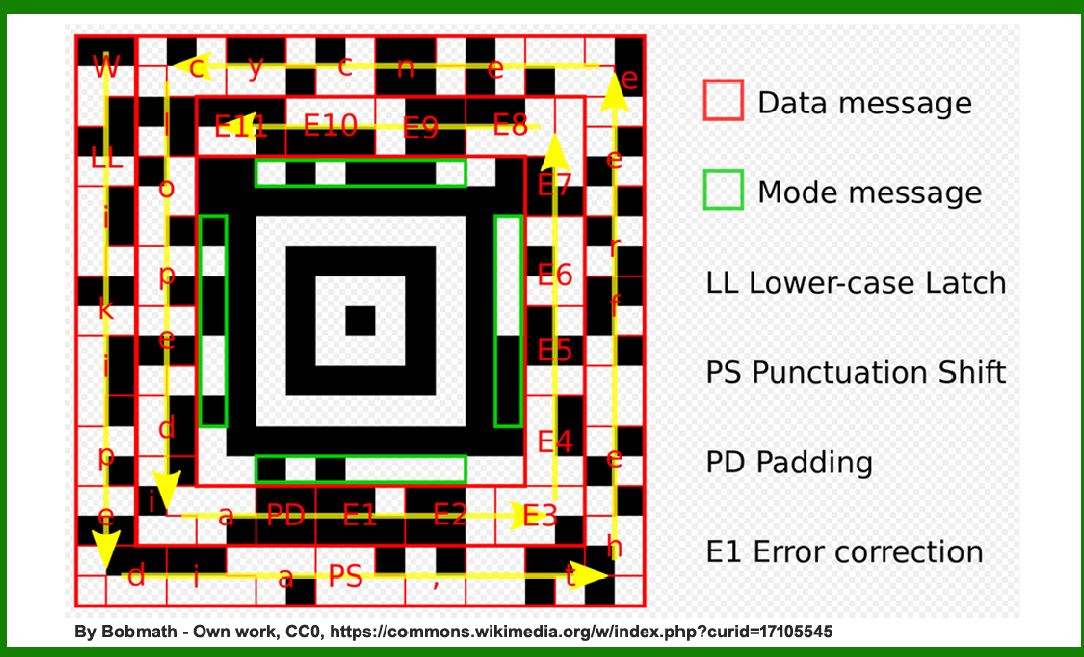
1.Data Representation: Data is encoded into the Aztec Code using a combination of black and white pixels arranged in concentric rings around the central bull's-eye. Each concentric ring represents a layer of data, with the outermost rings containing the most significant information. |
2.Error Correction: One of the notable features of the Aztec Code is its robust error correction capability. Error correction codewords are embedded within the code structure, enabling the reconstruction of data even if parts of the code are damaged or obscured during scanning. This ensures high reliability and readability in various real-world conditions where barcodes may be partially obscured or degraded. |
3.Data Capacity: The Aztec Code offers significant data capacity relative to its size. The number of concentric rings and the size of each code determine the total amount of data that can be encoded. Larger codes (e.g., 23x23 and above) can store more data but require more space, while smaller codes are more compact but hold less data. |
4.Application Flexibility: Due to its scalable nature and high data capacity, the Aztec Code finds applications across diverse industries. It is used for encoding a wide range of data types, including URLs, text, numeric data, and byte data, making it suitable for applications ranging from consumer products to industrial logistics. |

|
Decoding Process |
The decoding process of the Aztec Code involves several key steps that ensure accurate data extraction from the encoded symbol. |
1.Locator and Orientation: The scanning device first identifies the central bull's-eye pattern within the code, using it as a reference point for further decoding. Orientation marks located at the corners of the code guide the scanning process, allowing the device to determine the correct orientation (rotation and reflection) of the code. |
2.Layered Data Extraction: Starting from the identified corner with three black pixels, the scanner proceeds to decode each concentric ring of data. Data extraction continues layer by layer, moving outward from the central core to the outermost rings. This sequential approach ensures that all encoded data, including error correction codewords, is captured and processed effectively. |
3.Error Correction and Validation: As data is decoded, the scanning device simultaneously applies error correction algorithms to verify and correct any discrepancies or errors in the scanned data. Error correction capabilities allow the Aztec Code to compensate for minor imperfections such as smudges, blurring, or partial obstruction of the code during scanning. |
4.Data Output: Once decoding and error correction are completed, the extracted data is processed according to the application's requirements. Depending on the context, the decoded information may be displayed on a screen, stored in a database, or used to initiate further actions within a digital system. |

|
Applications and Usage |
The Aztec Code's versatility and robustness make it suitable for a wide range of applications across different industries and scenarios. |
1.Transport and Logistics: Used extensively in shipping and inventory management, where large amounts of data such as item details, batch numbers, and tracking information need to be encoded and scanned quickly. |
2.Retail and Consumer Products: Employed on product packaging for encoding product information, pricing, promotions, and loyalty rewards that can be quickly accessed by consumers and retailers alike. |
3.Healthcare and Pharmaceuticals: Utilized in medical environments for encoding patient information, medication details, and laboratory data on labels, wristbands, and medical supplies. |
4.Mobile Marketing and Digital Interaction: Integrated into advertising campaigns, promotional materials, and mobile applications to provide instant access to websites, promotions, and multimedia content through smartphones and tablets. |
5.Document Management and Authentication: Used to encode document identifiers, authentication tokens, and digital signatures for secure document management and verification purposes. |

|
Advantages and Considerations |
Understanding the structure and functionality of the Aztec Code highlights its advantages and considerations in practical use. |
1.Advantages: High Data Capacity: Capable of encoding large amounts of data in a compact space. Error Correction: Robust error correction ensures reliable data retrieval even under adverse conditions. Scalability: Supports varying sizes and configurations to accommodate different data storage requirements. Versatility: Suitable for diverse applications across industries due to its flexibility and readability. |
2.Considerations: Scanning Environment: Optimal scanning requires adequate lighting and clear visibility of the code to ensure accurate decoding. Size and Placement: Proper sizing and placement of the Aztec Code on products or documents are crucial to maintain scanning efficiency and readability. Compatibility: Ensure compatibility with scanning devices and software systems to maximize functionality and integration capabilities. |

|
Conclusion |
The Aztec Code represents a significant advancement in barcode technology, offering enhanced data capacity, robust error correction, and versatile application capabilities. Its structured design, centered around a bull's-eye pattern and concentric rings of data, facilitates efficient encoding and reliable decoding across various industries and use cases. By understanding its structure, encoding principles, decoding process, and practical applications, stakeholders can leverage the Aztec Code to streamline operations, enhance data management, and improve customer engagement in today's digital and interconnected world. |
 cs@easiersoft.com