Technical details of UPC barcode |
The Universal Product Code (UPC) is a widely used barcode symbology employed globally to track trade items in stores. UPC barcodes facilitate efficient product tracking and inventory management, benefiting both retailers and consumers. |
The key technical details: |
Structure: .......A UPC-A consists of 12 digits. .......Each digit is encoded using two bars and two spaces, with a total width of 7 units. .......The chosen symbology allows for bars (or spaces) of 1, 2, 3, or 4 units wide. .......Special guard patterns (not encoding a digit) are interspersed to aid decoding. .......The UPC can be scanned in either direction. .......The last digit serves as a checksum for error detection. |
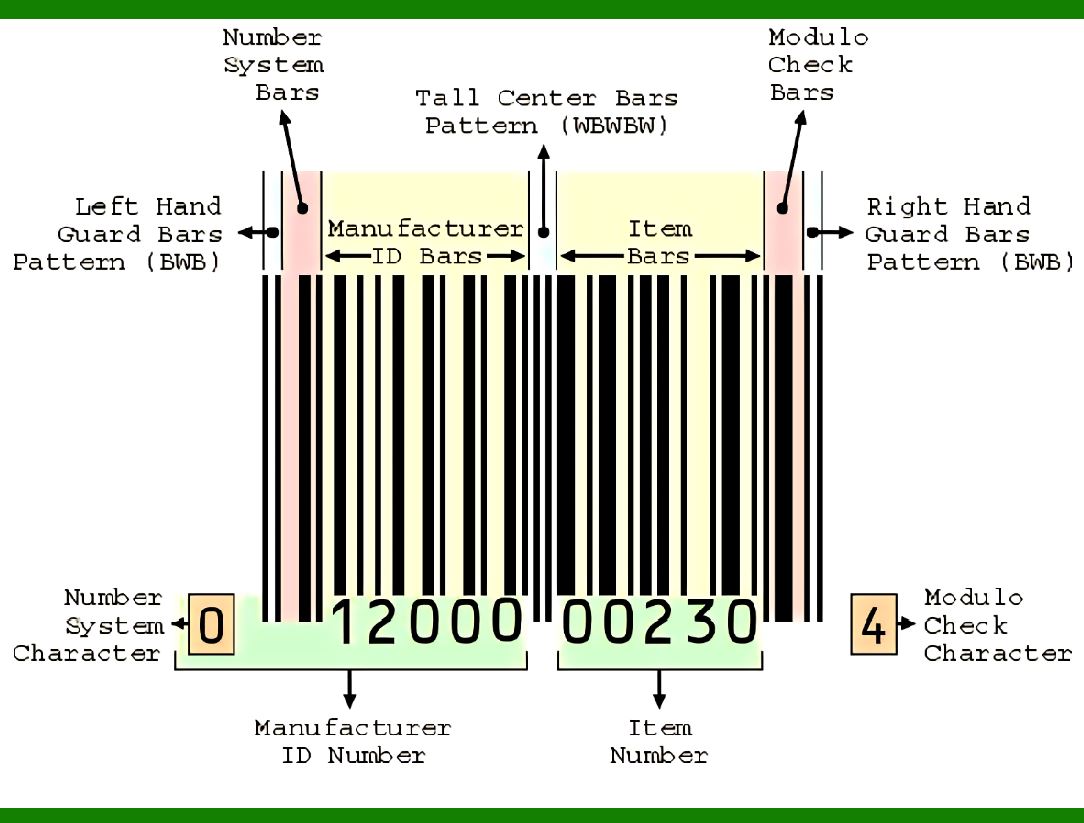
Components: .......First digit: Represents the type of product or system. .......Next five digits: Manufacturer's identification number. .......Following five digits: Specific to the product. .......Last digit: Checksum for validation. |
|
A UPC barcode consists of 12 digits that are uniquely assigned to each trade item. .......The international GS1 organisation assigns the digits used for both the UPC and the related International Article Number (EAN) barcode. .......UPC data structures are a component of Global Trade Item Numbers (GTINs) and follow the global GS1 specification, which is based on international standards. |
Each UPC-A barcode consists of a scannable strip of black bars and white spaces above a sequence of 12 numerical digits. ........No letters, characters or other content of any kind may appear on a UPC-A barcode. ........There is a one-to-one correspondence between 12-digit number and strip of black bars and white spaces, i.e. there is only one way to represent each 12-digit number visually and there is only one way to represent each strip of black bars and white spaces numerically. |
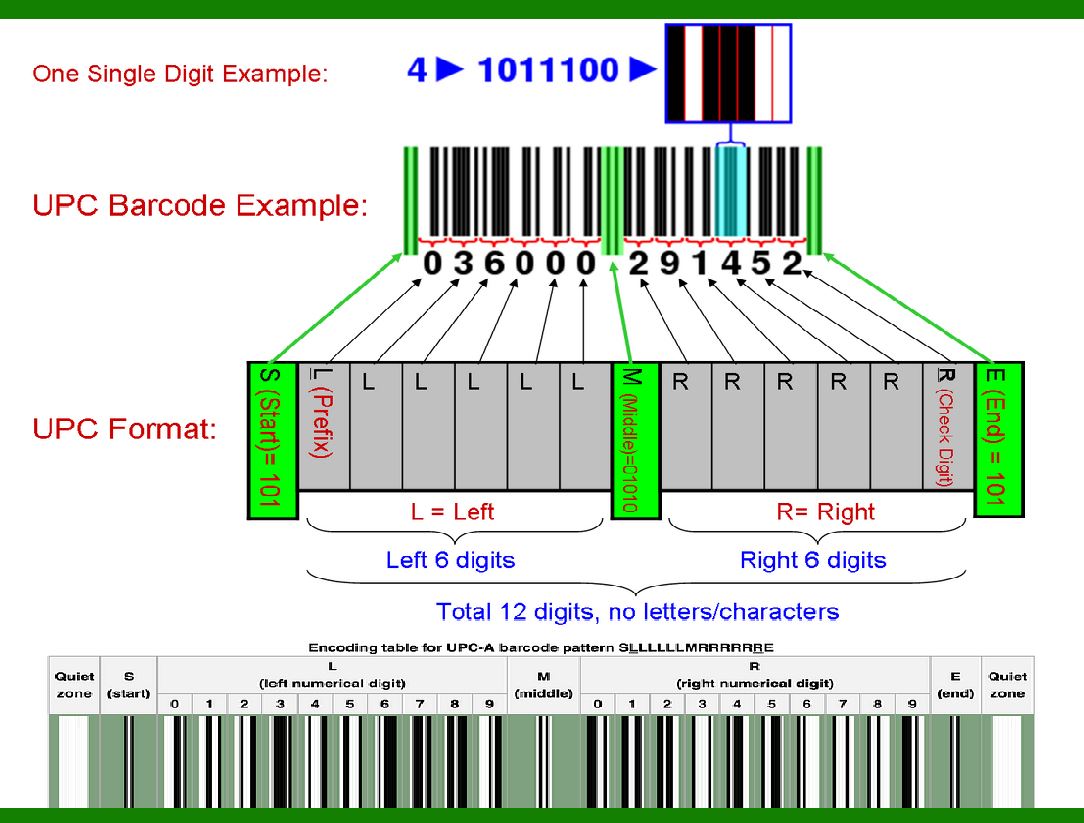
The scannable area of every UPC-A barcode follows the pattern SLLLLLLMRRRRRRE: ........Where S (start), M (middle), and E (end) guard patterns are represented the same way on every UPC-A barcode and the L (left) and R (right) sections collectively represent the 12 numerical digits that make each UPC-A unique. ........The first digit L indicates a particular number system to be used by the following digits. ........The last digit R is an error detecting check digit, that allows some errors to be detected in scanning or manual entry. ........The guard patterns separate the two groups of six numerical digits and establish the timing. |
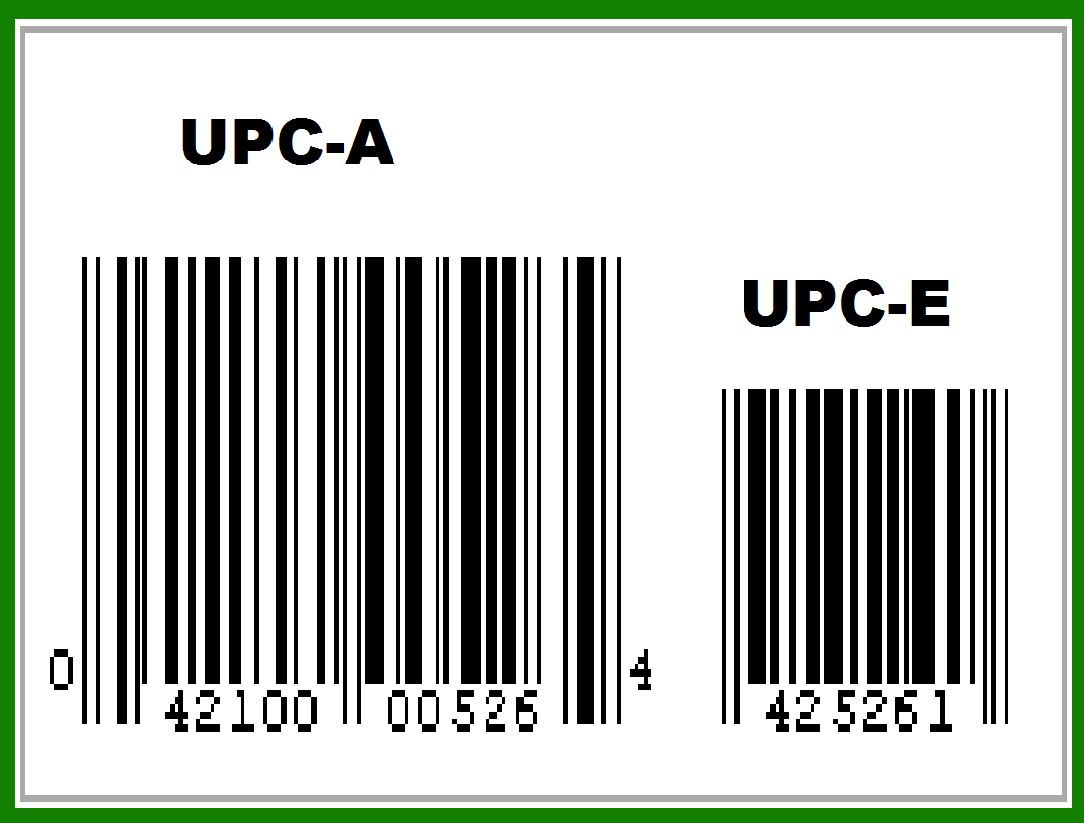
UPC-A 042100005264 is equivalent to UPC-E 425261 with the "EOEEOO" parity pattern, which is defined by UPC-A number system 0 and UPC-A check digit 4. |
|
Formatting and Size |
UPC-A barcodes can be printed at various densities to accommodate a variety of printing and scanning processes. .......The significant dimensional parameter is called x-dimension (width of single module element). .......The width of each bar (space) is determined by multiplying the x-dimension and the module width (1, 2, 3, or 4 units) of each bar (space). .......Since the guard patterns each include two bars, and each of the 12 digits of the UPC-A barcode consists of two bars and two spaces, .......all UPC-A barcodes consist of exactly (3 × 2) + (12 × 2) = 30 bars, .......of which 6 represent guard patterns and 24 represent numerical digits. |
The x-dimension for the UPC-A at the nominal size is 0.33 mm (0.013 inch). .......Nominal symbol height for UPC-A is 25.9 mm (1.02 inch). .......The bars forming the S (start), M (middle), and E (end) guard patterns, are extended downwards by 5 times x-dimension, with a resulting nominal symbol height of 27.55 mm (1.08 inch). .......This also applies to the bars of the first and last numerical digit of UPC-A barcode. .......UPC-A can be reduced or magnified anywhere from 80% to 200%. |
A quiet zone, with a width of at least 9 times the x-dimension, must be present on each side of the scannable area of the UPC-A barcode. .......For a GTIN-12 number encoded in a UPC-A barcode, the first and last digits of the human-readable interpretation are always placed outside the symbol in order to indicate the quiet zones that are necessary for UPC barcode scanners to work properly. |

|
Encoding table for UPC-A barcode |
The UPC-A barcode is visually represented by strips of bars and spaces that encode the UPC-A 12-digit number. .......Each digit is represented by a unique pattern of 2 bars and 2 spaces. .......The bars and spaces are variable width, i.e. 1, 2, 3, or 4 modules wide. .......The total width for a digit is always 7 modules. .......So UPC-A 12-digit number requires a total of 7×12 = 84 modules. |
.......A complete UPC-A is 95 modules wide: .......84 modules for the digits (L and R sections) combined with 11 modules for the S (start), M (middle), and E (end) guard patterns. .......The S (start) and E (end) guard patterns are 3 modules wide and use the pattern bar-space-bar, where each bar and space is one module wide. .......The M (middle) guard pattern is 5 modules wide and uses the pattern space-bar-space-bar-space, where each bar and space is also one module wide. .......In addition, a UPC-A symbol requires a quiet zone (extra space of 9 modules wide) before the S (start) and after the E (end) guard patterns. |
|
The UPC-A barcode system is meticulously designed to ensure accurate and efficient scanning. .......Parity: Each digit in the UPC-A code has a specific pattern of bars and spaces. The left-hand side digits (before the middle guard pattern) are encoded with odd parity. .......Odd Parity: This means that the total width of the black bars for these digits is an odd number of modules. In other words, the sum of the widths of the black bars is an odd value. .......Guard Patterns: The UPC-A includes guard patterns (such as the M guard pattern) that help scanners identify the beginning, middle, and end of the barcode. These guard patterns do not encode any digit but serve as reference points. .......Consequently, a UPC scanner can determine whether it is scanning a symbol from left-to-right or from right-to-left (the symbol is upside-down). .......With the parity/direction information, an upside-down symbol will not confuse the scanner. |
 cs@easiersoft.com