1. Introduction to Code 39 Barcode Technology |
Code 39, also known as 3 of 9, is a widely used alphanumeric barcode symbology that can encode numbers, uppercase letters, and a small set of special characters. It is one of the earliest barcode formats developed for real-time scanning and data management. The symbology is characterized by its relatively simple structure and high readability, which has made it a popular choice in many industries, including manufacturing, healthcare, logistics, and more. |
The development of Code 39 in the 1970s was driven by the need for a standardized, machine-readable format that could improve inventory management and product tracking. Code 39 became particularly useful in environments that required a simple, reliable method for encoding alphanumeric data with limited error correction. Over time, its compatibility with various scanners and systems cemented its position as one of the most used barcode types globally. |
|
2. Historical Context of Code 39 Barcode |
Code 39 was originally developed by Dr. David Allais and Ray Stevens in 1974. The goal was to create a barcode system that could encode both numbers and letters, unlike earlier barcode symbologies that were limited to numbers. In 1975, the American National Standards Institute (ANSI) published the first standards for Code 39 under the name '3 of 9' because each character was composed of nine elements: five bars and four spaces. |
Throughout the years, Code 39 gained traction due to its versatility, simplicity, and compatibility with a wide range of scanners. The barcode was initially used primarily in industrial applications, such as automotive and warehouse management, but its scope expanded as the technology became more reliable and accessible. By the 1980s and 1990s, Code 39 was adopted by many organizations for tracking products, assets, and even personnel. |
|
3. Code 39 Structure and Design |
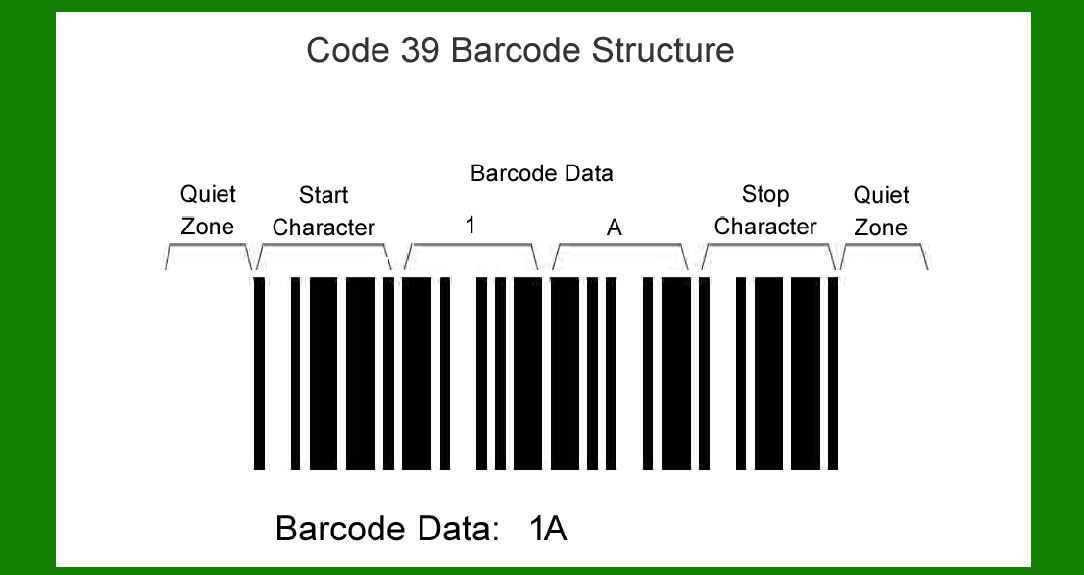
Code 39 is a one-dimensional (1D) barcode, consisting of a series of bars and spaces. Each character in Code 39 is represented by a combination of nine elements: five bars and four spaces. The bars and spaces are of varying widths to encode the data. These widths are standardized so that a scanner can easily decode the characters. The symbology follows a modular pattern where each symbol or character is defined by the widths of its bars and spaces. |
3.1 Character Set |
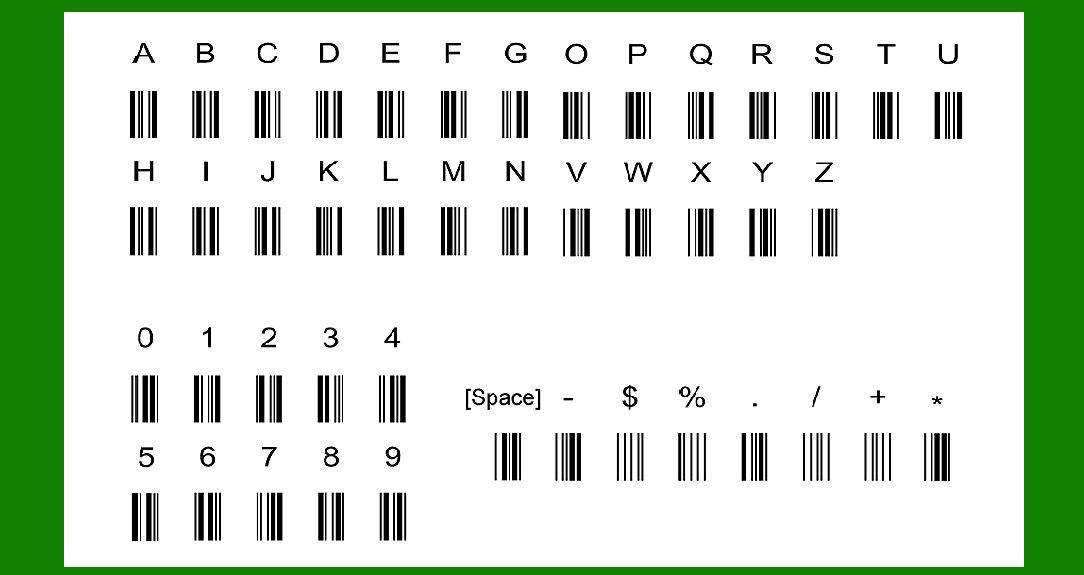
Code 39 can encode 43 characters in total, which includes: |
10 digits: 0-9 |
26 uppercase letters: A-Z |
7 special characters: space, minus sign (-), period (.), dollar sign ($), slash (/), plus sign (+), percent sign (%), and the asterisk (*), which is used as the start/stop character. |
The start and stop characters are represented by an asterisk (*) at the beginning and end of the barcode. This is why Code 39 is sometimes referred to as '3 of 9,' as it includes 9 elements (bars and spaces) for each character. |
3.2 Module and Element Width |
Each character in Code 39 is represented by a total of 9 elements, which are the combination of bars and spaces. These elements are of two different widths: |
Wide elements: These represent the larger bars and spaces. |
Narrow elements: These represent the smaller bars and spaces. |
The width ratio between the narrow and wide elements typically ranges from 1:2, though this ratio can vary depending on the scanner's configuration. |
3.3 Bar Widths and Inter-Character Spacing |
Bars: The bars in Code 39 are the dark elements of the barcode, which are either wide or narrow. The wide bars are generally twice the width of the narrow bars, making it easy for scanners to distinguish between the two. |
Spaces: The spaces between the bars also vary in width and contribute to the overall structure of the symbol. There are four spaces for each character in Code 39: one between each pair of adjacent bars and one at the beginning and end of the character. |
|
4. Encoding Process in Code 39 |
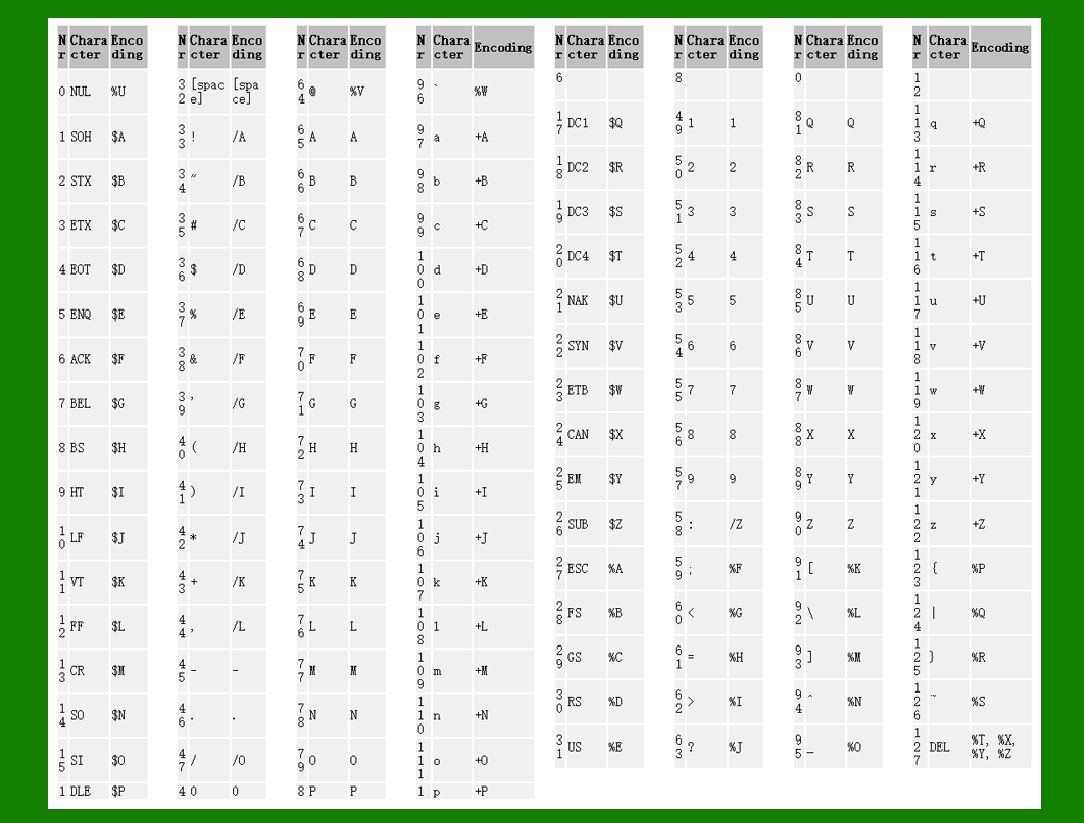
The encoding of data in Code 39 is straightforward. Each character is encoded as a series of bars and spaces, which are mapped to the corresponding alphanumeric symbol. This process is essentially the conversion of characters into a combination of narrow and wide bars and spaces. |
4.1 Start and Stop Characters |
The barcode begins and ends with a start/stop character, which is always the asterisk (*). These markers tell the scanner where the barcode begins and ends, ensuring accurate decoding. |
4.2 Character Mapping |
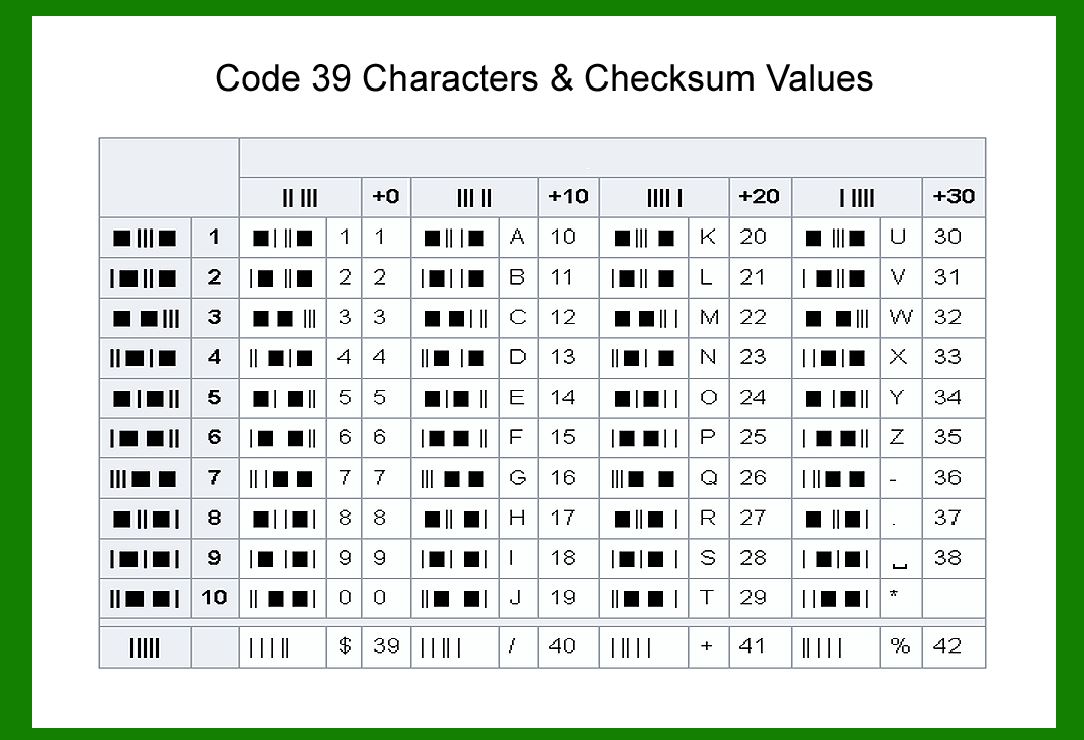
Each character (whether a digit, letter, or special symbol) is mapped to a specific sequence of bars and spaces. The sequence is predetermined and standardized, so both the encoding and decoding processes are consistent across systems. The number of bars and spaces for each character in Code 39 is fixed, which contributes to the reliability and uniformity of the technology. |
4.3 Code39 Checksum |
Although Code 39 itself does not require a checksum to detect errors, a checksum can be added for increased data integrity. This is optional but may be used in cases where higher accuracy is needed. The checksum is calculated by summing the values of all characters in the data string and applying a modulus operation to the sum. |
|
5. Decoding Process of Code 39 |
The decoding process of Code 39 is accomplished by scanning the barcode with a reader (also called a scanner). The scanner emits light that reflects off the bars, which are detected and converted into digital signals. These signals are then analyzed and interpreted by the scanner to determine the sequence of bars and spaces. |
5.1 Optical Detection |
When a scanner reads a Code 39 barcode, the light emitted by the scanner reflects off the bars. The light sensors in the scanner detect the varying reflectivity of the bars and spaces and convert these signals into binary data (ones and zeros). The scanner uses a light-to-dark or dark-to-light transition to detect the narrow and wide bars, which are then decoded into corresponding alphanumeric characters. |
5.2 Signal Processing |
The scanner's processor compares the detected patterns with the pre-programmed character set of Code 39 and determines which characters they represent. Since Code 39 uses a fixed width for each character, the process is relatively simple for scanners to execute. The start and stop characters are also identified in the decoding process to mark the boundaries of the barcode. |
5.3 Error Handling and Validation |
In environments where accuracy is crucial, scanners may also perform error detection. If the scanner detects an error, such as a misread or an unreadable symbol, it may request a rescan or trigger an error message. Some systems may also use additional encoding techniques like checksums to validate the integrity of the data. |
|
6. Applications of Code 39 Barcode |
Code 39 is used in a variety of industries for tracking and identification purposes. Its ability to encode both numbers and letters makes it versatile for many applications. Some of the most common uses include: |
6.1 Inventory Management |
Code 39 is often used in warehouse and inventory management systems to track products, parts, and assets. Its ability to encode alphanumeric data allows it to store detailed product information, such as serial numbers, lot numbers, and other identifiers. |
6.2 Healthcare Industry |
In healthcare, Code 39 is used to track medical devices, medications, and patient records. It is particularly useful for labeling items in clinical settings where quick identification and easy scanning are essential for patient safety. |
6.3 Automotive Industry |
The automotive industry uses Code 39 for parts tracking and inventory management. This includes labeling parts with serial numbers or product IDs, making it easier to manage supply chains and ensure quality control in manufacturing processes. |
6.4 Document Management |
Code 39 is also used in document management systems to label files, records, and documents. By assigning barcodes to physical documents, businesses can quickly locate, track, and manage files in a digital system. |

|
7. Benefits of Code 39 Barcode |
Code 39 offers several advantages that make it an attractive choice for many applications: |
7.1 Simplicity |
Code 39 is relatively simple to implement and use. Its encoding and decoding processes are straightforward, requiring minimal training for personnel. This makes it suitable for small and large-scale applications alike. |
7.2 Compatibility |
Code 39 is compatible with a wide variety of barcode readers and scanners, making it easy to integrate into existing systems. It can be scanned by both laser and camera-based scanners, further enhancing its versatility. |
7.3 Readability |
Code 39 is known for its high readability, even when printed in large or small sizes. The wide range of scanners that can read Code 39 further enhances its reliability in various environments. |
7.4 Error Detection |
While not inherently equipped with a checksum, the ability to add optional error detection methods, like a checksum, can enhance its reliability and reduce the chances of errors during scanning. |

|
8. Limitations of Code 39 Barcode |
Despite its widespread use, Code 39 does have some limitations: |
8.1 Limited Character Set |
One of the main limitations of Code 39 is its limited character set, which only includes uppercase letters, numbers, and a small set of special characters. This means that it cannot encode lowercase letters or a broader range of symbols, which may be a disadvantage in some use cases. |
8.2 Large Barcode Size |
Code 39 barcodes tend to be relatively wide compared to other barcode symbologies, especially when encoding a large amount of data. This can make it less ideal for applications where space is limited. |
8.3 Error Handling |
Though Code 39 can include an optional checksum, the standard does not have built-in error correction capabilities. This means that if a barcode is damaged or distorted, it may be difficult for the scanner to correctly interpret the data. |
The above sections give an in-depth explanation of Code 39 barcode technology. |

|
9. Code 39 vs. Other Barcode Technologies |
Code 39 has several competitors, each with its own advantages and trade-offs. Understanding how Code 39 compares to other barcode technologies, particularly in terms of encoding capabilities, scanning performance, and use cases, is important for determining its suitability for various applications. Below, we'll compare Code 39 with several other popular barcode symbologies, including EAN-13, Code 128, QR Code, and Data Matrix. |
9.1 Code 39 vs. EAN-13 |
Character Set: EAN-13, a linear barcode widely used in retail, encodes only numeric data (13 digits), while Code 39 can encode both numbers and uppercase letters. This makes Code 39 more versatile for applications requiring alphanumeric data. |
Data Capacity: EAN-13 is more compact in terms of data density than Code 39. EAN-13's focus on numeric data allows it to encode more information in a smaller space, which is crucial for retail scanning where speed and space efficiency are key. |
Usage: EAN-13 is predominantly used in retail for product identification and price scanning, while Code 39 is used in industrial applications like inventory management, document tracking, and asset labeling. Code 39’s ability to encode a broader character set makes it suitable for specialized uses that EAN-13 cannot cover. |
Readability: Both barcodes are highly readable, but because EAN-13 is smaller, it is often preferred in environments where limited space is available, such as on retail product packaging. Code 39, being wider, may require more space to print, especially when encoding more data. |
9.2 Code 39 vs. Code 128 |
Data Capacity: Code 128 is a more compact barcode that can encode all 128 ASCII characters, making it significantly more efficient in terms of data storage than Code 39. Code 39’s character set is limited, and when encoding large datasets, Code 128 is preferred due to its ability to encode more information in a smaller space. |
Compactness: Code 128 barcodes are generally much more compact than Code 39, making them suitable for applications where space is limited, such as packaging, shipping labels, and small product tags. |
Error Handling: Code 128 can support error detection and correction, which makes it more reliable in harsh environments where barcode integrity may be compromised. In contrast, Code 39 typically does not have built-in error correction, though checksums can be added for additional error handling. |
Complexity: Code 128, with its more complex encoding scheme and support for a wider range of characters, may require more sophisticated scanning equipment. Code 39, with its simpler structure, is easier to implement and decode, especially in environments with less advanced barcode technology. |
Applications: Code 128 is often used in high-volume applications like logistics, shipping, and pharmaceuticals due to its compact size and efficiency, while Code 39 is still widely used in industrial sectors where simplicity and readability take precedence. |
9.3 Code 39 vs. QR Code |
2D vs. 1D: Unlike Code 39, which is a one-dimensional (1D) barcode, QR Code is a two-dimensional (2D) barcode that can store a much larger amount of data, including alphanumeric characters, URLs, and even multimedia content. QR Codes can store hundreds or even thousands of characters, while Code 39 can encode only 43 characters. |
Data Capacity: QR Codes are far more efficient for encoding large datasets due to their 2D structure, which allows them to hold more information in a smaller space compared to Code 39, which is restricted to the horizontal space of a single line. |
Scanning Requirements: QR Codes are typically scanned using camera-based readers, which can capture data from multiple directions, making them more suitable for mobile applications, marketing, and interactive content. Code 39, on the other hand, requires a traditional barcode scanner to read the horizontal line, making it better suited for industrial and inventory tracking. |
Reliability in Harsh Conditions: Code 39 is more reliable in harsh industrial environments, as 1D barcodes like Code 39 are easier to print and read, even on materials like metal, plastic, or rubber. QR Codes, while robust, may require higher-quality printing for accurate scanning, especially in challenging conditions like high-speed scanning or low contrast situations. |
Use Cases: QR Codes are often used in consumer-facing applications like mobile payments, product traceability, and digital marketing, whereas Code 39 remains prevalent in industrial applications like warehouse management, automotive manufacturing, and healthcare tracking. |
9.4 Code 39 vs. Data Matrix |
Data Capacity: Data Matrix is a 2D barcode symbology capable of encoding significantly more data than Code 39. Data Matrix can hold up to 2,335 alphanumeric characters in a compact square symbol, while Code 39 is limited to a small set of characters and has a less efficient data capacity. |
Size: Data Matrix is ideal for applications requiring very small barcodes, as it can store large amounts of data in a very compact space. Code 39’s larger, linear format may not be suitable when space is limited, such as in small electronic components or pharmaceuticals. |
Error Correction: Data Matrix incorporates robust error correction features through Reed-Solomon error correction, which ensures that the barcode remains readable even if parts of it are damaged. In contrast, Code 39 lacks native error correction, though optional check digits can be added to improve reliability. |
Readability in Harsh Conditions: Data Matrix barcodes are highly reliable in challenging environments, such as on small parts or in low-quality printing conditions. They are also highly resistant to damage. Code 39, while reliable, can be more susceptible to distortion or poor print quality, especially in industrial applications. |
Applications: Data Matrix is often used in aerospace, electronics, and medical device industries, where small and highly reliable barcodes are needed for tracking tiny components or high-value items. Code 39 is still widely used in logistics, healthcare, and automotive industries where larger barcode symbols are acceptable. |

|
10. Code 39 Barcode Scanning Technology |
To fully understand the efficiency and adaptability of Code 39, it’s important to look at the types of scanners that support this barcode and their scanning capabilities. |
10.1 Laser Scanners |
Laser scanners are the most common type of barcode scanners used for reading Code 39 barcodes. They function by emitting a laser beam that scans across the barcode. The scanner detects the reflections from the bars and spaces and converts them into digital signals. Laser scanners are fast and efficient, and they work well with linear barcodes like Code 39. They can also read Code 39 barcodes at varying distances, making them ideal for warehouse and retail environments. |
Pros: Fast scanning, high accuracy, and good for long-distance scanning. |
Cons: Limited to reading 1D barcodes, such as Code 39. |
10.2 CCD Scanners (Charge-Coupled Device) |
CCD scanners use an array of tiny light sensors to capture an image of the barcode. This image is processed by the scanner and decoded into the corresponding alphanumeric data. CCD scanners are less common for Code 39 than laser scanners but still widely used for reading 1D barcodes. |
Pros: Can read barcodes from a variety of angles, relatively inexpensive. |
Cons: Shorter scanning range compared to laser scanners. |
10.3 Camera-Based Scanners |
Camera-based scanners, or imaging scanners, use a camera sensor to capture a digital image of the barcode. These scanners are capable of reading both 1D and 2D barcodes, including Code 39. Camera-based scanners are often used in mobile devices, smartphones, and tablets, allowing for flexibility in barcode scanning. |
Pros: Can read both 1D and 2D barcodes, very versatile, suitable for mobile applications. |
Cons: Typically slower than laser scanners for reading 1D barcodes like Code 39. |
|
11. Future Developments and Trends in Code 39 Barcode Technology |
Despite the rise of 2D barcode technologies like QR Code and Data Matrix, Code 39 remains an important player in industries that rely on simple, reliable, and robust 1D barcodes. The future of Code 39 may involve the integration of newer technologies and advancements that enhance its performance and compatibility with modern systems. |
11.1 Integration with Mobile Technologies |
As mobile devices continue to grow in popularity, integrating Code 39 into mobile scanning applications will become more common. Smartphone apps with built-in barcode readers can scan Code 39 barcodes efficiently, and this trend is likely to increase in sectors like retail, healthcare, and logistics. |
11.2 Enhanced Data Security and Error Detection |
The addition of error detection features, such as checksums or even error correction algorithms, may become more common in Code 39 barcodes. This would help address its current limitation in environments where data integrity is critical, such as pharmaceutical tracking or sensitive manufacturing processes. |
11.3 Miniaturization for Compact Devices |
As demand for smaller barcode symbols increases, Code 39 could evolve to become more compact, enabling it to be used in increasingly tight spaces while retaining its ability to encode alphanumeric characters. |
This extended section concludes the detailed explanation of Code 39 barcode technology. |

|
Here are some practical examples of how Code 39 barcodes are used in various industries. These real-world applications showcase the versatility of Code 39 in different settings, from logistics and healthcare to automotive and document management. |
1. Inventory Management in Warehouses |
In warehouse management, Code 39 is widely used for inventory tracking and asset management. Each item or product is labeled with a Code 39 barcode containing unique identifiers, such as the product name, part number, or serial number. As products move through the warehouse, workers scan the barcodes to track their location, update stock levels, and manage replenishments. |
Example: |
Scenario: A warehouse manages thousands of different products, such as electronics components, industrial tools, and raw materials. |
Solution: Each product is labeled with a Code 39 barcode that includes the product ID and serial number. When a worker picks a product for shipment, they scan the barcode, which updates the inventory management system in real-time. This helps ensure accurate stock levels and prevents overstocking or understocking. |

|
2. Healthcare and Medical Equipment Tracking |
In the healthcare industry, Code 39 is commonly used to track medical devices, pharmaceuticals, and even patient records. By attaching a Code 39 barcode to medical equipment or medications, healthcare professionals can easily scan and verify information such as expiration dates, batch numbers, and the item’s history. |
Example: |
Scenario: A hospital needs to track its medical devices and medications to ensure that they are being used correctly and safely. |
Solution: Every medical device and pharmaceutical package is labeled with a Code 39 barcode that contains a serial number, manufacturer details, and expiration date. When a nurse administers medication to a patient, they scan the barcode to verify the medication’s information. Similarly, equipment maintenance and inspections are tracked using the barcodes on devices. |

|
3. Automotive Parts Tracking |
In the automotive industry, Code 39 is used for tracking parts, components, and assemblies throughout the manufacturing and repair processes. Each part is labeled with a barcode that contains essential information such as part numbers, manufacturing dates, and serial numbers. |
Example: |
Scenario: An automotive company manufactures and assembles parts in a factory and needs a reliable system to track parts through the assembly line. |
Solution: Each part, whether it’s an engine component, a door handle, or a car seat, is labeled with a Code 39 barcode that includes the part number and serial number. As parts move through the production line, workers scan the barcodes to confirm that the correct parts are being assembled, track inventory levels, and ensure traceability for quality control and compliance. |

|
4. Document and File Tracking |
In document management, Code 39 barcodes are often used to label files, folders, and other records. These barcodes help companies and organizations organize and retrieve documents quickly. Libraries, law firms, and government agencies, in particular, rely on barcode systems to streamline document storage and retrieval processes. |
Example: |
Scenario: A law firm needs a system to track legal documents and files to ensure they are stored and retrieved efficiently. |
Solution: Each file folder is labeled with a Code 39 barcode that contains a case number or document identifier. When an employee needs to retrieve a specific case file, they can scan the barcode to locate the document in the filing system, ensuring that it is quickly and accurately found. |

|
5. Shipping and Logistics |
In shipping and logistics, Code 39 is used to track packages and freight as they move through the supply chain. Barcodes are attached to packages, pallets, or containers, and the data encoded in the barcode helps companies track the location of each item in real-time as it moves from one destination to another. |
Example: |
Scenario: A shipping company handles thousands of packages every day and needs an efficient way to track their movement. |
Solution: Each package is labeled with a Code 39 barcode that contains the shipping ID, destination address, and tracking number. As packages are loaded onto trucks and unloaded at various facilities, workers scan the barcodes to track the package’s progress through the supply chain. The barcode ensures that packages are correctly routed and delivered on time. |

|
6. Retail Inventory Management |
Although EAN-13 barcodes dominate retail environments, Code 39 is still used in some retail applications where simplicity and versatility are more important than compactness. For example, in bulk inventory management or for tracking items that require custom labels. |
Example: |
Scenario: A warehouse that supplies a retail chain needs to manage inventory for items that don’t have standardized UPC barcodes. |
Solution: The warehouse labels products like tools, cleaning supplies, and specialty items with Code 39 barcodes. These barcodes contain the product ID, category information, and serial number. Retail workers use scanners to check stock levels, conduct inventory counts, and ensure product availability. |

|
7. Asset Management in IT |
Code 39 is also used for IT asset tracking, where barcodes are applied to devices such as computers, servers, routers, and network equipment. This helps organizations keep track of their equipment and ensures proper maintenance and support. |
Example: |
Scenario: A company needs to track and manage its IT infrastructure, including computers, servers, and networking equipment. |
Solution: Each piece of equipment is tagged with a Code 39 barcode that contains a serial number, asset ID, and purchase date. IT staff can easily scan the barcode to update asset records, perform maintenance, or track warranties. This improves accountability, reduces theft, and ensures proper maintenance schedules are followed. |

|
8. Military and Aerospace Applications |
In the military and aerospace industries, Code 39 is often used to track highly sensitive and high-value assets, such as aircraft parts, weapons systems, and specialized tools. Barcodes ensure that components are correctly identified and managed throughout their lifecycle. |
Example: |
Scenario: The military needs to track specialized equipment, such as aircraft parts or weapons components, in both field operations and maintenance facilities. |
Solution: Every part is labeled with a Code 39 barcode that contains detailed information such as the part number, serial number, manufacture date, and maintenance history. This enables technicians to quickly identify parts, check their history, and ensure compliance with maintenance schedules. |

|
9. Library Book and Media Tracking |
Libraries have used barcodes for many years to manage their collections. Code 39 barcodes are used to label books, DVDs, and other media, making it easy to check out, return, and track materials. |
Example: |
Scenario: A university library needs an efficient system for tracking books and media borrowed by students and faculty. |
Solution: Each book or media item is labeled with a Code 39 barcode containing a unique identifier and book number. When a user checks out an item, the barcode is scanned, and the system records the transaction. This reduces human error and ensures accurate records of borrowed materials. |

|
10. Manufacturing Line and Production Tracking |
Code 39 is used on production lines to track the progress of manufactured goods. It is commonly used in industries like electronics and pharmaceuticals, where each product or batch needs to be tracked through various stages of production and quality control. |
Example: |
Scenario: A company produces medical devices and needs to track each device throughout the production process. |
Solution: Each device is labeled with a Code 39 barcode containing the batch number, serial number, and production date. Workers scan the barcode at different stages of the assembly line to ensure that the device is moving through the correct quality control processes and that all steps are documented. |

|
11. Special Events and Ticketing |
Code 39 barcodes are also used for event ticketing and access control. When scanning tickets, the Code 39 barcode ensures that attendees can enter without issues, and event managers can track attendance in real-time. |
Example: |
Scenario: A large concert venue needs to scan tickets for entry to the event. |
Solution: Every ticket issued is printed with a Code 39 barcode that contains event details, seat number, and ticket ID. Event staff scan the tickets at the entrance, which automatically updates the entry system and ensures that only valid tickets are accepted. |

|
Summary |
Code 39 barcodes continue to be an essential tool for various industries due to their simplicity, versatility, and ease of implementation. Whether in inventory management, healthcare, automotive production, or document tracking, Code 39 offers a reliable method for tracking and managing valuable assets, products, and information. |
In each of these examples, the Code 39 barcode is chosen because of its ability to encode both numeric and alphanumeric characters, its compatibility with a variety of barcode scanners, and its long-standing reputation for reliability in real-world applications. |

|
How do I use a font file to generate a Code 39 barcode? |
Using a font file to generate a Code 39 barcode involves a few straightforward steps, but it requires you to have a Code 39 barcode font installed on your system. These fonts are designed to display the barcode using the standard encoding scheme of Code 39, where each character in the text is represented as bars and spaces. |
Here’s how to generate a Code 39 barcode using a font file: |
1. Download and Install a Code 39 Font |
First, you need a Code 39 barcode font. Many barcode font sets are available for download, some free and some paid. Popular ones include: |
Free 3 of 9 (Free Barcode Font): This is a free font that generates a basic Code 39 barcode. |
IDAutomation Code 39 Font: A premium font that comes with additional features, including the ability to add start/stop characters. |
To install the font: |
Download the font: Look for a trusted source, like IDAutomation or other barcode font providers. |
Extract and Install the Font: |
Download the ZIP file, and extract the contents. |
On Windows, right-click the font file (e.g., .ttf or .otf) and select Install. |
On Mac, double-click the font file and click Install Font. |
2. Prepare the Text for Encoding |
Before you use the font, remember that Code 39 requires a start/stop character, which is an asterisk (*). Code 39 does not automatically generate this, so you must manually add it to your text. |
For Example: If you want to encode the text ABC123, you should modify it to *ABC123*. |
3. Use the Font in a Word Processor or Design Software |
Once the Code 39 font is installed, you can use it in programs like Microsoft Word, Excel, or graphic design tools like Adobe Illustrator. Here’s how you can do it in various applications: |
3.1 In Microsoft Word |
Open Microsoft Word. |
Type the text you want to encode. For example, if you want to encode ABC123, type *ABC123*. |
Select the text. |
Change the font to the Code 39 font you installed (e.g., Free 3 of 9). |
You will immediately see the text transformed into a Code 39 barcode. The asterisks at the beginning and end will appear as the start and stop characters. |
3.2 In Microsoft Excel |
Open Microsoft Excel. |
Enter the text you want to encode into a cell. Make sure to include the asterisks, e.g., *ABC123*. |
Select the cell. |
Change the font to the Code 39 font. |
The text will now be displayed as a barcode. |
3.3 In Graphic Design Software (e.g., Adobe Illustrator) |
Open Adobe Illustrator (or similar software). |
Create a text box. |
Type your text, including the start/stop characters (e.g., *ABC123*). |
Select the text and change the font to the Code 39 font. |
The text will be transformed into a barcode. You can adjust the size, color, and orientation as needed. |
4. Print or Export the Barcode |
Once the text is transformed into a Code 39 barcode, you can print it on labels, tickets, or documents. If you’re using graphic design software, you can also export the barcode as an image file (e.g., PNG or PDF) for use in various print materials. |
5. Scanning the Barcode |
After printing, the Code 39 barcode is ready to be scanned using a barcode scanner. The scanner will read the bars and spaces and decode the data encoded in the barcode. |
Key Points to Remember: |
Start/Stop Characters: Code 39 requires the barcode to start and stop with an asterisk (*). This is essential for proper decoding. |
Font Settings: You may need to adjust the font size, depending on how large or small you need the barcode to be. Typically, the font size should be at least 12 pt for a readable barcode, but this can vary based on your scanner’s capabilities. |
Barcode Size: If you’re using the font for labels, the size of the barcode depends on the amount of data encoded. More data typically requires a larger barcode. However, Code 39 generally takes up more space than other barcode symbologies (like Code 128). |
Barcode Scanning: Ensure that the printer quality is high enough for the scanner to read the barcode correctly. Low-quality prints may lead to scanning errors. |
Example of Creating a Barcode in Microsoft Word: |
Step 1: Open Microsoft Word. |
Step 2: Type the following text: *ABC123* (this includes the start/stop characters). |
Step 3: Highlight the text and change the font to Code 39 (e.g., Free 3 of 9). |
Step 4: You’ll see that the text turns into a barcode. |
Step 5: Print the document. |
This process allows you to easily generate Code 39 barcodes using just a font file. While this method is relatively simple and cost-effective, remember that fonts-based barcodes can have limitations in terms of error correction, so for critical applications, you might want to consider using a specialized barcode generation tool or software. |
|
Why can Code 39 barcodes be generated using a font file, while most other barcode formats cannot? |
The reason Code 39 barcodes can be generated using a font file while most other barcode formats cannot is primarily due to the simplicity and structure of the Code 39 encoding system. Here's a detailed breakdown of why this is the case: |
1. Simplicity of Code 39 Encoding |
Code 39 is a 1D (one-dimensional) linear barcode symbology. It is designed to represent data using a sequence of bars and spaces of varying widths. The barcode is straightforward, with each character represented by a fixed pattern of 9 elements (5 bars and 4 spaces), each of which can be narrow or wide. |
This relatively simple structure allows Code 39 to be directly mapped to a standard font, where each character in the barcode (such as the letter 'A' or number '2') corresponds to a specific combination of bars and spaces. The barcode reader interprets these bar/space patterns as encoded data. |
Why this works for fonts: |
Each character in Code 39 corresponds directly to a predefined sequence of bars and spaces. |
The start/stop character (asterisk *) can easily be encoded and decoded as part of this process. |
The fixed length of each symbol and the simplicity of the encoding process (just 9 elements) allows a font to represent the barcode visually without additional data processing. |
2. Code 39’s Limited Character Set |
Code 39 only encodes 43 characters (numbers 0-9, uppercase A-Z, and a small set of special characters). This limited character set simplifies the encoding process, making it easier to assign a unique bar/space pattern to each character. |
Other barcode symbologies, especially those that encode larger sets of characters or require more sophisticated error correction or compression, are not as straightforward and cannot be represented simply with a font. |
Example of why other barcodes are more complex: |
Code 128, for instance, can encode all 128 ASCII characters. The encoding structure of Code 128 is more complex because it uses different character sets (A, B, C) and can switch between them, requiring more advanced processing that cannot be directly mapped to a font file. |
QR Codes or other 2D barcodes require the use of both rows and columns to encode data in two dimensions. This added complexity involves error correction and variable-length encoding, making it impossible to represent them using a simple font. |
3. Static and Predictable Data Structure |
Code 39 barcodes have a static and predictable data structure. Each character in a Code 39 barcode is represented by a fixed sequence of 9 elements (5 bars and 4 spaces). Therefore, a barcode font simply needs to map each alphanumeric character (or symbol) to its corresponding pattern. |
Other barcode formats often rely on more dynamic encoding techniques. For example: |
QR Codes encode data using binary values and can hold large amounts of data (up to several thousand characters). These formats require error correction, data compression, and a two-dimensional layout, making them far more complex and impractical to represent as a standard font. |
4. Barcode Fonts vs. True Barcode Generation |
When using a Code 39 font, the characters are not actually encoding data the way that a typical barcode generator would do. Instead: |
The font merely visually mimics the barcode’s pattern. The text typed into the document is converted into bars and spaces according to the Code 39 specifications, but this is a simple visual representation and does not necessarily follow the same error-checking or optimization process that a true barcode generation algorithm would employ. |
For more complex barcodes like QR Codes or Code 128, barcode generation software is used to apply more advanced encoding methods, which might include: |
Compression of the data into a format suitable for scanning. |
Error correction algorithms (such as Reed-Solomon error correction) that ensure the barcode remains readable even if it is damaged or partially obscured. |
Dynamic sizing and layout of the code to fit a variety of different data lengths, including encoding both numbers and special characters in different formats. |
5. Error Detection and Correction |
Code 39 does not require complex error detection or correction mechanisms. While an optional checksum can be added, Code 39 barcodes typically do not rely on this for basic functionality. This makes it possible to generate the barcode using a font, as the scanner can generally decode the information without the need for extra data. |
In contrast, more advanced barcode formats like Code 128 or QR Codes often require built-in error correction and variable data encoding. These cannot be easily represented by fonts, as they require processing at both the encoding and decoding stages that goes beyond the simple representation of bars and spaces. |
6. Visual Simplicity of Code 39 |
Finally, Code 39 is visually simple, consisting only of narrow and wide bars. Unlike 2D barcodes, such as QR codes, which involve multiple layers of encoding and error correction arranged in a grid, Code 39 is linear. The start/stop characters are just asterisks * at both ends of the string, and each character’s encoding is a set of bars and spaces. This linear nature makes it ideal for font-based rendering. |
Summary: Why Code 39 Can Be Generated Using a Font |
Simplicity: Code 39 has a simple, fixed-length encoding scheme with a limited character set (43 characters). This makes it easy to map each character to a unique sequence of bars and spaces that can be displayed using a standard font. |
Static Structure: Each character in Code 39 corresponds to a simple, predictable combination of 9 elements, which is ideal for font-based generation. |
No Complex Error Handling: Code 39 doesn’t require complex error correction mechanisms, making it easier to render using a font. |
Linear Format: Code 39 is a 1D barcode, which makes it visually simple compared to 2D barcodes that need a grid layout for encoding data. |
Other barcode formats like QR codes, Code 128, and Data Matrix involve more sophisticated encoding schemes, larger character sets, error correction, and sometimes 2D layouts, which make them impractical for representation via a simple font. |

|
How can I resolve the issue of Code 39 barcodes being too wide and difficult to read by scanners? |
The issue of Code 39 barcodes being too wide and difficult to read by scanners can arise for several reasons, such as excessive data, improper printing, or issues related to the scanning environment. Here are some practical solutions to improve readability and reduce the width of Code 39 barcodes: |
1. Reduce the Amount of Data Encoded |
Since Code 39 barcodes encode each character as a fixed-width sequence of bars and spaces, the more characters you encode, the wider the barcode will become. If your barcode contains a lot of data, consider the following: |
1.1 Use Shorter Data Strings |
If possible, reduce the amount of data you are encoding. For instance, avoid encoding unnecessary information, such as redundant text, and focus only on the essential identifiers (e.g., a product ID or serial number). |
Alternatively, use abbreviations or codes instead of long alphanumeric strings to reduce the number of characters. |
1.2 Consider Using a Different Barcode Symbology |
If you need to encode a larger dataset, consider using a more compact barcode symbology like Code 128 or Data Matrix, which encode more information in a smaller space. |
Code 128: A linear barcode that is more space-efficient than Code 39. |
Data Matrix: A 2D barcode that is much more compact and can store large amounts of data in a small area. |
2. Optimize the Print Quality |
Poor print quality can significantly reduce the scanning ability of Code 39 barcodes. If the barcode is printed with low resolution or inconsistent ink, scanners may have difficulty distinguishing the bars from the spaces. |
2.1 Use High-Resolution Printing |
Use high-resolution printers (at least 300 DPI or higher) to ensure that the barcode is clear and sharp. |
Laser printers or thermal printers tend to offer better results for barcode printing compared to inkjet printers, which may cause smearing or pixelation. |
2.2 Ensure Proper Contrast |
Ensure there is a high contrast between the barcode’s bars (black) and the background (white). Low contrast can make it difficult for scanners to differentiate the bars from the spaces. |
Black bars on a white background provide the highest contrast and best readability. |
Avoid colored or shaded backgrounds, as they can reduce scanning accuracy. |
2.3 Avoid Overlapping or Distorted Bars |
Make sure the bars and spaces are properly aligned and do not overlap. |
Distorted or warped barcodes, especially when printed on non-flat surfaces, may be difficult for scanners to read. |
3. Adjust the Barcode Size |
If your Code 39 barcodes are too wide, but you still need to keep them at an appropriate size for scanning, you may need to adjust the size and scaling of the barcode. |
3.1 Reduce the Barcode Width |
You can reduce the width of the barcode (i.e., make it smaller horizontally) without reducing its readability, provided that the bars and spaces are still distinguishable by the scanner. |
Font Size Adjustments: In graphic design or word-processing software, you can decrease the font size of the barcode. However, be careful not to reduce the size so much that the scanner cannot read it. |
If the barcode becomes too small, the scanner may not be able to detect the narrow and wide bars properly. |
3.2 Increase the Barcode Height |
While Code 39 barcodes tend to be wide, increasing the height can sometimes help scanners read them more easily, especially when dealing with low-resolution printing. |
Barcodes that are too short may not have enough information for scanners to recognize the code accurately. A taller barcode offers more surface area for scanning. |
3.3 Use an Appropriate Barcode Printer |
If you're printing the barcodes on a label, ensure that the printer you're using supports the required size. Label printers designed for barcode generation can print them at the correct resolution and size. |
4. Consider Using a Barcode Label with Quiet Zones |
Each barcode, including Code 39, requires a quiet zone (a clear margin) around the barcode for proper scanning. This margin ensures that the scanner can accurately detect the start and end of the barcode. |
4.1 Increase Quiet Zones |
Ensure that there is a clear margin around the barcode—especially at the beginning and end of the barcode. |
The quiet zone should typically be at least 10 times the width of the narrowest bar. |
If the quiet zone is too small or absent, scanners may misinterpret or fail to read the barcode. |
5. Use an Appropriate Barcode Reader |
Some scanners are optimized to read particular barcode types or sizes. If your Code 39 barcodes are consistently difficult to read, the problem might lie in the type of barcode scanner you're using. |
5.1 Laser vs. CCD vs. Camera-Based Scanners |
Laser Scanners: Typically read 1D barcodes like Code 39 well, but might struggle with poor-quality prints or low-contrast barcodes. |
CCD Scanners: These are less effective for large-width barcodes but can offer flexibility in terms of reading orientation and distance. |
Camera-Based Scanners: Can handle barcodes in various sizes and conditions, and are suitable for scanning barcodes at a distance or under difficult conditions. |
5.2 Adjust Scanner Settings |
Some barcode scanners allow you to adjust settings such as scanning speed, contrast sensitivity, and barcode width preferences. Adjust these settings to improve barcode readability, especially if you're scanning barcodes that are printed at smaller sizes or in low-contrast conditions. |
6. Test the Barcode Regularly |
Finally, regular testing of barcodes with your scanners will ensure that they remain readable and correctly sized. |
6.1 Use Barcode Verification Tools |
Barcode verifiers are specialized devices that can check the quality and readability of barcodes. These tools ensure that the print quality, contrast, and symbology meet industry standards. |
Verifying the barcode's readability with a scanner before it is printed and used in the field will help ensure that it works well in real-world applications. |
Summary of Steps to Resolve the Issue: |
Reduce Data: Simplify the barcode content, encode fewer characters, or switch to a different symbology like Code 128 for more compact barcodes. |
Improve Print Quality: Use high-resolution printers, ensure proper contrast, and avoid poor-quality or distorted prints. |
Adjust Size: Modify the barcode’s size—make it smaller horizontally but ensure it's large enough for scanning. |
Increase Quiet Zones: Ensure the barcode has adequate margins around the edges to improve scanning accuracy. |
Use the Right Scanner: Ensure that the scanner is suitable for reading Code 39 barcodes, and adjust its settings if necessary. |
Regularly Test Barcodes: Use barcode verification tools to check the quality of your printed barcodes before they’re used in operations. |
By following these steps, you can improve the readability of Code 39 barcodes, making them easier for scanners to read and preventing issues with barcodes being too wide or difficult to scan. |
|
Which 1D barcode types can completely replace Code 39 barcodes? Consider factors such as data density and compatibility. |
When looking to replace Code 39 barcodes, the goal is to identify 1D barcode types that offer similar or better functionality in terms of data density, compatibility, and scanning performance. Several 1D barcode symbologies can effectively replace Code 39 in various applications, depending on the specific needs of the use case. |
Below, we will explore the main barcode types that can completely replace Code 39, considering key factors such as data density, compatibility, and use case suitability. |
1. Code 128 |
Code 128 is one of the most popular 1D barcode symbologies and is commonly used as a replacement for Code 39 due to its higher data density and greater versatility. |
Key Benefits: |
Higher Data Density: Code 128 can encode all 128 ASCII characters, including uppercase and lowercase letters, digits, and special characters. This makes it significantly more efficient than Code 39, which only encodes a limited set of characters (43 characters). This means Code 128 can store more data in a smaller space, making it ideal for applications where space is limited. |
Compact Size: Because it can store more data in a smaller area, Code 128 is more compact and allows you to encode more information without significantly increasing the width of the barcode. This helps reduce label size and ensures more efficient use of space. |
Error Handling: Code 128 supports a more advanced error checking mechanism, using checksum characters to improve accuracy and reduce the likelihood of errors during scanning. |
Use Cases: |
Shipping and Logistics: For labeling packages, pallets, and shipping containers, where space and speed are critical. |
Inventory Management: Where products and assets require alphanumeric data encoding in a compact format. |
Compatibility: |
Widely supported by most barcode scanners, software, and printing systems. |
Backward compatibility: Most modern barcode scanners can read Code 128, making it easy to transition from Code 39 without needing to upgrade equipment. |
2. Interleaved 2 of 5 (ITF) |
Interleaved 2 of 5 (ITF) is another 1D barcode symbology that is a possible replacement for Code 39, especially in applications where numeric-only encoding is sufficient. |
Key Benefits: |
Compact Size: ITF is more compact than Code 39, especially for numeric data. It uses an interleaved pattern that efficiently encodes pairs of digits (two digits at a time), which allows it to store the same amount of data in a narrower barcode. |
Numeric-Only Encoding: If your application only requires numeric data (e.g., product serial numbers or inventory items), ITF is an efficient and high-density choice. It can encode numeric values much more compactly than Code 39, making it more space-efficient. |
Use Cases: |
Warehouse Management: Used in environments that require numeric product IDs, such as product pallets or cartons. |
Industrial Applications: For encoding inventory data, asset tracking, and shipping containers where only numeric values are needed. |
Compatibility: |
Widely supported by barcode scanners, but not as commonly used for general retail purposes compared to Code 39 or Code 128. |
Limited to numeric data, so it is not suitable for applications that require alphabetic or special characters. |
3. EAN-13 |
While EAN-13 is primarily used in retail for product identification, it is worth mentioning because it can replace Code 39 in certain contexts, especially if you're dealing with product labeling. |
Key Benefits: |
High Compatibility with Retail Systems: EAN-13 is the standard barcode used for retail product labeling worldwide. It offers great compatibility with retail and point-of-sale systems. |
Compact Size: Since EAN-13 is designed for retail packaging, it can fit into smaller label areas and still encode 13 digits of data, which is sufficient for many products in various industries. |
Use Cases: |
Retail: For product labeling, especially where a unique product identifier (GTIN) is needed. |
Shipping: For products with specific retail identifiers that are used throughout the supply chain. |
Compatibility: |
Retail and POS Systems: EAN-13 is fully supported by retail scanners and checkout systems, making it a natural replacement for Code 39 in retail environments. |
Limited Character Set: Only encodes numeric data (13 digits), so it’s not suitable for encoding alphanumeric or special characters. |
4. Codabar |
Codabar is an older barcode format that can also serve as a replacement for Code 39 in some specific applications, particularly in library systems, blood banks, and membership card applications. |
Key Benefits: |
Simpler Encoding: Codabar is a simple and lightweight symbology that can encode numbers and a small set of special characters. It’s easy to generate and decode. |
Compact Size: Codabar is more compact than Code 39 for applications that need to encode only numeric or special characters. |
Error Checking: Like Code 39, Codabar includes a start and stop character for data integrity, but it does not have a built-in checksum. |
Use Cases: |
Library Systems: Often used for books and document tracking. |
Blood Banks: Used for tagging blood bags and patient records. |
Membership and ID Cards: For applications requiring simple alphanumeric data encoding. |
Compatibility: |
Limited Use: While Codabar is supported in specialized applications, it is less common in general barcode scanning systems compared to Code 39 or Code 128. |
Numeric and Special Characters Only: It can only encode numbers and a few special characters, so it is not suitable for encoding a broader character set. |
5. Pharmaceutical or Medical Applications: GS1-128 (EAN-128) |
For industries such as pharmaceuticals, healthcare, and logistics, GS1-128 (a subset of Code 128) is often used as a replacement for Code 39 because it provides additional features, such as extended information encoding. |
Key Benefits: |
Advanced Data Encoding: It is used in industries where product traceability and regulatory compliance are critical, such as pharmaceuticals. It can encode GTINs, batch numbers, expiry dates, and other important information. |
Space Efficiency: GS1-128 is more compact than Code 39 and can carry more information in less space. |
Use Cases: |
Pharmaceutical Packaging: Used to encode drug information such as serial numbers, expiry dates, and batch numbers. |
Logistics and Healthcare: For tracking medical products and inventory with regulatory requirements. |
Compatibility: |
Widely Used in Specific Industries: Especially in pharmaceuticals, healthcare, and logistics, where regulatory compliance is essential. |
Requires Compatible Scanners: Requires Code 128-compatible scanners, but most modern scanners support GS1-128. |
Which Barcode Should Replace Code 39? |
For general use where more data needs to be encoded, and space is a concern, Code 128 is the best alternative. It provides higher data density, supports a wider character set (including lowercase letters), and is supported by a wide range of scanners. |
For numeric-only data, Interleaved 2 of 5 can be an excellent replacement, providing higher data density and a more compact form than Code 39. |
For retail and product labeling, EAN-13 is a strong choice, especially for applications that involve product identifiers in retail environments. |
For specialized applications in libraries, blood banks, or membership systems, Codabar may be an appropriate alternative for simple numeric or alphanumeric data. |
For industries that require complex data encoding, such as healthcare or pharmaceuticals, GS1-128 is a perfect replacement for Code 39, as it supports extended data and is compatible with regulatory requirements. |
|
Conclusion |
If you're looking to replace Code 39 with a more efficient, space-saving barcode, Code 128 is typically the best option for a broad range of industries. It offers greater data density, supports a larger character set, and is widely compatible with existing scanners and systems. For more specialized applications like numeric-only labeling, Interleaved 2 of 5 could be considered. However, for specific needs such as retail or healthcare, EAN-13 or GS1-128 might be better suited. |
 cs@easiersoft.com