1. Introduction to DataMatrix Barcode Technology |
DataMatrix is a two-dimensional (2D) barcode technology that encodes data in a matrix format using both horizontal and vertical elements. Unlike traditional linear barcodes, DataMatrix barcodes can store large amounts of data in a small space. They are often used in industries requiring high-density data encoding, such as electronics, pharmaceuticals, aerospace, and logistics. |
|
2. Structure of DataMatrix Barcode |
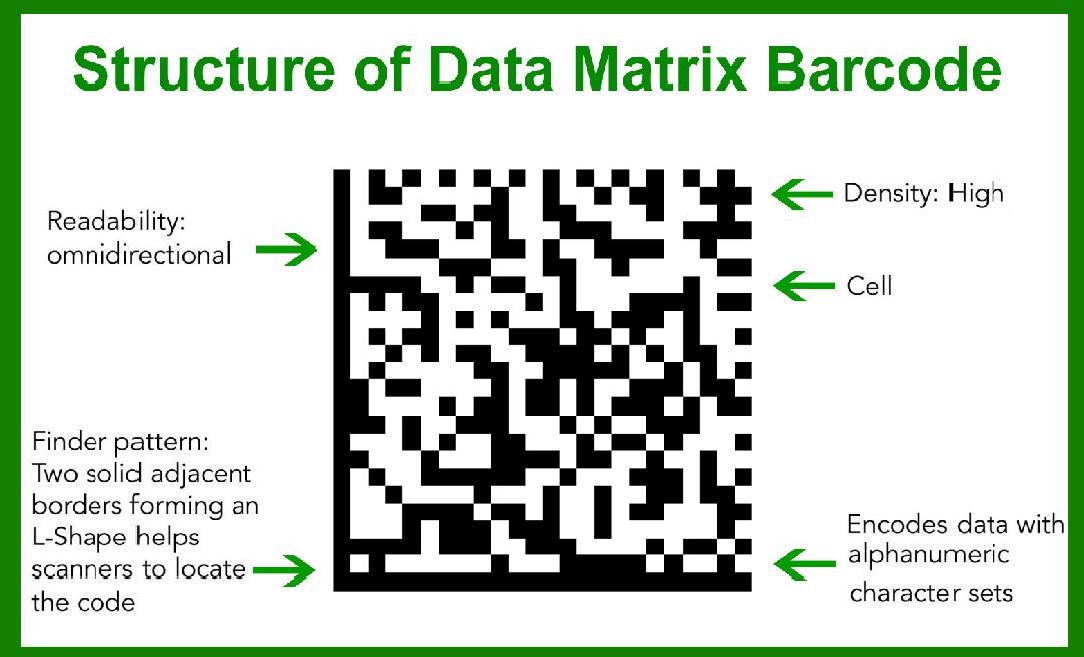
DataMatrix barcodes are made up of black and white modules arranged in a square or rectangular grid. These modules represent binary data: black squares represent '1', and white squares represent '0'. The size of a DataMatrix barcode can vary depending on the data it needs to encode, with the smallest being as small as 10x10 modules, and the largest being up to 144x144 modules. |
Modules: The individual black or white squares that make up the matrix. |
Quiet Zone: A clear area surrounding the barcode, ensuring that it can be read without interference from other elements. |
Finder Pattern: Typically located in three of the four corners of the barcode, the finder pattern is a set of dark modules used to help the scanner orient the barcode. |
|
3. Encoding Mechanism |
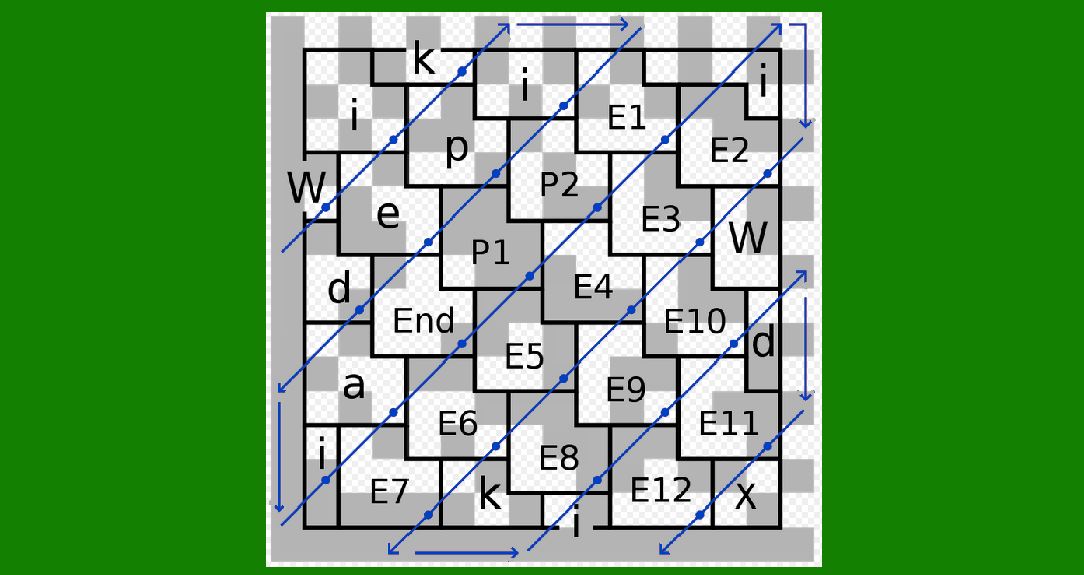
DataMatrix encodes data using a special algorithm that compresses information into a square or rectangular grid. It employs a series of encoding techniques, including: |
ECI (Extended Channel Interpretation): A mechanism to allow encoding of non-ASCII characters. |
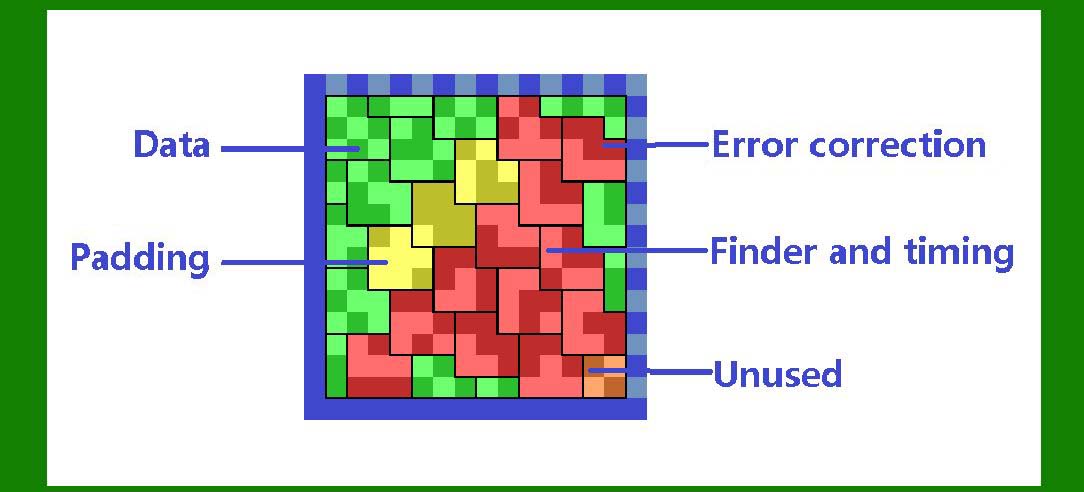
Error Correction: The barcode uses Reed-Solomon error correction to recover data even if part of the barcode is damaged. |
The data is encoded in a way that minimizes redundancy, making DataMatrix a very efficient technology for high-density data. |
|
4. Error Correction in DataMatrix |
DataMatrix uses a robust error correction algorithm based on Reed-Solomon codes, a form of forward error correction (FEC). This system allows DataMatrix to maintain readability and accuracy even if part of the barcode is obscured, dirty, or damaged. The error correction levels vary, providing different levels of fault tolerance depending on the specific application. For example, a DataMatrix with a higher error correction level will still be readable even if a large portion of the code is unreadable. |
Reed-Solomon Codes: These are block codes that correct errors by introducing redundancy in the data. |
Redundant Data: Error correction is achieved by including redundant data, which helps in recovering lost information. |
DataMatrix typically uses 2 to 5% of the barcode's total area for error correction. |

|
5. Encoding Formats and Standards |
DataMatrix barcodes are governed by international standards to ensure interoperability across different industries. The primary standard for DataMatrix is ISO/IEC 16022, which defines its structure, encoding methods, and error correction processes. |
The DataMatrix standard supports multiple encoding formats: |
ASCII: A common encoding method that allows the storage of alphanumeric characters. |
Binary Data: This format encodes raw binary data, such as images or non-textual information. |
Text Encoding: DataMatrix can store text, including international characters, using specific encoding schemes. |

|
6. Size and Capacity |
The size of a DataMatrix barcode can be highly variable depending on the amount of data that needs to be encoded. A small DataMatrix barcode, such as a 10x10 module matrix, can store about 50 alphanumeric characters, while a larger DataMatrix barcode, such as a 144x144 module matrix, can store up to 2,000 alphanumeric characters or 3,000 numeric characters. |
Small Barcodes: Suitable for encoding small amounts of data, often used in applications such as component labeling in electronics or pharmaceuticals. |
Large Barcodes: Used for more complex applications, such as document management or logistics tracking. |

|
7. Applications of DataMatrix |
DataMatrix barcodes are versatile and used in a wide range of industries. Here are a few key applications: |
Manufacturing and Electronics: DataMatrix is commonly used for labeling small electronic components like resistors, capacitors, and integrated circuits. These barcodes can encode detailed information about the component, such as serial numbers and product specifications. |
Pharmaceuticals: The pharmaceutical industry uses DataMatrix barcodes for serialization and traceability of drugs. The small size and high data capacity make DataMatrix ideal for encoding batch numbers, expiration dates, and serial numbers. |
Aerospace and Defense: Aerospace components are often labeled with DataMatrix codes for tracking purposes. The codes can withstand extreme conditions such as high temperatures, vibration, and exposure to chemicals, making them suitable for military applications. |
Logistics: DataMatrix barcodes are used in logistics for package tracking and inventory management. Their ability to store a large amount of data in a small space is especially useful for tracking shipments or inventory items in a warehouse. |
Healthcare: Medical devices, surgical instruments, and laboratory samples are often labeled with DataMatrix barcodes for identification, tracking, and authentication. |

|
8. Scanning and Decoding |
Scanning a DataMatrix barcode requires a 2D barcode scanner or a smartphone with a camera. The scanner captures an image of the barcode and decodes the data by detecting the pattern of black and white modules. The process involves: |
Pattern Recognition: The scanner identifies the finder patterns and orientates the image to align with the barcode. |
Decoding the Data: The scanner then interprets the matrix of black and white squares and converts it into digital data. |
Modern scanners can read DataMatrix codes from various angles and even at low resolution, making them very efficient for high-speed applications. Some scanners can also read damaged or partially obscured codes due to the error correction capabilities built into the barcode. |

|
9. Advantages of DataMatrix |
High Data Density: DataMatrix can store a significant amount of information in a small area, making it ideal for applications where space is limited. |
Error Correction: The Reed-Solomon error correction makes it more resilient to damage and makes the code more robust. |
Compact Size: Even with high data density, DataMatrix barcodes can be very small, making them suitable for tagging small items like medical devices and components in electronics. |
Versatility: DataMatrix can encode different types of data, including alphanumeric characters, binary data, and special symbols, making it adaptable to many industries. |

|
10. Challenges with DataMatrix |
Despite its advantages, there are some challenges when implementing DataMatrix barcodes: |
Scanning Equipment: While most modern scanners can read DataMatrix codes, older or low-quality scanners may struggle with reading the small barcodes, particularly if they are printed poorly. |
Printing Quality: High-quality printing is essential to ensure the readability of DataMatrix barcodes. Poor printing can lead to the loss of data or make the barcode unreadable. |
Size Limitations: While DataMatrix can be printed in small sizes, very large datasets may require multiple barcodes or an even larger matrix. |
|
11. Future Developments in DataMatrix Technology |
As technology continues to evolve, DataMatrix barcodes are likely to see improvements in several areas: |
Increased Data Capacity: As the need for more data increases, future versions of DataMatrix may be capable of storing even more information in smaller spaces. |
Integration with IoT: DataMatrix codes could play a larger role in the Internet of Things (IoT), enabling devices to automatically read and process product information. |
Enhanced Security: As data security concerns continue to grow, future DataMatrix codes may include advanced encryption methods to ensure that sensitive information is securely encoded and decoded. |
This overview touches on key aspects of DataMatrix technology. |

|
Let's dive deeper into each section to provide a more detailed and thorough explanation of DataMatrix barcode technology. Here’s an expanded breakdown: |
1. Introduction to DataMatrix Barcode Technology |
DataMatrix is a two-dimensional barcode technology that encodes information using a grid of square or rectangular elements (modules). Each module represents a bit of data, and the arrangement of black and white modules determines the encoded information. It is a type of matrix barcode, widely used for applications that require high data density and small barcode sizes. This technology is particularly beneficial in industries where traditional linear barcodes fail due to space constraints or the need for large data storage. |
Key Features of DataMatrix: |
Compact Size: One of the most significant advantages of DataMatrix is its ability to store a large amount of information in a small space. Even with limited physical area, it can encode up to 2,000 alphanumeric characters, making it ideal for small-item tagging. |
Error Correction: DataMatrix includes built-in error correction using the Reed-Solomon algorithm. This allows it to maintain readability even if parts of the barcode are obscured, damaged, or poorly printed. |
Industry Adoption: It’s widely used in the aerospace, electronics, healthcare, automotive, and pharmaceutical industries, primarily for product serialization, tracking, and traceability. |

|
2. Structure of DataMatrix Barcode |
The structure of a DataMatrix barcode consists of several elements that work together to ensure the barcode is scannable, recognizable, and robust. These include: |
2.1. Modules |
Definition: A module is the smallest unit in the DataMatrix barcode, which is represented by either a black square (1) or a white square (0). |
Arrangement: The modules are arranged in a square or rectangular grid pattern, with the number of rows and columns depending on the amount of data to be encoded. |
Density: The higher the density (number of modules per unit area), the more data can be stored in a given space. Smaller DataMatrix codes use fewer modules, while more extensive codes can store more data. |
2.2. Quiet Zone |
Definition: The quiet zone is a blank area surrounding the barcode that ensures the scanner can detect the start and end of the barcode without interference. |
Requirements: According to ISO/IEC 16022 standards, the quiet zone must be at least four modules wide on all sides of the DataMatrix code. |
2.3. Finder Pattern |
Definition: The finder pattern is a set of distinctive dark modules placed in three corners of the barcode to help scanners locate the orientation and positioning of the barcode. |
Role: It ensures that scanners can quickly recognize the barcode's boundaries and align the image for decoding, even at different angles. |
2.4. Clocking Pattern |
Definition: A clocking pattern is often incorporated into the barcode’s design to improve alignment and reading accuracy, especially for scanners that need precise orientation to decode data correctly. |
Design: It consists of specific modules placed in a way that aids in the decoding process by helping the scanner differentiate rows and columns. |

|
3. Encoding Mechanism |
3.1. Character Set Encoding |
DataMatrix supports several encoding modes to store different types of data: |
ASCII Encoding: A character set where each module represents one ASCII character (i.e., alphanumeric and special symbols). |
Binary Encoding: Encodes raw binary data, which is useful when storing files, images, or other non-textual data. Binary encoding uses fewer modules per unit of data, making it efficient for space-constrained environments. |
Unicode Encoding: A newer format that allows for the encoding of international characters (such as Chinese, Arabic, etc.) in a DataMatrix barcode. This encoding is typically used for global applications where text in various languages is required. |
3.2. Encoding Process |
Data Conversion: First, the data is converted into binary form. For instance, each alphanumeric character is converted into its binary equivalent using ASCII encoding. |
Error Correction Data: The next step involves applying the Reed-Solomon algorithm, where redundant bits are calculated and added to the data stream to create error-correcting codes. |
Data Placement: The data and the error correction codes are then mapped to the modules in the matrix, following a specific pattern designed to optimize the code's scannability. |
3.3. Data Compression |
DataMatrix uses a compression algorithm that reduces the number of modules needed for encoding, especially when dealing with large datasets. This is especially useful when encoding binary or graphic data, allowing DataMatrix barcodes to store more information in a smaller area. |

|
4. Error Correction in DataMatrix |
One of the standout features of DataMatrix barcodes is their error correction mechanism, which helps maintain readability even when part of the code is damaged, obscured, or degraded. |
4.1. Reed-Solomon Error Correction |
Overview: The error correction used in DataMatrix is based on Reed-Solomon codes, which are widely used in data transmission and storage for their robustness. |
Error-Correcting Capacity: Reed-Solomon codes can correct multiple errors within the barcode. The amount of error correction is determined by the number of redundant modules encoded into the DataMatrix. |
Redundancy: Error correction works by adding redundant information to the original data. Even if some modules are unreadable (for example, due to dirt, damage, or poor printing), the scanner can still recover the original data. |
4.2. Error Detection and Recovery |
Detection: If a DataMatrix barcode contains errors that cannot be corrected, it is flagged as unreadable. |
Recovery: If the error is minor (e.g., 5% or less of the barcode is unreadable), the error correction algorithm can reconstruct the original data. |

|
5. Encoding Formats and Standards |
DataMatrix barcodes follow the ISO/IEC 16022 standard, which defines the symbol structure, encoding methods, and error correction capabilities. |
5.1. Standardization |
ISO/IEC 16022: This is the international standard that defines the rules and specifications for DataMatrix barcodes. It outlines how data should be encoded and how error correction should be applied. |
Compatibility: Being an open standard, DataMatrix can be used globally, ensuring that the barcodes are readable across different devices and systems. |
5.2. Encoding Modes |
Alphanumeric Encoding: This encoding method is used for text data, such as names, addresses, and serial numbers. It follows a specific pattern that allows efficient use of space while encoding alphanumeric characters. |
Numeric Encoding: DataMatrix can encode only numeric data in a highly space-efficient manner. Numeric data, such as product IDs, batch numbers, and pricing, can be encoded using a smaller number of modules compared to alphanumeric data. |
Binary Encoding: This mode is used for raw binary data, allowing the barcode to store non-textual information, such as images or files. It maximizes the data density in the barcode. |

|
6. Size and Capacity |
The capacity of a DataMatrix barcode depends on its size (i.e., the number of rows and columns) and the encoding method used. |
6.1. Small Size |
10x10 Matrix: A 10x10 matrix (smallest possible size) can encode around 50 alphanumeric characters or 80 numeric digits. It’s primarily used for small components in the electronics industry where limited data needs to be encoded in a small space. |
6.2. Large Size |
144x144 Matrix: The largest possible size for a DataMatrix barcode (144x144 matrix) can store up to 2,000 alphanumeric characters, 3,000 numeric characters, or up to 1,500 bytes of binary data. |
Variable Size: DataMatrix barcodes are scalable, and their size increases as the volume of data to be encoded increases. |

|
7. Applications of DataMatrix |
7.1. Manufacturing & Electronics |
Component Marking: In electronics, DataMatrix is used to mark small components, such as semiconductors, resistors, and capacitors. These components often need to be individually serialized and tracked for quality control and compliance. |
Track & Trace: It provides an efficient way to track components and parts throughout the supply chain, offering traceability that is crucial for industry standards and regulatory compliance. |
7.2. Pharmaceuticals |
Drug Serialization: In the pharmaceutical industry, DataMatrix barcodes are used for serializing individual drug packages to comply with regulations such as the Drug Quality and Security Act (DQSA). This allows the tracking of pharmaceutical products to prevent counterfeiting and improve patient safety. |
7.3. Aerospace & Automotive |
Parts Tracking: The aerospace and automotive industries often require high-density data encoding to track parts throughout the supply chain. DataMatrix is well-suited for this due to its small size and robust nature. |
Compliance: DataMatrix barcodes can encode a large amount of regulatory and safety-related data, such as serial numbers, production dates, and certifications. |

|
8. Scanning and Decoding |
Scanners used for reading DataMatrix barcodes include: |
2D Barcode Scanners: These scanners use cameras to capture an image of the barcode and decode the information. They can read DataMatrix barcodes from various angles and orientations. |
Smartphones: With the rise of mobile technology, smartphones can now scan and decode DataMatrix barcodes using their built-in cameras and specialized apps. |
8.1. Decoding Process |
Image Capture: The scanner captures the barcode image. |
Alignment & Orientation: The scanner locates the finder patterns to align the barcode correctly. |
Data Extraction: The scanner extracts the binary data from the modules and converts it back into the original information. |
8.2. Speed and Efficiency |
High-Speed Decoding: Modern scanners are designed for high-speed operations, enabling them to read DataMatrix barcodes even in fast-paced environments such as manufacturing lines and warehouses. |

|
Let's dive deeper into the size and capacity of DataMatrix barcodes. DataMatrix is a 2D matrix barcode that is highly efficient in terms of data encoding, compactness, and error correction. Here’s a detailed breakdown: |
1. Size and Structure of DataMatrix Barcodes |
Matrix Grid: The DataMatrix barcode is made up of a matrix of square cells arranged in a grid. Each cell can be black or white, representing binary data. |
Size Variability: One of the key features of DataMatrix barcodes is their ability to adjust in size according to the data they need to encode. The smallest possible DataMatrix barcode is a 10x10 matrix (for the ECC 0 error correction level), but this can increase depending on the amount of data and the error correction level required. |
Standard Sizes: The size of DataMatrix barcodes can vary from 8x8 to 144x144 modules. The larger the barcode, the more data it can store. Each module in the matrix represents a single bit of data. |

|
2. Data Capacity of DataMatrix |
DataMatrix barcodes are high-density codes, which means they can store a significant amount of data in a small area. The data capacity depends on: |
The error correction level: The more error correction applied, the less capacity the barcode will have, as some of the data capacity is reserved for redundancy. |
The size of the barcode: Larger barcodes can store more information. For instance, a 144x144 DataMatrix barcode can hold significantly more data than a 10x10 barcode. |
a. Data Storage Breakdown |
Numeric-only encoding: If the DataMatrix is used to store only numeric data (digits 0-9), it can store up to 3116 digits in the largest matrix (144x144). |
Alphanumeric encoding: For alphanumeric data (letters A-Z, numbers 0-9, and a few special characters), the largest DataMatrix barcode (144x144) can store 2335 characters. |
Binary encoding: When using binary encoding, which allows the full range of ASCII characters, the largest DataMatrix barcode can store 1555 characters. |
Unicode encoding: For full Unicode (UTF-8) encoding, the largest DataMatrix can store 1000 characters. |
|
3. Error Correction in DataMatrix |
Error Correction Levels: The capacity of a DataMatrix barcode can be influenced by its error correction level. There are 4 error correction levels for DataMatrix: ECC 0, ECC 50, ECC 200, and ECC 200+. ECC 200 offers the highest error correction but reduces the barcode’s data capacity since a portion of the data is dedicated to error recovery. |
ECC 0: This level offers no error correction and has the maximum data capacity. |
ECC 200: This is the most common error correction level and strikes a balance between error recovery and data capacity. |
ECC 200+: This level provides even greater error correction at the cost of data storage. |

|
4. Data Matrix Size Calculation Formula |
The size of a DataMatrix barcode is determined by: |
The module count (how many rows and columns are in the matrix), ranging from 8x8 to 144x144. |
The error correction level that influences the data encoding, which also impacts the overall data storage. |
General formula for DataMatrix size: |
Size of barcode = module count × module count (e.g., 144x144 for the largest DataMatrix). |
Data capacity will depend on the encoding method and error correction applied. The table below (for reference) shows the approximate capacities for various error correction levels: |
Encoding MethodECC 0 (No Error Correction)ECC 50ECC 200ECC 200+ |
Numeric3116 digits298023351900 |
Alphanumeric2335 characters221017451450 |
Binary (ASCII)1555 characters14701150960 |
Unicode1000 characters950770640 |

|
5. Printing and Scanning Constraints |
Minimum Size for Printing: While DataMatrix barcodes are highly compact, their minimum print size must still be adequate to ensure reliable scanning. The size of the individual modules (cells) in the matrix can be as small as 0.2 mm (for high-quality printers), but the size of the printed barcode depends on factors like the printer’s resolution and the scanner's capabilities. |
Scanning Range: DataMatrix barcodes can be read by high-resolution scanners even when printed very small. This makes them ideal for applications where space is constrained, such as on small items like electronic components, medical devices, and packaging. |

|
6. Practical Applications and Examples |
Small Item Identification: Due to their high data density and small size, DataMatrix barcodes are used extensively in electronics, pharmaceuticals, and aerospace industries. For example, they are found on microchips, circuit boards, and small pharmaceutical vials where traditional barcodes (such as Code 128 or EAN) would not fit. |
Government and Military Use: Military and government agencies use DataMatrix codes to store critical information on items such as weapons and ammunition. The compact size allows them to store detailed information like serial numbers, manufacturing dates, and batch codes. |

|
7. DataMatrix Barcode in Various Sizes |
The capacity of a DataMatrix barcode also varies depending on the size selected, where smaller barcodes are typically used for short information (e.g., product codes), and larger ones are used for more complex data (e.g., product details, manufacturing history, serial numbers, etc.). |
Small 10x10 matrices: Used for very basic data encoding (e.g., a simple product identifier). |
Larger 144x144 matrices: Used for complex encoding such as entire product information or batch tracking data. |
By carefully choosing the size and error correction level, you can tailor the DataMatrix barcode to meet the requirements of any given application while maintaining high levels of accuracy and efficiency. Let me know if you'd like more detail on any specific aspect or a different encoding type! |
|
Let's dive deeper into the applications of DataMatrix barcodes. Due to their small size, high data density, and robust error correction capabilities, DataMatrix barcodes are used across a wide range of industries. Here’s a detailed breakdown of the various applications: |
1. Manufacturing and Supply Chain Management |
Product Tracking: DataMatrix barcodes are extensively used in the manufacturing industry to track parts, components, and finished goods through production lines and across warehouses. The compact size allows these barcodes to be placed on very small parts, which is crucial for tracking individual components in assembly lines. |
Asset Management: In supply chain management, DataMatrix codes are used to track assets, such as machinery, tools, and other equipment. This helps to streamline inventory control, maintenance schedules, and life-cycle tracking of the equipment. For example, companies like Caterpillar and GE use DataMatrix barcodes to manage large fleets of industrial equipment. |
Item-Level Tracking: Unlike traditional barcodes that might be used to track larger quantities, DataMatrix is often used for item-level tracking in industries like electronics and pharmaceuticals, where precision is critical. This level of granularity helps ensure that every item is accounted for, preventing mix-ups and errors. |
|
2. Healthcare and Pharmaceuticals |
Medical Device Labeling: Medical devices, particularly small and high-precision items, are labeled with DataMatrix barcodes to store critical information, such as serial numbers, manufacture dates, and lot numbers. This improves traceability and patient safety by enabling easy access to important product data, even in emergencies. |
Pharmaceuticals: In the pharmaceutical industry, DataMatrix codes are widely used to encode drug information such as expiration dates, batch numbers, and serial numbers. This aids in drug traceability, counterfeit prevention, and recall management. Regulatory bodies like the FDA have strict guidelines requiring the use of barcodes for pharmaceutical products, especially for serialization and tracking. |
Patient Tracking: Hospitals use DataMatrix barcodes to track patient information. For example, patient wristbands often include DataMatrix codes, which can store vital information like medical history, allergies, and treatment records. Healthcare providers can scan these codes to access patient data instantly and reduce the risk of medical errors. |
|
3. Aerospace and Defense |
Aircraft Component Identification: The aerospace industry employs DataMatrix barcodes for labeling parts and components of aircraft. These components need to be tracked meticulously for maintenance, inspection, and safety reasons. DataMatrix barcodes store detailed information such as part numbers, serial numbers, and manufacturing dates. |
Military Applications: DataMatrix barcodes are used in military logistics to track a wide range of items, from weapons and ammunition to uniforms and equipment. The compact nature of the barcode allows it to be printed on small parts, which is crucial for military applications where space is often limited. |
Asset and Inventory Management: Similar to manufacturing, the defense sector also uses DataMatrix codes to track assets and inventory across large systems. This ensures that maintenance schedules are followed and that components are replaced or serviced as needed. |
|
4. Retail and Consumer Goods |
Product Authentication and Anti-Counterfeiting: DataMatrix barcodes are increasingly being used in the consumer goods sector, especially for luxury items, electronics, and high-value goods, to combat counterfeiting. By storing product-specific information, such as unique serial numbers and authentication keys, manufacturers can ensure the authenticity of their products. |
Inventory and Warehouse Management: In retail, DataMatrix codes help in managing inventory. They allow retailers to keep track of stock levels, handle restocking efficiently, and minimize the risk of stockouts. The small size of the barcode allows it to be used on a variety of packaging sizes, from small products to large boxes. |
POS Systems: At the point of sale (POS), DataMatrix codes are increasingly being used for quick product identification. The ability to store large amounts of data allows for richer product descriptions, pricing, and discount information to be embedded in a single barcode. |
|
5. Electronics and Semiconductor Industry |
Microchip and PCB Tracking: The electronics industry heavily utilizes DataMatrix barcodes for labeling microchips and printed circuit boards (PCBs). Due to the small size and high data density of DataMatrix, it is ideal for these components, which are often no bigger than a few millimeters. |
Component Authentication: In the semiconductor industry, DataMatrix codes are used for component authentication to prevent the use of counterfeit chips. This is critical, as counterfeit components can result in failures or safety issues, especially in high-performance applications like computers or medical equipment. |
Assembly Line Traceability: DataMatrix barcodes enable traceability of components along the entire assembly line. Every step in the assembly process, including testing, calibration, and inspection, can be recorded against the item’s unique DataMatrix code. |
|
 cs@easiersoft.com