The PDF417 barcode is a 2D (two-dimensional) matrix barcode format. It is known for its ability to encode a significant amount of data into a relatively small space, making it ideal for applications that require data storage and easy scanning. Below is a comprehensive, detailed exploration of PDF417 technology, focusing on its structure, encoding methods, error correction, practical applications, and its significance within the barcode and data management landscape. |
|
1. Introduction to PDF417 Barcode Technology |
PDF417, developed by Symbol Technologies in 1994, is a two-dimensional barcode that is capable of encoding both numeric and alphanumeric data. The name 'PDF417' stands for 'Portable Data File' with the number 417 representing the number of modules in the code. It is capable of storing over 1,800 characters in a single symbol, making it much more data-efficient compared to traditional 1D barcodes. |
PDF417 was designed to meet the growing need for encoding large amounts of data within a compact format, allowing it to store text, numbers, and even binary data. Due to its high data capacity, it is widely used in applications such as document management, shipping, and identification. |

|
2. Structure of PDF417 Barcode |
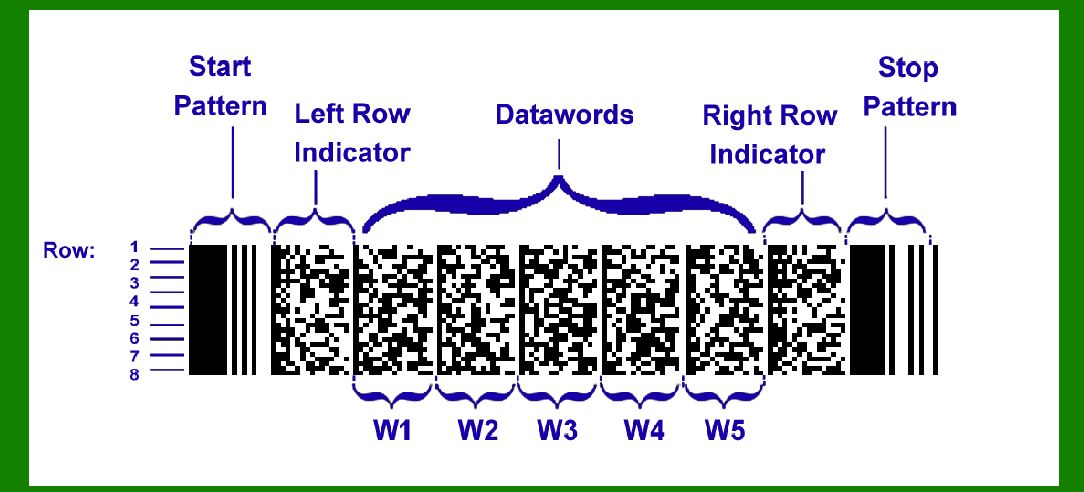
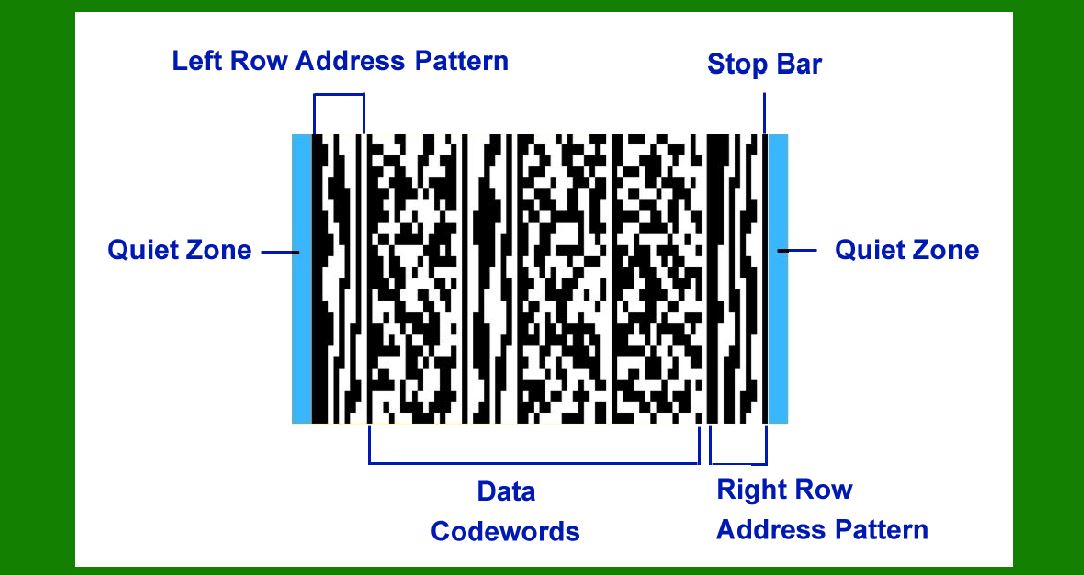
The PDF417 barcode consists of rows and columns that create a two-dimensional grid. It contains a series of data modules, which are small dark and light squares that form the actual encoded information. The code is composed of several key parts, including the start pattern, data regions, and stop pattern. |
Start Pattern: Each PDF417 symbol begins with a start pattern, which includes specific patterns used to define the barcode's orientation and structure. This is important for enabling scanners to detect and decode the symbol correctly. |
Data Regions: The core of the barcode is the data region, which consists of multiple rows. Each row contains multiple columns of black and white modules (bars). The number of rows and columns can vary based on the amount of data being encoded. |
Stop Pattern: At the end of the symbol, a stop pattern is used to signal the termination of the barcode. This pattern indicates to the scanner that the code has been completely read. |
Quiet Zone: Surrounding the barcode is a blank space known as the 'quiet zone,' which ensures that the barcode scanner can easily differentiate the barcode from the surrounding environment. |
|
3. Encoding Data in PDF417 |
PDF417 supports encoding both text and numeric data, as well as binary data. The process of encoding information in PDF417 is based on a combination of characters, which are represented as a sequence of black and white modules. |
Numeric Encoding: In the case of numeric data, PDF417 encodes up to 929 digits in a single barcode. Numeric data is represented in base-10 and is stored in blocks of 3 digits each. Each block is converted into a 10-bit binary sequence. |
Alphanumeric Encoding: When encoding alphanumeric data, PDF417 uses a set of 256 characters, including uppercase letters, digits, and common punctuation marks. This encoding scheme allows the barcode to store a wide range of textual information. |
Binary Encoding: PDF417 can also encode binary data, allowing it to store images, files, or even application-specific data. This is achieved by converting the binary data into a series of bits and encoding it into the barcode's module structure. |
The encoding process involves converting the input data into a sequence of codewords, where each codeword is represented by a combination of adjacent modules (either black or white) within a row. The number of rows and columns in the barcode is determined by the total number of codewords in the data. |

|
4. Error Correction in PDF417 |
One of the standout features of the PDF417 barcode is its error correction capabilities. PDF417 uses Reed-Solomon error correction, a robust error-correcting code that ensures data integrity even if parts of the barcode are damaged or obscured. |
Error Correction Codewords: PDF417 divides the barcode data into a series of codewords, some of which are dedicated to error correction. These error correction codewords are added to the barcode during the encoding process, and they help recover lost or corrupted data when scanned. |
Levels of Error Correction: PDF417 offers different levels of error correction, typically ranging from Level 0 (no error correction) to Level 8 (maximum error correction). The higher the level of error correction, the more redundant data is added, which increases the size of the barcode but improves its reliability under challenging conditions. |
Reed-Solomon Algorithm: The Reed-Solomon error correction algorithm is applied to the data and error correction codewords to enable recovery of lost data. This algorithm can restore up to 25% of the symbol¡¯s codewords, depending on the chosen error correction level. |
|
5. Data Capacity and Sizes of PDF417 |
PDF417 barcodes can store a wide range of data, making them versatile for many applications. The amount of data that can be encoded depends on the size and configuration of the barcode. |
Maximum Data Capacity: A single PDF417 symbol can store up to 1,850 alphanumeric characters, 2,710 numeric characters, or 1,100 binary bytes. This makes it ideal for applications that require storing larger amounts of information compared to 1D barcodes. |
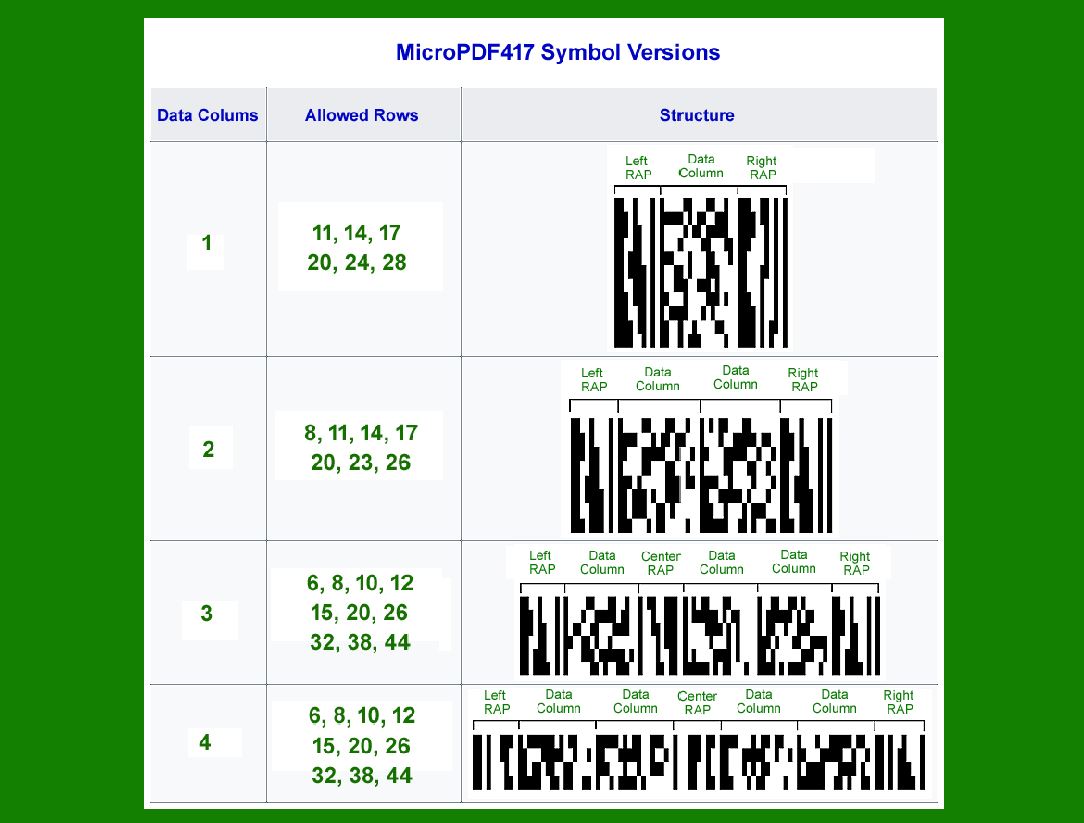
Barcode Dimensions: The number of rows and columns in a PDF417 barcode varies depending on the data being encoded. PDF417 can use anywhere from 3 to 90 rows, and the number of columns can range from 1 to 30. The higher the number of rows and columns, the larger the barcode, which may impact its readability and the space required for printing. |
Storage Efficiency: PDF417 is more efficient in terms of data storage than other 2D barcodes, such as QR codes. The trade-off is that PDF417 barcodes may require more space to print due to their complex structure. |

|
6. Applications of PDF417 |
The versatile nature of PDF417 makes it a popular choice for a variety of industries. Below are some of the most common applications for PDF417 barcodes: |
Shipping and Logistics: PDF417 is commonly used in shipping labels and freight tracking systems. It provides a compact method for storing tracking numbers, shipping details, and package information. The error correction feature ensures that the barcode remains readable even if damaged during transit. |
Identification Cards and Driver¡¯s Licenses: Many identification cards, including driver¡¯s licenses, use PDF417 barcodes to store personal information such as name, address, and date of birth. This provides an efficient way to encode and retrieve vital data quickly. |
Inventory Management: PDF417 barcodes are often used in inventory management systems to track items in warehouses and retail environments. The high data capacity allows detailed product information to be stored in a single barcode, simplifying the tracking and retrieval process. |
Healthcare: PDF417 is used in healthcare for patient identification, medical records management, and medication tracking. The ability to store large amounts of information makes it ideal for maintaining patient histories and prescription details. |
Document Management: PDF417 can be found in documents such as invoices, contracts, and legal documents, where large amounts of data need to be stored and easily retrieved. The barcode format ensures that documents can be indexed and accessed efficiently. |

|
7. PDF417 Barcode Scanners and Reader Technology |
The ability to scan PDF417 barcodes depends on the quality of the scanner and its compatibility with 2D barcode formats. PDF417 requires scanners that are capable of reading matrix-based barcodes. |
Laser Scanners: Traditional laser scanners are not capable of reading 2D barcodes like PDF417. However, many modern laser scanners have been adapted to handle PDF417 symbols. |
Imager-based Scanners: Most commonly, PDF417 barcodes are read by imager-based scanners, which capture an image of the barcode and process it using decoding algorithms. These scanners are capable of reading both 1D and 2D barcodes. |
Camera Phones: Many smartphones with built-in cameras can read PDF417 barcodes using specialized barcode scanning apps. This has expanded the use of PDF417 in consumer applications, such as mobile ticketing and event access. |

|
8. PDF417 in Compliance and Standardization |
PDF417 has been adopted by various standards organizations for its robustness and versatility. It is particularly prominent in compliance with international regulations. |
ISO/IEC 15438: PDF417 is standardized under ISO/IEC 15438, which defines the specifications for 2D barcodes. This standard ensures consistency in barcode generation, scanning, and usage across different industries. |
Government and Industry Regulations: Many governments and industry bodies mandate the use of PDF417 for certain types of documents, such as driver¡¯s licenses, passports, and freight tracking. Its widespread adoption in regulatory frameworks ensures that PDF417 will remain a key technology for data encoding and tracking. |

|
9. Advantages and Disadvantages of PDF417 |
Advantages: |
High Data Density: PDF417 can store a large amount of data in a compact space. |
Error Correction: The built-in Reed-Solomon error correction ensures data integrity even in harsh conditions. |
Versatile Applications: PDF417 is used in various sectors, from logistics to government compliance. |
Disadvantages: |
Size: The complexity of the barcode can lead to larger sizes compared to other 2D barcodes, such as QR codes. |
Printing and Scanning Requirements: The high data density requires careful printing and scanning, especially in environments where space is limited or equipment is less advanced. |

|
10. Future of PDF417 |
As barcode technology continues to evolve, PDF417 will likely remain an important format due to its ability to store large amounts of data and provide robust error correction. However, with the growing popularity of other 2D barcodes like QR codes and Data Matrix, PDF417¡¯s role may become more specialized for applications requiring extensive data storage and error correction. |
Advances in barcode scanning technology, such as the development of high-resolution scanners and enhanced mobile apps, will continue to improve the functionality and accessibility of PDF417 barcodes, ensuring their relevance in future applications. |
This detailed explanation provides an in-depth look at the PDF417 barcode technology, from its structure and encoding methods to its applications, benefits, and challenges. This makes it clear why PDF417 remains a popular choice in industries that require reliable, high-capacity barcode solutions. |

|
Detail of PDF417 Structure |
The PDF417 barcode is a two-dimensional (2D) barcode standard that encodes data in both the horizontal and vertical dimensions. It's widely used for applications that require the encoding of large amounts of data, such as in shipping, inventory management, and identity verification. The structure of PDF417 consists of a series of rows and columns, and the data is encoded within these rows. Here's a detailed breakdown of its structure: |
1. Overview of PDF417 Structure |
PDF417 is composed of a matrix of rows and columns where each row consists of a series of black and white bars (modules). Each module represents either a binary '0' or '1'. The structure is essentially a two-dimensional array of these modules, and the total number of rows and columns depends on the amount of data being encoded. |
Rows: Each row in a PDF417 barcode is made up of alternating black and white modules. |
Columns: The number of columns in a PDF417 barcode can vary, but it is generally between 3 and 90. The number of columns is related to the data encoding capacity of the barcode. |

|
2. Encoding Structure and Symbol Length |
PDF417 barcodes can encode up to 1,850 characters in a compact area, and they can store various types of data such as text, numeric data, or binary data. |
The symbol length of a PDF417 barcode refers to the number of rows and columns used to store the encoded data. The barcode length adjusts depending on the data being encoded. |
For example, a small PDF417 barcode may have a symbol length of 3 rows by 6 columns, while a larger one could have 90 rows and 144 columns. |
3. Data Encoding |
PDF417 uses a composite code structure that allows encoding of alphanumeric data, including special characters and punctuation. Data is encoded by transforming the characters into a sequence of codewords. Each codeword consists of 17 bits, which are encoded as a combination of black and white modules. |
The encoding process divides the data into 'blocks', and each block is represented as a series of codewords arranged in a series of rows. The codewords are grouped in columns across multiple rows to form the complete barcode symbol. |
For example: |
A single character might be represented by a 17-bit sequence, which is then split into two parts: one part is encoded into a sequence of modules in a row, and another part is encoded in the next row. |
For larger data sets, multiple rows are used, and each row is filled with a portion of the data codeword. |

|
4. Bar Width and Module Size |
Modules are the individual units (bars and spaces) that make up the entire barcode. |
The module size refers to the width of each module (black or white bar). PDF417 barcodes use modules with fixed width sizes, but the overall size of the barcode symbol will increase as the data size grows. Larger data sets require larger module sizes to ensure proper scanning. |
Example: If the barcode has a large amount of data, the module size might be set to a larger value to accommodate the necessary number of rows and columns. |
5. Start and Stop Patterns |
Like most barcodes, PDF417 barcodes have start and stop patterns that help the barcode scanner identify the beginning and end of the barcode. |
These patterns are usually represented by special guard bars or patterns placed at the beginning and end of the symbol. The start pattern is used to indicate the start of data encoding, and the stop pattern signals the end of the encoded data. |
6. Error Correction |
PDF417 supports error correction using a mechanism known as Reed-Solomon error correction. This means that if part of the barcode is damaged or unreadable, the error correction code can help reconstruct the lost data. The barcode is divided into data blocks, and each block has error correction codewords. |
Error correction capacity: The level of error correction depends on the number of error correction codewords added to the symbol. A higher error correction level improves the ability to recover from damage but increases the size of the barcode. |
For instance, a low-error-correction PDF417 may be able to recover 5% of the barcode, while a high-error-correction version could recover up to 30% of the symbol. |

|
7. Row Structure |
Each row in a PDF417 barcode consists of multiple codewords. Each codeword is made up of 17 bits, and it is represented by a sequence of black and white bars. The bars within each row are aligned to form a recognizable pattern that can be read by scanners. |
For example: |
A codeword might look like this (where 0 represents a white bar and 1 represents a black bar): |
0 1 1 0 1 0 1 1 0 0 1 1 1 0 1 1 0 |
These binary patterns are then grouped to form the full barcode, with each row being a continuation of the encoded information. |
8. Function Codes (FNC) |
In PDF417, Function Codes (FNC) are special characters or codes used to signify specific functions. For instance, the FNC1 code is commonly used to indicate that the data being encoded adheres to a specific standard, such as when a barcode encodes product identification numbers. |
Example: In certain use cases, FNC1 can be used as a delimiter between different sections of the data. This is particularly important for barcodes used in logistics or product tracking. |
9. Human-Readable Text |
While not strictly part of the barcode's data structure, PDF417 symbols often include human-readable text below the barcode. This is the textual representation of the encoded data that helps humans identify the data in situations where a scanner cannot be used or is unavailable. |
The human-readable portion typically shows the raw data encoded in the barcode (e.g., a product number or an identification code). This can be displayed in a variety of fonts and styles, depending on the application and the scanner's capabilities. |

|
10. Example |
To better understand the structure, let's consider a simple example. Suppose we encode the following short string: 'HELLO'. |
Each character is mapped to a codeword. For example, the letter 'H' might correspond to a specific 17-bit sequence, and similarly, the letters 'E', 'L', and 'O' will have their respective codewords. |
The barcode will be constructed with a series of rows, where each row contains the individual codewords for 'H', 'E', 'L', 'L', and 'O', arranged in a matrix form. |
If the data exceeds the capacity of a single row, additional rows are added. |
This arrangement ensures that even for complex datasets, the PDF417 barcode is scalable and able to accommodate varying lengths of information while remaining readable by scanners. |
Conclusion |
The PDF417 barcode structure is a highly flexible and efficient method of encoding large amounts of data. Its matrix of rows and columns allows for a high-density encoding of information, which can include text, numeric data, and binary data. The error correction, start/stop patterns, and function codes enhance the reliability and functionality of the barcode, making it suitable for a wide range of applications, from inventory management to transport and logistics. |

|
Detail about Encoding Data in PDF417 |
1. Introduction to PDF417 Encoding |
PDF417 is a two-dimensional barcode that encodes data in a series of vertical and horizontal lines. It is part of the family of 2D barcodes, and unlike traditional linear barcodes that can encode only a limited amount of information, PDF417 can encode large amounts of data in a compact format. |
To understand how data is encoded in PDF417, it¡¯s essential to recognize its structure. PDF417 is built from a combination of data codewords and error correction codewords, which allows it to be robust in scanning and error recovery. It uses a specific encoding scheme that divides data into smaller units, which are then represented by bars and spaces within a symbol. |

|
2. Structure of a PDF417 Symbol |
A PDF417 symbol consists of several components: |
Start Pattern: It signals the beginning of the barcode. |
Data Codewords: These are the actual data encoded in the barcode. |
Error Correction Codewords: These help correct any errors that may occur during scanning. |
Stop Pattern: It marks the end of the barcode. |
Quiet Zones: These are areas around the barcode where no other information is present, providing a clear boundary for the reader to detect the barcode. |
Each codeword is made up of 17 modules (black and white squares). These modules represent a unique character or value, and the data is divided into these chunks. |

|
3. Encoding Data in PDF417 |
The process of encoding data in PDF417 follows several stages: |
3.1. Character Set Selection |
PDF417 supports several different character sets, including: |
ASCII (ISO-8859-1): Common for encoding text and alphanumeric data. |
Binary: For encoding raw data such as images or non-printable characters. |
Extended ASCII: Allows for a wider range of characters, including special symbols. |
The type of data being encoded will determine which character set is used. For instance, a text message would use ASCII, while binary data might use a specific binary mode. |
3.2. Data Segmentation |
When encoding large amounts of data, PDF417 divides the data into blocks. Each block is represented by a symbol, and the PDF417 barcode can consist of multiple symbols to represent a large dataset. The segmentation process ensures that the data is manageable and scannable in smaller pieces. |
3.3. Codeword Representation |
Each character or group of characters is converted into a codeword. Codewords in PDF417 are represented by 17 modules. Depending on the encoding scheme, a codeword could represent: |
A single character (like a letter or digit). |
A part of a larger data set (for binary data). |
An encoded group of symbols in the case of high-density data. |
For example: |
The ASCII character 'A' is represented by a specific codeword that corresponds to a 17-module pattern. |
A number like '5' may have a different codeword representation than 'A'. |
3.4. Error Correction Encoding |
PDF417 uses Reed-Solomon error correction to improve the reliability of the barcode. Error correction codewords are added to the data codewords, allowing the scanner to recover lost or corrupted data. The number of error correction codewords depends on the level of error correction chosen, which can range from Level 0 (low error correction) to Level 8 (high error correction). Each level can correct a certain percentage of erroneous codewords. |
For example, a PDF417 barcode with Level 5 error correction can recover from up to 40% of corrupted data, while Level 0 can only correct a smaller amount of data. |
3.5. Data Compaction |
Data compaction is a method used to store different types of data more efficiently. PDF417 supports compaction techniques, such as: |
Numeric Compaction: If the data being encoded is numeric, PDF417 may use fewer codewords by converting sequences of numbers into a more compact form. For example, the number sequence '1234567890' could be represented in a more compressed form using numeric compaction. |
Text Compaction: When encoding textual data, PDF417 can group frequently used characters or phrases together, reducing the space needed to encode them. |
3.6. Final Encoding |
Once the data has been segmented, compacted, and error-corrected, the codewords are arranged into the final PDF417 symbol. The data codewords are placed first, followed by the error correction codewords. The symbol is then completed with the stop pattern and the necessary quiet zones. |

|
4. Examples of Data Encoding in PDF417 |
Example 1: Text Encoding |
Let¡¯s encode the word 'HELLO' using ASCII encoding. |
Convert each character into its ASCII code value: |
H = 72 |
E = 69 |
L = 76 |
L = 76 |
O = 79 |
Convert the ASCII values to binary: |
72 = 01001000 |
69 = 01000101 |
76 = 01001100 |
76 = 01001100 |
79 = 01001111 |
These binary values are then represented as codewords, with each 17-module pattern corresponding to a specific character or binary value. |
Example 2: Numeric Encoding |
Let¡¯s encode the number '12345' using numeric compaction: |
Convert the number into its compacted form using PDF417¡¯s numeric encoding rules. In this case, '12345' could be represented as a single, more compact codeword rather than five individual ones. |
The corresponding codewords are determined by the compaction method, reducing the space required. |
Example 3: Binary Data Encoding |
Consider encoding a small image or a file using binary encoding. The data is divided into chunks and each chunk is converted into codewords. Error correction codewords are added for robustness, allowing the file to be scanned and retrieved even if part of the barcode is damaged. |
5. Conclusion |
Encoding data in PDF417 involves multiple stages: selecting the character set, segmenting the data, converting it into codewords, adding error correction, and compacting the data for efficiency. PDF417¡¯s ability to store large amounts of data and its robust error correction features make it ideal for applications like shipping labels, identification cards, and documents that require extensive information in a compact, scannable format. |

|
Detail of the Error Correction |
Error correction in PDF417 is a critical aspect of this 2D barcode technology, ensuring data integrity even when the barcode is damaged, poorly printed, or affected by noise during scanning. PDF417 employs a combination of techniques to recover lost or corrupted data. The key mechanism for error correction in PDF417 is based on Reed-Solomon error correction codes, which allow the barcode to withstand a certain level of damage without losing the encoded information. |
1. Reed-Solomon Error Correction |
PDF417 uses Reed-Solomon (RS) codes to implement error correction. This method is well-known in error-correcting codes and works by adding extra redundant data to the encoded message, which allows the original message to be reconstructed even when some of the data is lost or corrupted. |
How Reed-Solomon Works: |
The Reed-Solomon algorithm takes the data in the PDF417 barcode and divides it into blocks, adding additional 'parity' symbols to each block. These parity symbols are calculated based on the original data, and they serve as a form of redundancy. When the barcode is scanned, the Reed-Solomon decoder uses the parity symbols to identify and correct errors in the original data. |
Tolerating Errors: |
The number of errors that can be corrected depends on the number of redundancy symbols (or error correction level) chosen when generating the barcode. PDF417 supports a range of error correction levels from ECL0 to ECL8, with each level corresponding to a specific amount of redundancy. For example: |
ECL0 can correct up to 0 errors in each codeword. |
ECL1 can correct up to 1 error in each codeword. |
ECL8 can correct up to 8 errors in each codeword. |
This level of error correction allows PDF417 to handle situations where up to 25% of the barcode is damaged or obscured. |

|
2. Error Correction Codewords |
PDF417 divides the encoded data into blocks, and each block contains a set of codewords. These codewords are combinations of data symbols (which represent actual information) and check symbols (used for error correction). |
Codeword Structure: |
Each codeword in PDF417 consists of 17 modules, and each module is a single bit (black or white). The codewords are arranged in rows and columns that form the barcode's overall structure. |
For example, in a PDF417 barcode with error correction enabled, if some modules are unreadable due to damage or printing issues, the Reed-Solomon algorithm can recover the missing information by using the redundant codewords from the error correction portion. |
3. Error Correction in Practical Scenarios |
PDF417 barcodes are often used in applications such as transportation, inventory management, and identification cards where barcodes are subject to wear, distortion, or environmental conditions. The error correction capabilities of PDF417 are essential to ensure reliable scanning even when the barcode is compromised. |
Example 1: Partial Damage in Shipping Labels |
Imagine a shipping label containing a PDF417 barcode, which is partially damaged due to rough handling during transit. The barcode might have scratches or smudges that obscure up to 20% of its content. Despite this, the error correction algorithm would likely still allow the scanner to reconstruct the full data, enabling the correct delivery of the package. |
Example 2: Barcode on a Wet Surface |
A PDF417 barcode on a wet surface (e.g., an outdoor construction site) might suffer from water droplets obscuring parts of the code. With PDF417¡¯s error correction capability, even if the barcode is partially unreadable, the scanner can often reconstruct the missing information, such as tracking numbers or item IDs, from the remaining code. |
|
4. Error Correction Process: |
Here¡¯s how the error correction process works in more detail: |
Data and Error Correction Codewords Generation: |
When generating a PDF417 barcode, the data to be encoded is split into data codewords, and error correction codewords are added based on the selected error correction level. The number of error correction codewords depends on the amount of redundancy required for the barcode's intended use. |
Encoding and Scanning: |
During encoding, the system creates a set of symbols that represent the data and error correction codes. When a barcode is scanned, the scanner reads the codewords and compares them with the expected values. If errors are detected, the Reed-Solomon decoder uses the parity symbols to correct the errors by checking the relationships between the data and error correction codewords. |
Decoding Process: |
If the scanner encounters a situation where one or more codewords are unreadable, the error correction process begins. The Reed-Solomon decoder uses the redundant information stored in the error correction codewords to attempt to reconstruct the original data. |
Example Process: |
Step 1: Scanner reads the codewords, some of which are damaged. |
Step 2: The Reed-Solomon decoder checks the parity symbols associated with the codewords. |
Step 3: The decoder uses the redundancy to identify and correct the corrupted codewords. |
Step 4: The original data is reconstructed, even though parts of the barcode were unreadable during scanning. |

|
5. Limitations and Trade-offs |
While PDF417 offers robust error correction, there are some limitations: |
Overhead of Error Correction: |
As the level of error correction increases (e.g., using ECL8), more codewords are needed, increasing the size of the barcode. This means that for very large datasets, the barcode may become impractically large or require more printing space. |
Diminishing Returns: |
There¡¯s a point where adding more redundancy might not yield significantly better results for a specific application. If a barcode is severely damaged (e.g., torn), even the maximum error correction level might not be enough to recover the original data. |
6. Applications of PDF417¡¯s Error Correction |
Government and ID Cards: |
PDF417 barcodes are commonly used on driver¡¯s licenses, national ID cards, and other official documents. The ability to handle some physical damage or degradation over time (such as from handling or aging paper) is essential for these applications. |
Ticketing Systems: |
Event tickets often use PDF417 barcodes. These tickets can be exposed to wear and tear, such as folding or bending, which may damage the barcode. Error correction ensures that the data can still be read accurately. |
Logistics and Shipping: |
In logistics, where packages move through rough environments, PDF417 barcodes are ideal because they can tolerate minor damage while still preserving the essential information for tracking. |
Conclusion |
PDF417¡¯s error correction ensures that it is a reliable barcode system for applications that require high data density and error tolerance. Its use of Reed-Solomon error correction codes allows it to recover from data loss and distortion up to a certain extent. With its ability to handle damage in environments such as shipping, ticketing, and government identification, PDF417 remains an essential technology for scenarios where data integrity is critical. |
|
Detail of the Data Capacity and Sizes of PDF417 |
1. Introduction to PDF417 Data Capacity |
PDF417 is a two-dimensional barcode format that is capable of encoding a large amount of data in a compact space. The capacity of a PDF417 barcode depends on several factors, including the number of rows, columns, and the error correction level. PDF417 is known for its ability to store both numeric and alphanumeric data, which is why it is commonly used in applications like identification cards, shipping labels, and inventory tracking. |

|
2. Structure of PDF417 Barcode |
PDF417 consists of a series of rows and columns, forming a matrix of symbols. It is capable of encoding up to 1,850 bytes or 2,710 characters (depending on the encoding scheme). This makes PDF417 an efficient option for encoding large amounts of data. |
2.1 Rows and Columns |
The standard size for PDF417 barcodes typically ranges from 3 to 90 rows, and each row has between 1 and 30 columns. The number of rows and columns in the barcode determines its overall data capacity. |
Minimum Size: A PDF417 barcode can be as small as 3 rows and 1 column. |
Maximum Size: A PDF417 barcode can go up to 90 rows and 30 columns. |
|
3. Data Capacity Based on Row and Column Count |
The data capacity of a PDF417 barcode depends directly on the number of rows and columns it uses. Let's break this down: |
3.1 Numeric Data |
When encoding only numeric data (digits from 0 to 9), PDF417 barcodes are more efficient in terms of data storage. |
1 Symbol (a single row/column pair) can encode up to 3 numeric digits. |
Example: If a PDF417 barcode has 30 rows and 6 columns, it can encode up to 30 ¡Á 6 ¡Á 3 = 540 numeric digits. |
3.2 Alphanumeric Data |
Alphanumeric data (letters and numbers) take up more space in a PDF417 barcode because each character requires more bits to encode. |
1 Symbol can store 1 alphanumeric character. |
Example: A PDF417 barcode with 15 rows and 5 columns can store 15 ¡Á 5 = 75 alphanumeric characters. |
3.3 Binary Data |
Binary data (such as images, compressed files, or other non-text data) also can be encoded, but it will require more space than alphanumeric characters. |
1 Symbol can store 0.5 bytes of binary data. |
Example: A PDF417 barcode with 20 rows and 10 columns could store around 20 ¡Á 10 ¡Á 0.5 = 100 bytes of binary data. |
|
4. Error Correction and Its Impact on Data Capacity |
PDF417 uses Reed-Solomon error correction to improve the reliability of reading the barcode, even when parts of the barcode are damaged or obscured. The error correction level affects the barcode's overall data capacity. |
4.1 Error Correction Levels |
There are 8 levels of error correction in PDF417, with higher levels providing better protection but reducing data capacity. |
Error Correction Level 0: No error correction. This allows for the highest data capacity but is prone to errors. |
Error Correction Level 8: Maximum error correction. This level sacrifices some data capacity to ensure that the barcode can still be read even with substantial damage. |
Each increase in error correction reduces the available space for encoding data by about 25%. |
4.2 Example |
For a PDF417 barcode with 6 columns and 10 rows (without error correction), it could encode 6 ¡Á 10 = 60 alphanumeric characters. With an error correction level of 3, it may only encode around 45 alphanumeric characters due to the added redundancy. |
|
5. Practical Examples |
5.1 Small Data Set |
A PDF417 barcode used for a shipping label might encode basic information like the recipient¡¯s name, address, and tracking number. |
Example Data: Name: 'John Doe', Address: '123 Main St.', Tracking Number: '987654321' |
Encoding: This data requires about 40 alphanumeric characters. Using a barcode with 10 rows and 5 columns would suffice to store this data, and it would fit well even with error correction enabled. |
5.2 Larger Data Set |
In a scenario where PDF417 is used for encoding a product¡¯s detailed specifications, warranty information, or customer data, more data would be required. |
Example Data: Product Specifications (e.g., 200 words), Serial Number, Manufacturing Date, etc. |
Encoding: This type of information might need up to 500 characters or more. A larger PDF417 barcode with 30 rows and 10 columns could accommodate this size. The barcode might also use a higher error correction level to ensure readability in poor scanning conditions. |
5.3 Binary Data Example |
If PDF417 is used to store a file like an image or a compressed document, the data capacity would depend on the size of the file. |
Example Data: A 100KB image file encoded as binary. |
Encoding: A PDF417 barcode with 50 rows and 10 columns would encode up to 50 ¡Á 10 ¡Á 0.5 = 250 bytes of binary data, which is not sufficient for a 100KB file. To encode such a large file, the barcode would need to be much larger. |
|
6. Factors Affecting Barcode Size and Data Capacity |
6.1 Resolution of the Printer/Scanner |
The resolution of the printer and scanner used to print and read the PDF417 barcode also plays a significant role. Higher resolution allows for smaller barcodes that can still hold the same amount of data, while lower resolution printers may require larger barcodes to maintain readability. |
6.2 Environment and Quality of Print |
The printing quality (e.g., whether the barcode is printed on high-quality paper or labels) also affects the data capacity. Poor-quality printing may result in unreadable or partially readable codes, reducing the amount of data that can be reliably encoded. |
6.3 Barcode Length |
Larger barcodes (more rows and columns) can encode more data, but they also increase in physical length, which may not be desirable for space-constrained applications. Balancing data capacity with barcode size is an important consideration in choosing the right barcode configuration. |
|
7. Summary |
The data capacity of PDF417 barcodes is highly dependent on the number of rows, columns, and the error correction level. A barcode with more rows and columns can store significantly more data, while a higher error correction level will reduce the overall data capacity but increase the barcode¡¯s robustness. PDF417 can efficiently store numeric, alphanumeric, and binary data, making it a versatile option for applications where a large amount of data needs to be encoded in a compact format. |
 cs@easiersoft.com