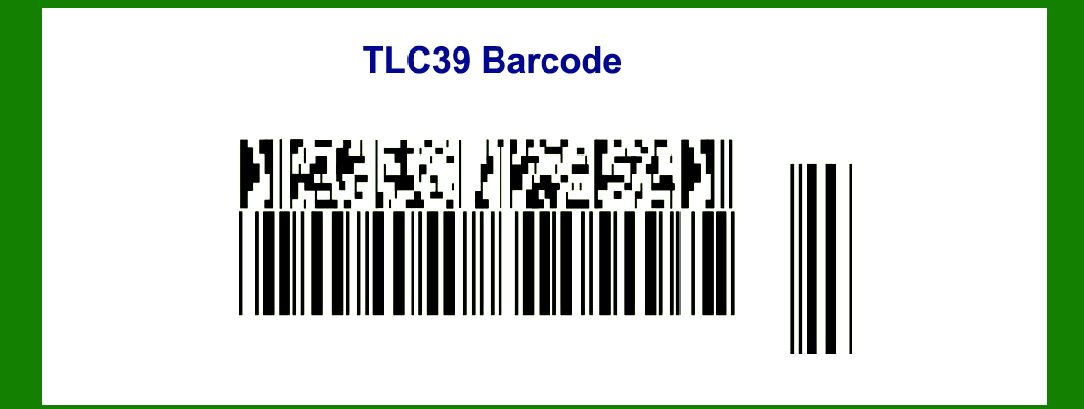
TLC39, also known as TCIF Linked Code 39 or Telecommunications Industry Forum Code 39, is a specialized 2D barcode symbology that combines elements of the traditional Code 39 and MicroPDF417 barcodes. |
This hybrid barcode is designed to meet specific requirements within the telecommunications industry, offering benefits such as increased data capacity, error correction capabilities, and compatibility with existing scanning infrastructure. In this detailed explanation, we'll explore the technology, structure, encoding methods, applications, and advantages of TLC39. |
|
1. Introduction to TLC39 |
TLC39 is an innovative barcode symbology that blends characteristics from both Code 39 and MicroPDF417 barcodes. It was developed to address the needs of the telecommunications sector, where there is a demand for compact yet information-rich barcode solutions capable of storing various types of data, including alphanumeric characters, special symbols, and control codes. |

|
2. Components of TLC39 |
2.1 Code 39 Elements |
Code 39 is a linear barcode that encodes data using a set of bars and spaces of varying widths. It is widely used in various industries due to its simplicity and reliability. Key features of Code 39 include: |
Character Set: Code 39 can encode alphanumeric characters (0-9, A-Z), along with a few special characters (-, ., $, /, +, %, and space). Structure: It consists of a start character '', data characters, an optional checksum digit, and a stop character ''. |
2.2 MicroPDF417 Elements |
MicroPDF417, on the other hand, is a 2D stacked barcode that offers high-density encoding capabilities. It is particularly known for: |
Compact Size: Despite its small size, MicroPDF417 can store up to 1500 bytes of data. Error Correction: It supports advanced error correction algorithms, ensuring accurate data retrieval even in the presence of damaged or obscured barcodes. |

|
3. Structure of TLC39 |
TLC39 integrates these elements to create a unique 2D barcode structure. It typically consists of: |
Code 39 Data Encoding: The alphanumeric and special characters are encoded using the Code 39 format. MicroPDF417 Stacking: The encoded data from Code 39 is then further encoded and stacked in a MicroPDF417 format to achieve higher data capacity and error correction capabilities. |

|
4. Encoding Methods |
4.1 Code 39 Encoding |
In TLC39, the data encoding follows the principles of Code 39: |
Each character (alphanumeric or special) is represented by a pattern of bars and spaces. The barcode includes start and stop characters ('*') to delineate the beginning and end of the data. A checksum digit may optionally be added to verify the accuracy of the encoded data. |
4.2 MicroPDF417 Encoding |
After the initial Code 39 encoding, the data is formatted and encoded using MicroPDF417: |
Data is divided into segments suitable for stacking. Error correction codewords are added to each segment to enhance data integrity. Stacked segments form a compact, high-density 2D barcode pattern. |

|
5. Applications of TLC39 |
TLC39 finds applications primarily in the telecommunications industry due to its specific design features: |
Network Equipment Identification: Used for labeling and tracking network equipment, such as routers, switches, and servers. Inventory Management: Enables efficient inventory tracking of telecommunications components and spare parts. Asset Tracking: Provides a reliable method for tracking and managing assets across large-scale telecommunications networks. Service Provisioning: Facilitates quick and accurate provisioning of services by scanning equipment labels containing TLC39 barcodes. |

|
6. Advantages of TLC39 |
6.1 Data Capacity |
TLC39 offers a significant increase in data capacity compared to traditional linear barcodes like Code 39. By leveraging the stacking capabilities of MicroPDF417, it can encode large amounts of information in a compact format. |
6.2 Error Correction |
The incorporation of MicroPDF417's error correction algorithms enhances the reliability of data retrieval. Even if part of the barcode is damaged or obscured, TLC39 can often reconstruct the original data accurately. |
6.3 Compatibility |
Despite its advanced features, TLC39 remains compatible with existing scanning infrastructure used for Code 39. This compatibility ensures a smooth transition and integration into telecommunications operations without requiring significant upgrades to scanning equipment. |
6.4 Versatility |
Beyond telecommunications, TLC39's versatility extends to other industries where there is a need for robust barcode solutions capable of handling variable data types and environments. |

|
7. Implementing TLC39 |
Implementing TLC39 involves: |
Barcode Generation: Using software tools capable of generating TLC39 barcodes based on specified data inputs. Printing Considerations: Ensuring high-quality printing to maintain barcode readability, especially for MicroPDF417 segments. Scanning Infrastructure: Verifying compatibility with existing scanners and integrating TLC39 into data capture and management systems. |

|
8. Conclusion |
TLC39 represents a significant advancement in barcode technology, blending the strengths of Code 39 and MicroPDF417 to meet the specific demands of the telecommunications industry. With its high data capacity, error correction capabilities, and compatibility with existing infrastructure, TLC39 is well-suited for applications ranging from network equipment labeling to inventory management and service provisioning. As technology continues to evolve, TLC39 stands out as a robust solution for encoding and managing critical data in telecommunications and beyond. |
 cs@easiersoft.com