Core Electronic Components of Barcode Label Printers: Memory |
Barcode label printers are complex devices that integrate various components to perform precise and efficient printing operations. One of the crucial elements in these printers is memory. The memory in barcode label printers is used for multiple functions, ranging from storing firmware to temporarily holding print data during operation. These printers typically contain both volatile and non-volatile memory, each serving distinct purposes. In this detailed description, we will delve into the role of memory in barcode label printers, breaking it down into its different types, their functions, and how they contribute to the overall performance and capabilities of the printer. |
1. Overview of Memory in Barcode Label Printers |
Barcode label printers require memory to store and process data during printing tasks. This data can include print layouts, configuration settings, barcode data, and even the firmware that controls the operation of the device. The two primary categories of memory used in barcode label printers are: |
Volatile memory: This memory is temporary and typically used for tasks that require fast access but do not need to be retained after the printer is turned off. |
Non-volatile memory: Unlike volatile memory, non-volatile memory retains data even when the printer is powered off. It is used to store firmware, configuration settings, and sometimes graphics for printing. |
Each type of memory plays an essential role in ensuring the printer operates efficiently and accurately, allowing for high-quality prints and the ability to handle complex printing tasks. |
|
2. Volatile Memory in Barcode Label Printers |
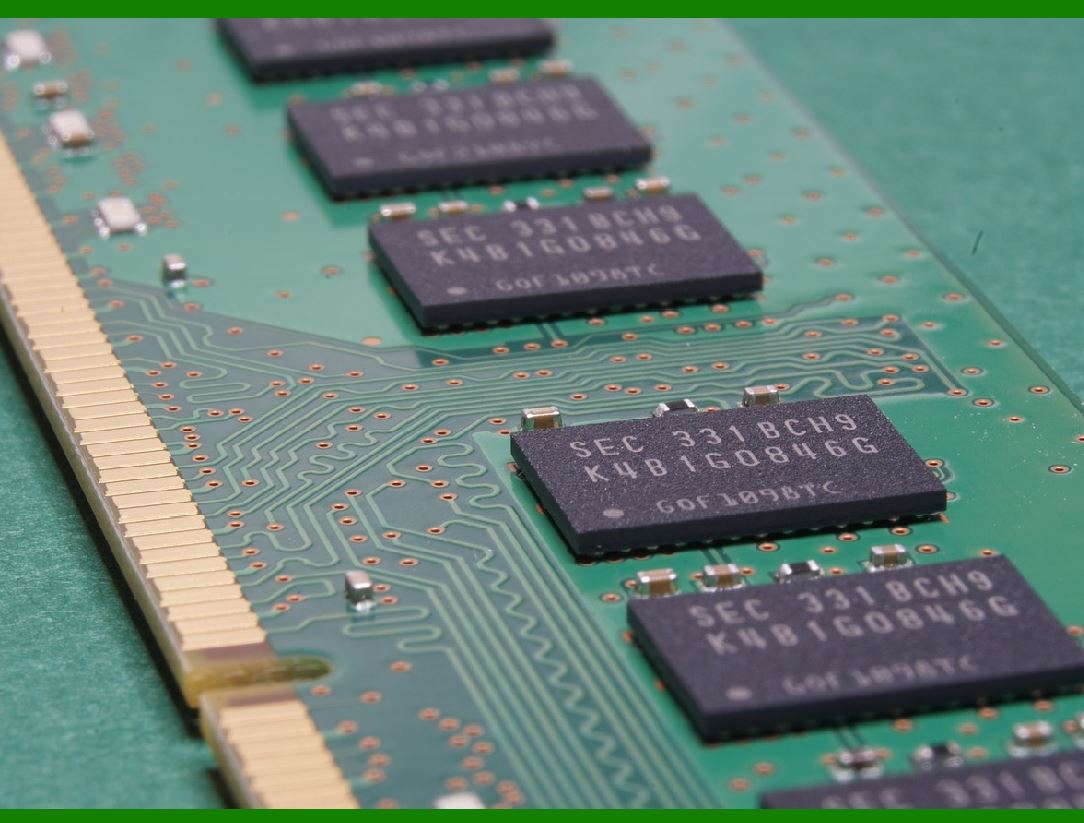
Volatile memory is crucial for the short-term operations of a barcode label printer. This type of memory is used to temporarily store data that is required only during the printing process. The most common form of volatile memory found in these printers is RAM (Random Access Memory). |
2.1. RAM (Random Access Memory) |
RAM in barcode label printers is used primarily to handle the print data while the printer is active. When a print job is sent to the printer, the data is loaded into RAM, where it is processed before being sent to the print head for actual printing. The amount of RAM in a barcode printer affects the speed and efficiency with which it can process print jobs. A higher amount of RAM allows the printer to process larger files, which is particularly important when printing complex labels with intricate graphics, logos, or large amounts of data. |
Key Functions of RAM: |
Temporary Storage for Print Data: The primary function of RAM in barcode label printers is to store the data that is being printed. This includes the barcode data, text, images, and any other design elements. |
Buffering: When printing large or complex jobs, RAM acts as a buffer to hold the data until it can be processed and sent to the print head. This helps to maintain continuous printing without delays. |
Processing and Formatting: RAM is used to process and format the print job, ensuring that the data is ready for printing according to the specifications of the printer, such as the resolution, orientation, and label size. |
2.2. Role in Print Speed and Performance |
The amount of RAM in the barcode label printer directly affects the print speed and overall performance. Printers with more RAM can handle larger files and more complex designs with ease, leading to faster printing times and smoother operation. Conversely, printers with limited RAM may experience delays or slower processing times, especially when dealing with intricate or large print jobs. |
|
3. Non-Volatile Memory in Barcode Label Printers |
Non-volatile memory in barcode label printers is responsible for storing data that must persist even after the printer is powered down. The most common types of non-volatile memory in barcode printers are flash memory and EEPROM (Electrically Erasable Programmable Read-Only Memory). |
3.1. Flash Memory |
Flash memory is widely used in modern barcode label printers due to its speed, durability, and low power consumption. Flash memory is non-volatile, meaning it retains data even when the printer is powered off. It is commonly used to store: |
Firmware: The printer's operating software, or firmware, is stored in flash memory. This software controls how the printer processes print jobs, communicates with external devices, and manages internal operations. Firmware updates can be easily applied to flash memory, making it flexible and upgradable. |
Label Formats and Layouts: Flash memory is also used to store the graphical layout of labels, including any fixed images or logos that are part of the label design. This allows the printer to retrieve and print these elements quickly without needing to reload the data from external sources. |
Fonts: Flash memory can store fonts that the printer uses to render text on labels. These fonts are often proprietary to the printer manufacturer and are stored in the memory to allow for faster rendering and more accurate printing. |
Advantages of Flash Memory: |
Speed and Reliability: Flash memory offers quick data access and is more reliable than older memory types like magnetic storage. |
Durability: Flash memory is solid-state, meaning it has no moving parts. This makes it highly durable and resistant to shock, making it ideal for industrial environments where barcode label printers are subject to wear and tear. |
3.2. EEPROM (Electrically Erasable Programmable Read-Only Memory) |
EEPROM is another form of non-volatile memory used in barcode label printers. It is slower than flash memory but serves a crucial role in the printer's operation. EEPROM is typically used to store: |
Printer Configuration Data: The configuration settings of the printer, such as communication protocols, label sizes, print density, and other preferences, are stored in EEPROM. These settings are retained even when the printer is powered off. |
Calibration Data: Calibration settings, such as sensor calibration for detecting label gaps or black marks, are stored in EEPROM. This ensures that the printer is accurately aligned when printing, even after it has been turned off and on again. |
User Preferences: User-specific preferences, such as print speed, darkness settings, and other custom configurations, are also stored in EEPROM. This allows the printer to maintain a consistent performance without requiring reconfiguration each time it is powered on. |
Key Functions of EEPROM: |
Permanent Storage: Unlike volatile RAM, EEPROM ensures that configuration and calibration data is not lost when the printer is turned off. |
Easy Update and Reprogramming: EEPROM can be electrically erased and reprogrammed, allowing for firmware updates and configuration changes without needing to replace the memory chip. |
|
4. How Memory Affects Printer Performance and Capabilities |
The memory architecture in a barcode label printer directly influences its performance, capabilities, and flexibility. A well-designed memory system ensures smooth operation, faster printing, and the ability to handle more complex print jobs. |
4.1. Print Speed and Job Complexity |
As discussed earlier, the amount of RAM and the type of non-volatile memory can influence print speed. A printer with more RAM can handle larger print jobs more efficiently, reducing the time it takes to process and print complex labels. Printers with advanced memory capabilities are also better equipped to manage the simultaneous handling of multiple label designs, especially in applications where dynamic barcode information or variable data needs to be printed. |
4.2. Firmware Flexibility and Upgrades |
Non-volatile memory, especially flash memory, plays a significant role in enhancing the flexibility of barcode label printers. Firmware stored in flash memory can be updated to add new features, fix bugs, or improve performance. This means that barcode label printers can stay current with the latest technologies and protocols, ensuring long-term functionality without needing to replace the hardware. |
4.3. Storage of Graphics and Fonts |
The use of non-volatile memory to store fonts, graphics, and logos is another critical function that affects the printer's capabilities. By storing these elements directly in the printer's memory, the printer can quickly access them when needed, ensuring fast and accurate printing without requiring external data transfers. This is particularly important in applications where speed is crucial, such as high-volume printing in warehouses or retail environments. |
4.4. User Customization and Error Recovery |
Memory also plays a role in enabling user customization and error recovery. Barcode label printers often allow users to modify print settings, store custom labels, and adjust calibration data. These settings are stored in EEPROM, ensuring that they persist even when the printer is powered off. In the event of a system failure or power outage, the printer can recover its configuration and calibration settings, reducing the likelihood of errors and improving the consistency of printed labels. |
|
5. Conclusion |
In conclusion, memory is a fundamental component of barcode label printers, contributing to their performance, flexibility, and overall functionality. Both volatile and non-volatile memory are used in these printers, each serving a distinct purpose. Volatile memory, primarily in the form of RAM, is responsible for handling temporary data and ensuring fast processing during print jobs. Non-volatile memory, such as flash memory and EEPROM, is used to store firmware, configuration settings, graphics, and other persistent data. |
The combination of these memory types allows barcode label printers to operate efficiently and accurately, ensuring that users can print high-quality labels quickly and reliably. As technology continues to evolve, the role of memory in barcode label printers will likely grow, enabling even more advanced features and capabilities to meet the demands of modern industries. |
|
6. Manufacturing Technology and Main Manufacturers of Memory Components for Barcode Label Printers |
The memory components in barcode label printers-such as RAM, flash memory, and EEPROM-are manufactured using advanced semiconductor technologies. These memory chips are typically produced through a highly precise and complex process known as semiconductor fabrication. This process involves several steps, including wafer production, photolithography, doping, etching, and packaging. Let's take a deeper look at the manufacturing technology and key players in the production of these memory components. |
6.1. Manufacturing Technology for Memory Components |
Memory components used in barcode label printers are produced using semiconductor manufacturing technologies. The primary technologies include: |
6.1.1. Semiconductor Fabrication |
The fabrication of memory chips involves creating a silicon wafer, which is then processed to form the individual memory cells that will later make up the chip. This process typically follows the steps outlined below: |
1.Wafer Production: Silicon wafers are produced from high-purity silicon. These wafers serve as the base material for creating memory chips. The silicon is cut from large cylindrical rods, which are purified and shaped to ensure a consistent crystalline structure. |
2.Photolithography: Photolithography is used to define the tiny circuits on the wafer. A light-sensitive chemical (photoresist) is applied to the wafer, and ultraviolet light is used to etch patterns onto the surface. These patterns represent the individual transistors and connections that make up memory cells. |
3.Doping and Etching: In doping, impurities are introduced into the silicon wafer to modify its electrical properties, creating regions of semiconductor material with specific behaviors. Etching is then performed to remove unwanted material, leaving behind the intricate circuit patterns. |
4.Deposition: Layers of conductive and insulating materials, such as metals and dielectrics, are deposited onto the wafer to form the electrical connections and insulation needed for memory cells to function. |
5.Testing and Packaging: After the memory cells are created, the wafer undergoes electrical testing to ensure the memory components are functioning properly. Once testing is complete, the wafer is cut into individual memory chips and packaged in protective enclosures to prevent damage and ensure easy integration into electronic devices like barcode label printers. |
6.1.2. Flash Memory Manufacturing |
Flash memory chips, which are used for storing firmware, label formats, and configuration data, are manufactured using a specific technology known as NAND flash memory or NOR flash memory (depending on the application). These technologies allow for high-density storage and quick read/write capabilities. |
NAND Flash Memory: This type of memory is optimized for high storage capacities and is typically used for applications where large amounts of data need to be stored, such as in barcode label printers for storing fonts, images, and large label formats. |
NOR Flash Memory: Used for applications requiring faster read speeds and lower latency, NOR flash memory is often employed for firmware storage in barcode printers, where data retrieval speed is crucial for smooth operation. |
6.1.3. EEPROM Manufacturing |
EEPROM (Electrically Erasable Programmable Read-Only Memory) is used in barcode label printers to store configuration and calibration data. EEPROM chips are designed for applications that require non-volatile storage of small amounts of data with the ability to be reprogrammed electronically. |
Manufacturing EEPROM involves processes similar to flash memory, but with a focus on creating reliable, low-capacity storage that can be erased and rewritten electrically. EEPROM is typically used in embedded systems like barcode label printers, where small amounts of persistent storage are needed for calibration and configuration data. |
|
6.2. Main Manufacturers of Memory Components for Barcode Label Printers |
Memory components used in barcode label printers are manufactured by leading semiconductor companies that specialize in producing RAM, flash memory, and EEPROM. These companies provide the critical components that enable barcode printers to function efficiently. Some of the most prominent manufacturers include: |
6.2.1. Micron Technology, Inc. |
Micron Technology is one of the world's largest producers of semiconductor memory, including DRAM, NAND flash memory, and other memory technologies. Micron manufactures high-performance memory solutions used in a wide range of applications, including barcode label printers. Their NAND flash memory and DRAM modules are used to store print data, firmware, and configuration settings in these printers. |
Key Products: NAND Flash, DRAM, and EEPROM |
Technologies: Micron has a long history of innovation in memory technology, with ongoing developments in 3D NAND, DDR5 DRAM, and other advanced memory solutions. |
Applications in Barcode Printers: Micron's memory solutions are commonly used in industrial barcode printers, especially for high-performance applications where both speed and reliability are critical. |
6.2.2. Samsung Electronics Co., Ltd. |
Samsung Electronics is another dominant player in the memory market, known for its advanced semiconductor fabrication technology. Samsung manufactures both NAND flash and DRAM chips, which are widely used in barcode label printers. Their NAND flash memory is particularly suited for storage-intensive applications such as printing graphics and large label formats, while DRAM is used for fast data access during print jobs. |
Key Products: NAND Flash, DRAM, Mobile DRAM, and EEPROM |
Technologies: Samsung is known for its leadership in NAND flash memory production, with ongoing advancements in storage density and speed. |
Applications in Barcode Printers: Samsung's memory chips are integrated into many commercial and industrial barcode label printers, where high-performance memory is necessary for managing print layouts, fonts, and graphics. |
6.2.3. SK hynix Inc. |
SK hynix is a leading manufacturer of DRAM and flash memory chips, providing components used in various applications, including barcode label printers. SK hynix's memory technologies are known for their high reliability and performance, making them ideal for embedding in devices that require rapid access to memory, such as printers. |
Key Products: DRAM, NAND Flash, and EEPROM |
Technologies: SK hynix is one of the largest producers of DRAM chips and NAND flash memory, with significant investments in research and development to increase performance and storage density. |
Applications in Barcode Printers: SK hynix's memory solutions are commonly used for storing configuration data, firmware, and print data in barcode label printers. |
6.2.4. STMicroelectronics |
STMicroelectronics is a global semiconductor manufacturer that produces a wide range of memory components, including EEPROM, flash memory, and SRAM (Static RAM). They are known for their work in automotive, industrial, and consumer electronics, and their memory products are often used in embedded systems like barcode printers. |
Key Products: EEPROM, Flash Memory, SRAM |
Technologies: STMicroelectronics produces EEPROM chips that are used for storing non-volatile configuration and calibration data, which is vital for the operation of barcode printers. |
Applications in Barcode Printers: STMicroelectronics' EEPROM and flash memory products are used in barcode label printers for storing persistent data and firmware, ensuring that the printer can be quickly calibrated and configured each time it is powered on. |
6.2.5. Texas Instruments Inc. |
Texas Instruments (TI) is another significant player in the semiconductor industry, offering a wide range of memory solutions, including EEPROM and flash memory. TI specializes in embedded memory solutions used in various applications, including barcode label printers, particularly for smaller, embedded systems. |
Key Products: EEPROM, Flash Memory |
Technologies: Texas Instruments focuses on producing cost-effective, low-power memory solutions for embedded applications, with a particular emphasis on non-volatile memory. |
Applications in Barcode Printers: TI's memory products are used in smaller or more budget-friendly barcode printers where cost-effectiveness is key. Their EEPROM and flash memory chips are used to store configuration and operational data. |
6.2.6. Winbond Electronics Corporation |
Winbond Electronics is a well-known manufacturer of memory solutions, including NAND flash memory and SPI flash memory. Winbond's memory components are widely used in consumer electronics, industrial devices, and embedded systems, such as barcode label printers, where reliability and performance are essential. |
Key Products: SPI Flash, NAND Flash, DRAM |
Technologies: Winbond is particularly recognized for its SPI flash memory, which is often used for storing firmware and configuration data in embedded systems like barcode printers. |
Applications in Barcode Printers: Winbond's SPI flash memory chips are commonly used in barcode label printers for storing firmware, print layout data, and other essential information. |

|
6.3. Conclusion |
The memory components used in barcode label printers are essential to their overall performance and functionality. These memory chips-ranging from volatile RAM to non-volatile EEPROM and flash memory-are manufactured using advanced semiconductor fabrication technologies. Companies like Micron Technology, Samsung Electronics, SK hynix, STMicroelectronics, Texas Instruments, and Winbond Electronics are the key manufacturers behind these components, providing critical memory solutions that enable barcode label printers to efficiently process and store data. |
As the demand for faster, more reliable printing systems continues to grow, the role of memory in barcode label printers will only become more important, and these manufacturers will continue to drive innovations that improve both the performance and capabilities of these devices. |
 cs@easiersoft.com