Core Electronic Components of Barcode Label Printers: Microcontroller (MCU) |
1. Introduction |
Barcode label printers are specialized machines designed to produce high-quality, readable barcode labels for various applications, such as inventory management, shipping, and retail product labeling. The efficiency and performance of these printers depend heavily on several core components, with the microcontroller (MCU) being one of the most crucial. The microcontroller serves as the 'brain' of the barcode label printer, orchestrating a variety of functions that enable the printer to process data, interact with external devices, and manage printing tasks. In this detailed discussion, we will explore the role of the microcontroller in barcode label printers, its architecture, functionality, and how it interacts with other printer components. |
|
2. The Role of the Microcontroller in Barcode Label Printers |
The primary role of the microcontroller in a barcode label printer is to manage the communication between the printer and external devices, process the data received, and convert this data into a format that can be understood by the printer's hardware. In addition to data processing, the MCU controls various printer functions, including print speed, print density, print head temperature, and label feeding mechanisms. The MCU ensures that all these components work in synchrony, allowing the printer to produce high-quality barcode labels accurately and efficiently. |
The microcontroller accomplishes these tasks through a series of inputs, processing cycles, and output commands. Data is typically received from a connected device such as a computer, mobile device, or network interface. Once the data is received, the MCU interprets it and converts it into a series of commands that guide the printer's internal hardware. The result is a printed barcode label that meets the specific design and content requirements. |

|
3. Microcontroller Architecture |
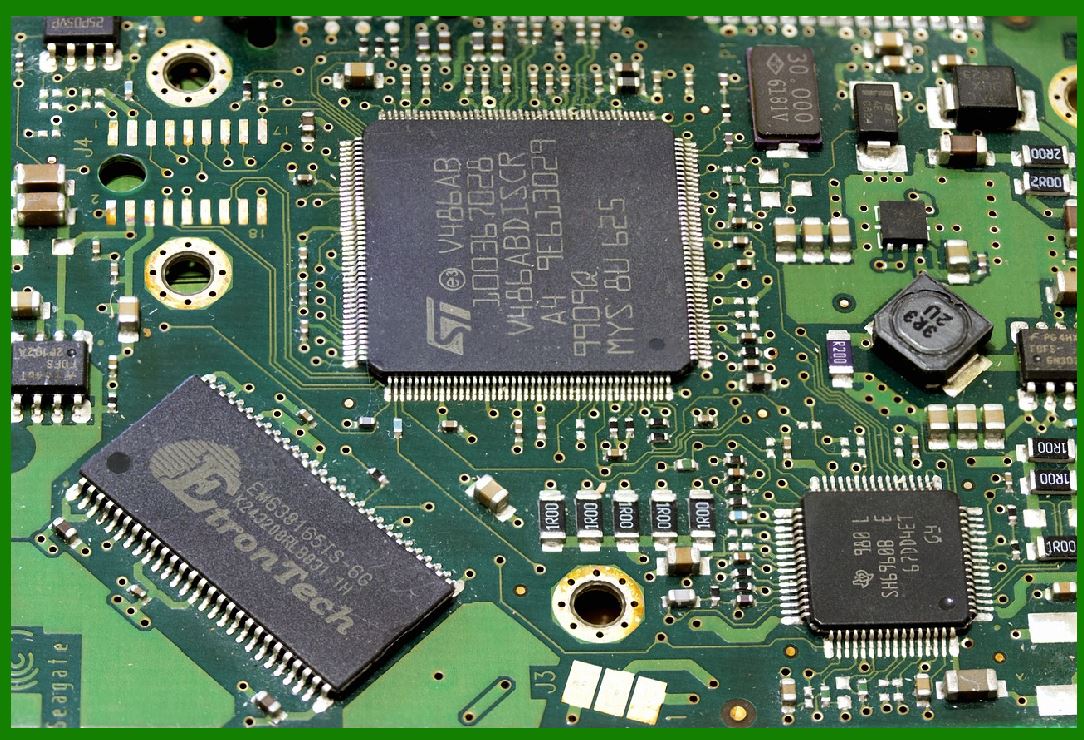
Microcontrollers in barcode label printers are typically based on a simple yet highly efficient architecture that includes several essential components: the central processing unit (CPU), memory, input/output interfaces, and communication protocols. These elements work together to ensure the printer performs reliably. |
Central Processing Unit (CPU): The CPU is the heart of the microcontroller and is responsible for executing instructions that control all the printer functions. The CPU executes low-level operations such as interpreting commands, managing data flow, and processing printing tasks. In more advanced MCUs, the CPU can also handle tasks like error checking and fault detection. |
Memory: The microcontroller contains several types of memory, including read-only memory (ROM), random-access memory (RAM), and flash memory. ROM stores the firmware and predefined routines that govern the printer's operation. RAM is used to store temporary data during the printing process, such as the barcode image and print parameters. Flash memory is often used to store larger data files, such as printer settings and user configurations. |
Input/Output (I/O) Interfaces: These interfaces allow the microcontroller to communicate with external devices (e.g., computers, mobile devices, barcode scanners) and internal printer components (e.g., motors, sensors, print heads). I/O interfaces may include serial ports (RS-232), USB, Ethernet, or wireless communication protocols like Bluetooth or Wi-Fi. The MCU receives data input from these devices, processes the information, and sends commands to the printer's various components. |
Communication Protocols: Barcode label printers often need to support various communication protocols, such as parallel, serial, or network communication. The microcontroller handles these communication protocols, ensuring that data can be transferred accurately between the printer and the connected devices. |
|
4. Data Processing and Command Interpretation |
One of the most important functions of the microcontroller is interpreting the data it receives from the external device. The data typically comes in the form of a text string or graphical file, which the MCU must process and convert into a printable format. |
The data can include textual information such as product names, numbers, or dates, as well as graphical elements like barcodes or logos. Barcodes are typically represented in specialized formats, such as 1D or 2D barcode standards (e.g., UPC, QR codes), which the MCU must decode and translate into commands that control the print head's movement. |
The MCU processes this data by: |
1.Receiving the data: The microcontroller accepts input from the connected device, which may include information such as the barcode type, label size, and any specific print settings (e.g., print speed or quality). |
2.Parsing the data: The microcontroller parses the input data to identify the individual components of the label (e.g., text, barcode, graphics). For barcode data, the MCU needs to identify the correct encoding (e.g., Code 39, QR code) and convert it into a suitable format. |
3.Converting to printable format: After parsing the data, the MCU converts the information into a sequence of printing instructions. This involves translating the graphic design (such as the barcode) and text into a bitmap or raster image that the printer's thermal print head can reproduce. |
4.Managing print settings: The microcontroller adjusts the print settings, such as print density, speed, and head temperature, based on user input or preset configurations. These settings ensure that the printed label is clear, sharp, and scannable. |

|
5. Control of Printer Components |
In addition to data processing, the microcontroller is responsible for controlling the various mechanical and electrical components of the barcode label printer. These components include: |
Print Head: The print head is the most critical component in the printing process. It consists of an array of tiny heating elements that melt the thermal transfer ribbon (for thermal transfer printers) or directly heat the paper (for direct thermal printers). The microcontroller controls the print head's operation by sending signals to the heating elements, determining which elements to heat, when to heat them, and for how long. |
Stepper Motors: Barcode label printers use stepper motors to drive the movement of the label feed mechanism. These motors precisely control the positioning of the label to ensure that it aligns correctly for each print job. The MCU sends commands to the motors to control the label's movement, adjusting speed and direction as necessary. |
Sensors: Printers often incorporate various sensors, such as media sensors (for detecting the presence of labels or gaps between labels), ribbon sensors (for thermal transfer printers), and print head temperature sensors. The MCU processes input from these sensors to adjust the printer's operation, ensuring consistent performance and high-quality prints. |
Media Handling Mechanisms: The microcontroller controls the mechanisms responsible for loading and advancing the label media. This includes the motors, sensors, and rollers that guide the label through the printer, ensuring it is correctly aligned for printing. |
Button and Display Interface: Many barcode label printers feature a user interface that allows the operator to configure settings, troubleshoot errors, and monitor printer status. The MCU manages these interfaces, interpreting user inputs and displaying relevant information on the printer's screen or through indicator lights. |
|
6. Communication with External Devices |
Barcode label printers are designed to interact with a variety of external devices, including computers, mobile devices, barcode scanners, and networks. The microcontroller is responsible for managing these communication channels and ensuring data is exchanged accurately between the printer and external sources. |
USB Interface: Most modern barcode printers support USB connections for communication with computers. The MCU uses the USB interface to accept print jobs from a computer or mobile device and relay the necessary information to the printer's hardware components. |
Serial Communication: In some cases, barcode printers use serial communication (RS-232) for connecting with older systems or specific industrial applications. The MCU decodes the serial data and processes the print job accordingly. |
Wireless Communication (Wi-Fi/Bluetooth): Some barcode printers are equipped with wireless communication capabilities. The MCU handles the connection with wireless networks or Bluetooth-enabled devices, allowing the printer to be accessed remotely or integrated into a larger network of devices. |
Network Communication (Ethernet): Ethernet ports on barcode printers allow them to communicate with computers or servers over a local area network (LAN). The microcontroller processes incoming network data, allowing for remote printing, centralized management, and integration with enterprise-level systems. |
|
7. Firmware and Software Integration |
The microcontroller's operation is governed by firmware, which is the set of instructions or software that controls how the MCU interacts with the printer hardware. This firmware is typically pre-programmed into the microcontroller's ROM or flash memory. |
Firmware updates are important for enhancing the printer's functionality, fixing bugs, or supporting new communication protocols. In many cases, these updates can be applied through the printer's USB port or network interface, allowing users to keep the printer's software up-to-date. |
Additionally, the microcontroller interacts with printer drivers and software applications running on external devices. These software solutions often provide a graphical user interface (GUI) for users to design barcode labels, adjust settings, and manage print jobs. The printer driver communicates with the MCU to translate user settings into printable commands. |
|
8. Power Management |
The microcontroller also plays a key role in managing the printer's power consumption. Barcode label printers often operate in environments where energy efficiency is critical. The MCU ensures that the printer only uses power when necessary, controlling components like the print head, motors, and display. |
In addition to regulating power usage during printing, the microcontroller manages power-up and power-down sequences, preventing sudden surges that could damage components and extending the life of the printer. |
|
9. Error Detection and Troubleshooting |
The microcontroller is also responsible for monitoring the printer's operation and detecting errors. Common issues in barcode label printers include media jams, low ribbon or label supply, print head overheating, and sensor failures. |
By processing input from sensors and performing diagnostic checks, the MCU can detect these issues and trigger appropriate responses, such as pausing the print job, displaying error messages, or attempting to correct minor issues automatically. |
In more advanced printers, the microcontroller can store error logs and maintenance history, allowing users or technicians to perform more targeted troubleshooting. |
|
10. Conclusion |
The microcontroller is a critical component in barcode label printers, acting as the central processing unit that manages data processing, component control, communication, and error detection. Its ability to efficiently process data, control various mechanical elements, and interface with external devices directly impacts the printer's performance, reliability, and versatility. As barcode label printers continue to evolve, the role of the microcontroller remains essential to ensuring high-quality, efficient, and error-free printing. |
|
Case Studies: Microcontroller (MCU) in Barcode Label Printers |
Case Study 1: Retail Inventory Management System |
Industry: Retail |
Application: Barcode label printing for inventory management |
Problem: The retail company was experiencing issues with slow label printing, inaccurate data transfer, and difficulty integrating their barcode printers with existing network systems. |
Solution: The company upgraded its barcode label printers with advanced microcontrollers capable of handling high-speed data processing, efficient communication protocols, and better integration with their inventory management system. |
MCU Role: |
Data Processing: The microcontroller efficiently handled incoming data from the company's central database and processed it in real-time. It converted product information into barcode formats (UPC, QR codes), which were then printed on labels. |
Communication: The printers were upgraded to support both USB and Ethernet connectivity. The MCU ensured seamless communication between printers and the company's central inventory system, which tracked product movements and sales in real-time. |
Performance Optimization: The new MCUs enabled higher print speeds by optimizing the timing of the print head and motor functions. This resulted in faster throughput of labels, helping the company keep up with high-volume printing demands during busy sales periods. |
Error Detection: The MCU monitored the print head and sensor systems for any anomalies, such as media jams or low ribbon levels. In the event of an issue, the MCU sent alerts to the user interface, reducing downtime by providing immediate error diagnostics. |
Outcome: |
The upgraded barcode label printers dramatically improved the speed and reliability of label printing. The company was able to reduce label printing time by 30%, and the seamless integration between the printers and the inventory management system allowed for real-time data synchronization. As a result, stockouts were minimized, and inventory accuracy improved, ultimately leading to better customer satisfaction and reduced operational costs. |

|
Case Study 2: Logistics and Shipping Automation |
Industry: Logistics and Supply Chain |
Application: Barcode label printing for shipping packages and inventory tracking |
Problem: A logistics company faced challenges with automating the shipping process. Manual label generation and inefficient printing workflows were leading to shipping delays and errors in package identification. |
Solution: The logistics company adopted thermal barcode label printers integrated with advanced microcontrollers. The goal was to streamline the shipping process by automating label printing and improving the accuracy of shipping data. |
MCU Role: |
Data Handling and Conversion: The microcontroller processed incoming shipment data from the company's logistics software and converted it into printable barcode formats. For example, the MCUs handled different barcode standards (e.g., Code 128 for tracking) and ensured that data such as shipping address, delivery instructions, and tracking numbers were accurately converted into readable barcodes. |
Multiple Communication Protocols: The printers were connected to a centralized network using both Ethernet and Wi-Fi. The MCU managed communication between the printers and the logistics system, ensuring that data sent from various stations (warehouse, packing, and shipping) were synchronized and processed without delays. |
Motor Control and Precision: The MCU controlled stepper motors, ensuring that the labels were fed precisely and accurately, even during high-volume printing. By optimizing motor movements, the printer minimized misprints or alignment errors, which could cause delays or wrong shipments. |
Sensor Integration: The printers used sensors to detect label gaps and ensure proper alignment. The MCU processed sensor data and adjusted motor operations to ensure that each label was correctly positioned for printing. |
Error Management: The microcontroller was also tasked with monitoring hardware components such as print heads and rollers. If any issues (e.g., print head overheating or ribbon issues) occurred, the MCU would trigger an automatic halt, display error codes, and notify the operator of the issue, ensuring minimal disruption to the workflow. |
Outcome: |
The logistics company reduced the time spent on labeling by 40%, and errors related to incorrect or misplaced labels dropped by 25%. The automation of label printing also allowed for smoother integration with tracking systems, improving package traceability and reducing shipping errors. As a result, the company increased its shipping throughput and provided more accurate delivery information to customers. |
|
Case Study 3: Healthcare Asset Tracking |
Industry: Healthcare |
Application: Barcode label printing for medical equipment and asset tracking |
Problem: A healthcare organization needed to streamline the tracking of medical equipment, including life-saving devices, to ensure compliance with safety regulations and reduce loss or misplacement of equipment. |
Solution: The organization implemented barcode label printers integrated with advanced microcontrollers for generating and printing unique asset identification labels for each medical device. |
MCU Role: |
Barcode Generation: The microcontroller handled the data processing for the creation of unique barcodes for each medical device, including encoding serial numbers, device information, and regulatory codes. The MCU ensured the proper formatting of these barcodes for both 1D (Code 39) and 2D (QR Code) formats. |
Integration with Hospital Management System (HMS): The printers were connected to the hospital's asset management software. The MCU ensured seamless communication between the printers and the HMS, automatically syncing updates such as equipment status, location, and maintenance history. |
Environmental Sensitivity: Medical environments have strict cleanliness and environmental requirements. The barcode printers were equipped with MCUs that could adjust settings based on environmental factors, such as ambient temperature and humidity, which could affect the print quality or the media used. |
Motor and Sensor Control: The microcontroller was responsible for controlling the precision of label feeding and ensuring that labels were correctly aligned before printing. Additionally, it managed the sensor system that detected label presence and gaps, preventing label jams or misprints. |
User Interface: The printers were equipped with intuitive user interfaces for hospital staff to quickly print asset tags when new equipment arrived or underwent maintenance. The MCU was responsible for managing user inputs and displaying necessary feedback on the printer's screen, ensuring ease of use. |
Outcome: |
The healthcare organization was able to improve the tracking and management of medical equipment by reducing asset misplacement by 35%. The integration between the printers and the asset management system allowed for automatic updating of equipment status, helping staff keep track of the location and condition of critical medical devices. Compliance with regulatory requirements was also improved, as the printed labels allowed for easier tracking during inspections and audits. |
|
Case Study 4: Manufacturing and Parts Labeling |
Industry: Manufacturing |
Application: Barcode label printing for parts and inventory management |
Problem: A manufacturing company was facing inefficiencies in parts tracking and inventory management. Barcode labels were being printed manually, leading to errors in parts identification and delays in production. |
Solution: The company adopted an automated barcode label printing system powered by microcontrollers. This system integrated with the company's Enterprise Resource Planning (ERP) system to automate the creation of part numbers, lot numbers, and barcodes. |
MCU Role: |
Data Processing and Integration: The microcontroller processed data directly from the ERP system, including part numbers, lot numbers, and quantities. The MCU converted this data into barcode formats suitable for the type of parts being labeled (e.g., Code 128 for parts tracking). |
Print Optimization: The microcontroller controlled the print head and motor operations to optimize print quality and speed. The efficient handling of print settings, such as print speed, density, and temperature, ensured the printed labels were crisp and scannable, even for small parts with minimal space for labeling. |
Multiple Label Sizes: Manufacturing environments require different label sizes for different parts, ranging from tiny components to large machinery. The microcontroller was capable of adjusting the print settings dynamically to accommodate various label sizes. |
Barcode Quality Control: The MCU monitored the quality of the printed barcode, ensuring that it met the required standards for readability. If the printed barcode was not clear or was out of spec, the MCU triggered a reprint request to prevent mislabeled parts from entering the production line. |
Outcome: |
The manufacturing company experienced a significant reduction in production delays due to labeling issues. The automated label printing system allowed for real-time tracking of parts, leading to a 20% reduction in part shortages and a 15% increase in overall manufacturing efficiency. The MCU's ability to adjust for different label sizes and print settings ensured consistent label quality, and the integration with the ERP system allowed for accurate and timely labeling. |
|
Conclusion |
These case studies demonstrate the crucial role of microcontrollers in barcode label printers across a wide range of industries. In each case, the MCU was integral to data processing, communication with external systems, control of mechanical components, and overall performance optimization. Whether in retail, logistics, healthcare, or manufacturing, the advanced capabilities of MCUs enable barcode label printers to handle complex tasks efficiently, leading to improved productivity, accuracy, and cost savings. |
 cs@easiersoft.com