Part 1 |
Introduction to Cloud Database Technology, Barcode Technology, and POS Systems in Modern Chain Stores |
1. The Digital Transformation Background of Modern Chain Stores |
1.1 |
In the past several decades, the retail industry has undergone enormous technological changes. Traditional chain stores once relied heavily on manual bookkeeping, paper invoices, handwritten inventory records, and decentralized store management methods. These operational methods were relatively effective in the early stages of retail development, especially when the number of stores was small and product categories were limited. However, as retail enterprises expanded geographically and operational complexity increased, traditional management approaches gradually became insufficient. The emergence of large-scale chain supermarkets, convenience stores, specialty retail chains, restaurants, pharmacies, and warehouse clubs created new operational challenges that could no longer be solved using manual systems alone. |

|
1.2 |
The increasing complexity of retail operations led to the need for digital technologies capable of processing massive amounts of operational data in real time. Retail enterprises needed systems that could simultaneously handle procurement, inventory management, sales transactions, customer membership management, pricing adjustments, promotions, logistics coordination, supplier communication, and financial reconciliation. As competition intensified, businesses also needed accurate data analysis tools to improve efficiency and reduce costs. This environment created the foundation for the widespread adoption of barcode technology, POS systems, and eventually cloud database platforms. |
1.3 |
Modern chain stores are no longer simple physical retail outlets. They have evolved into highly integrated commercial ecosystems involving suppliers, warehouses, logistics providers, online platforms, mobile applications, payment systems, customer relationship management systems, and data analytics engines. Every customer purchase generates operational data, and every inventory movement affects procurement decisions and supply chain planning. Without intelligent information systems, it becomes nearly impossible to maintain operational efficiency across dozens, hundreds, or even thousands of stores. |
|
1.4 |
The rise of e-commerce further accelerated digital transformation in the retail industry. Consumers increasingly expect seamless integration between online and offline shopping experiences. They expect accurate inventory visibility, real-time product availability, fast checkout experiences, personalized recommendations, and synchronized membership benefits across channels. To support these expectations, retailers require centralized data management capabilities that can unify information from physical stores, online stores, mobile applications, and third-party sales channels. Cloud database technology has become one of the core infrastructures enabling this transformation. |
1.5 |
At the same time, retail profit margins in many sectors continue to shrink due to market competition. Businesses must therefore optimize operational efficiency at every level. Small improvements in inventory accuracy, checkout speed, procurement planning, or labor allocation can generate substantial financial benefits when multiplied across an entire chain network. Technologies such as barcode systems and POS terminals play critical roles in achieving these efficiencies. |

|
2. Overview of Barcode Technology in Retail Operations |
2.1 |
Barcode technology is one of the most fundamental technologies in modern retail operations. A barcode is a machine-readable representation of data that allows products, assets, or documents to be identified quickly and accurately using optical scanning devices. The widespread adoption of barcode systems revolutionized retail by replacing manual product entry and reducing human error during sales and inventory operations. |
2.2 |
The earliest commercial barcode systems primarily used one-dimensional barcodes, commonly known as linear barcodes. These barcodes represent data using varying widths and spacing of parallel lines. Common examples include UPC (Universal Product Code) and EAN (European Article Number) standards. These barcode formats became global retail standards because they allowed fast product identification during checkout operations. |
2.3 |
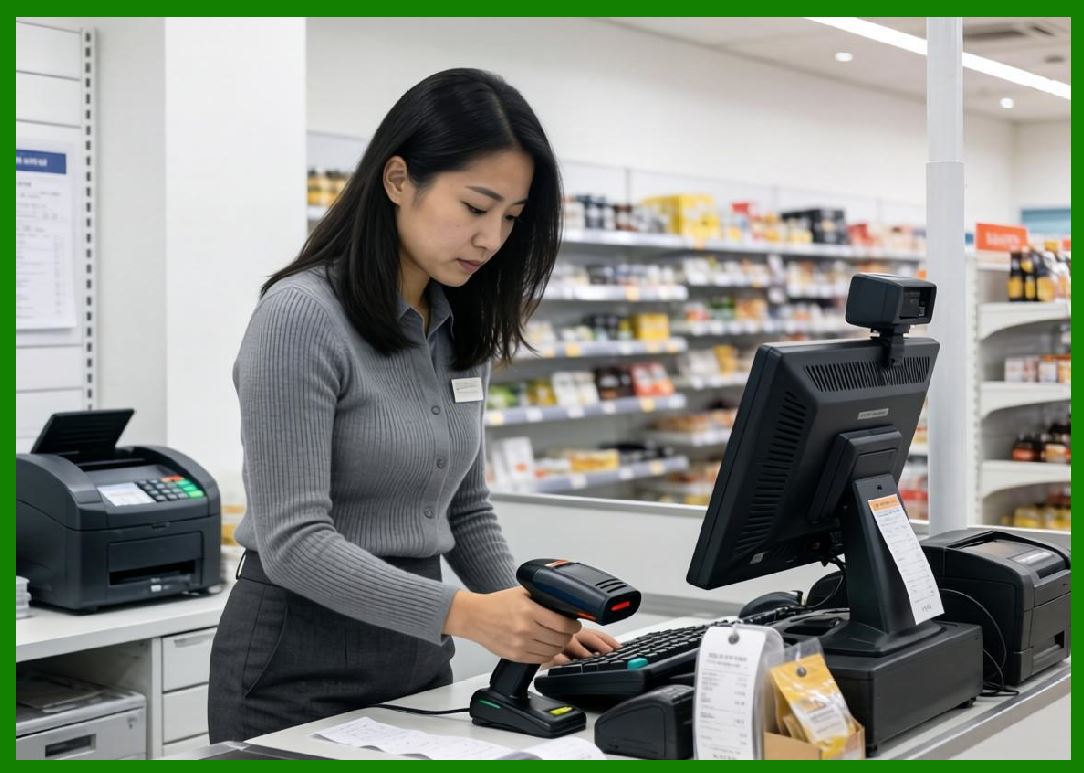
When a cashier scans a barcode at a POS terminal, the barcode scanner converts optical patterns into digital data. The POS system then uses the decoded product identifier to retrieve information from the product database. This information may include product name, price, tax category, promotional discounts, inventory quantity, supplier details, and membership reward eligibility. The entire process usually occurs within milliseconds. |
2.4 |
Barcode technology significantly improves operational accuracy. Before barcode adoption, cashiers manually entered product codes or prices, increasing the likelihood of typing errors. Barcode scanning dramatically reduced these mistakes while also accelerating checkout speed. Faster checkout improves customer satisfaction and reduces queue congestion during peak shopping periods. |

|
2.5 |
Beyond checkout operations, barcode systems support many additional retail functions. Warehouses use barcode labels for receiving, picking, packing, and shipping products. Inventory staff use handheld barcode scanners for stock counting and shelf replenishment. Procurement departments track supplier deliveries using barcode identifiers. Logistics systems monitor shipment movement using barcode-based tracking labels. |
2.6 |
Two-dimensional barcode technologies such as QR Codes and Data Matrix codes expanded the capabilities of traditional barcode systems. Unlike one-dimensional barcodes, 2D barcodes can store significantly larger amounts of information. Retailers use QR Codes for mobile payments, digital coupons, product traceability, anti-counterfeiting systems, electronic receipts, and customer engagement campaigns. |
2.7 |
In modern smart retail environments, barcode technology serves as a bridge between physical products and digital information systems. Every product becomes a digital data node that can be tracked, analyzed, and managed throughout its lifecycle. This integration is essential for modern supply chain visibility and retail automation. |

|
3. The Role of POS Systems in Chain Store Management |
3.1 |
A POS system, or Point of Sale system, is the operational center of retail transaction processing. It combines hardware and software components to manage sales transactions, payment processing, inventory updates, customer information, and operational reporting. Modern POS systems are far more advanced than traditional cash registers and have become core operational platforms for retail businesses. |
3.2 |
A typical POS system includes several hardware components such as barcode scanners, receipt printers, touch-screen terminals, payment card readers, cash drawers, customer-facing displays, and sometimes biometric devices. On the software side, the POS system includes modules for product management, transaction processing, employee management, customer membership systems, promotional pricing, reporting, and analytics. |
3.3 |
When a customer purchases products, the POS system performs multiple tasks simultaneously. It identifies the products through barcode scanning, calculates prices and taxes, applies discounts or promotions, processes payment transactions, updates inventory quantities, records sales history, and generates receipts. All of these processes occur within a highly integrated software environment. |

|
3.4 |
For chain stores, POS systems also support centralized management functions. Headquarters can remotely configure pricing rules, promotional campaigns, product catalogs, tax settings, and user permissions for all stores. This centralized control improves operational consistency across the entire retail network. |
3.5 |
Modern POS systems support multiple payment methods, including cash, credit cards, debit cards, mobile wallets, QR code payments, contactless payments, gift cards, and digital memberships. The ability to integrate with financial institutions and payment gateways is essential for modern retail operations. |
3.6 |
POS systems also generate valuable business intelligence data. Retailers can analyze sales trends, peak shopping periods, product performance, customer purchasing behavior, employee productivity, and promotional effectiveness. This data-driven approach enables better decision-making and more accurate business planning. |
3.7 |
Cloud-connected POS systems have become increasingly popular because they allow real-time synchronization between stores and centralized databases. A manager at headquarters can immediately view sales performance from all branches without waiting for manual reports. This capability significantly improves operational visibility and responsiveness. |

|
4. Understanding Cloud Database Technology |
4.1 |
Cloud database technology refers to database systems hosted on cloud computing infrastructure rather than local on-premises servers. These databases are accessible through internet connections and provide scalable, centralized, and highly available data management services. Cloud databases are one of the foundational technologies enabling modern digital retail ecosystems. |
4.2 |
Traditional retail systems often relied on local databases installed within individual stores. Each store maintained its own data independently, and synchronization between stores was difficult and time-consuming. Data consolidation often required manual exports, scheduled synchronization processes, or physical transfer of backup files. These limitations reduced operational efficiency and created data inconsistency risks. |
4.3 |
Cloud databases solve many of these problems by centralizing data storage and management. All stores connect to a unified database platform hosted in cloud data centers. This architecture enables real-time synchronization of product data, inventory levels, pricing information, membership records, and transaction histories across the entire organization. |
4.4 |
One of the most important advantages of cloud databases is scalability. Retail businesses often experience fluctuations in transaction volume during holidays, promotional events, or seasonal shopping periods. Cloud platforms can dynamically allocate computing resources to handle increased workloads without requiring expensive hardware upgrades. |

|
4.5 |
Cloud databases also improve reliability and disaster recovery capabilities. Major cloud providers replicate data across multiple geographic regions and maintain redundant infrastructure to minimize downtime risks. Even if one server fails, backup systems can continue operating with minimal interruption. |
4.6 |
Modern cloud database platforms support both relational databases and NoSQL databases. Relational databases organize data into structured tables using SQL queries, making them suitable for transactional retail systems. NoSQL databases provide flexible data models optimized for high-volume, semi-structured, or real-time analytics workloads. |
4.7 |
Cloud databases enable integration between many business systems. POS systems, warehouse management systems, e-commerce platforms, supplier portals, CRM systems, and mobile applications can all share centralized data resources through APIs and cloud services. This interconnected architecture creates a unified operational ecosystem. |
4.8 |
Security is another critical aspect of cloud database technology. Modern cloud platforms implement encryption, access control, identity management, auditing, backup automation, and network isolation mechanisms. Retailers handling sensitive customer payment data and membership information rely heavily on these security capabilities. |

|
5. The Historical Evolution of Retail Information Systems |
5.1 |
Retail information systems evolved gradually through several technological generations. Early retail operations relied entirely on manual recordkeeping. Store employees maintained handwritten inventory logs, paper receipts, and ledger books for financial tracking. While functional for small stores, these methods became inefficient for large retail operations. |
5.2 |
The introduction of mechanical cash registers improved transaction recording but still lacked integration with inventory management systems. Retailers could record sales totals but could not automatically track stock movement or customer purchasing patterns. |
5.3 |
The adoption of barcode technology during the 1970s and 1980s marked a major turning point in retail automation. Barcode scanners enabled automated product identification and reduced checkout processing times. Retailers could now maintain digital inventory databases linked directly to sales transactions. |

|
5.4 |
During the 1990s, client-server POS systems became widespread. Stores installed local servers connected to multiple POS terminals. These systems improved transaction management and reporting capabilities but often operated independently at each store location. |
5.5 |
As internet technology matured, retailers began connecting stores through centralized enterprise systems. Headquarters could synchronize pricing, inventory, and financial data across multiple branches. However, maintaining private data centers and networking infrastructure remained expensive and technically complex. |
5.6 |
Cloud computing transformed retail IT infrastructure by allowing businesses to outsource server management and database hosting to specialized cloud providers. Retailers could access enterprise-grade computing resources without building large internal IT infrastructures. |
5.7 |
Today, modern chain stores increasingly adopt hybrid retail ecosystems that integrate physical stores, online commerce platforms, mobile applications, self-checkout systems, smart shelves, IoT sensors, AI analytics, and cloud databases into unified operational frameworks. Barcode technology and POS systems remain foundational components within this evolving environment. |
|
6. Why Integration Among the Three Technologies Is Essential |
6.1 |
Barcode technology, POS systems, and cloud databases each provide valuable functionality independently, but their true power emerges when they are fully integrated. In modern chain stores, these technologies work together as interconnected components of a unified retail management system. |
6.2 |
Barcode technology acts as the data capture layer. It enables rapid and accurate identification of products, inventory items, customer memberships, and logistics units. Without barcode systems, data entry would remain heavily manual and error-prone. |
6.3 |
POS systems serve as the transaction processing and operational execution layer. They interact directly with customers, process payments, update inventory records, manage promotions, and support store operations. POS terminals are the primary operational interface between retail businesses and consumers. |

|
6.4 |
Cloud databases function as the centralized intelligence and coordination layer. They store and synchronize data across all stores and systems. Cloud databases provide the foundation for analytics, forecasting, centralized control, and enterprise-wide visibility. |
6.5 |
Consider a simple retail transaction. A cashier scans a product barcode at a POS terminal. The POS system retrieves pricing information from the cloud database, processes payment, deducts inventory quantity, updates sales reports, and synchronizes the transaction across the enterprise network. This entire process depends on the seamless integration of all three technologies. |
6.6 |
The integration also enables advanced operational capabilities such as real-time inventory visibility, omnichannel retailing, centralized procurement planning, personalized marketing, and AI-driven demand forecasting. Without integrated systems, these advanced functions would be difficult or impossible to implement efficiently. |
6.7 |
For chain stores with hundreds of locations, integration ensures operational consistency. Product pricing, promotional campaigns, membership rewards, and inventory policies can all be managed centrally while remaining instantly synchronized across all branches. |

|
7. The Increasing Importance of Data in Retail Decision-Making |
7.1 |
Modern retail competition increasingly depends on the ability to collect, process, analyze, and utilize operational data. Data has become one of the most valuable strategic assets for chain store enterprises. |
7.2 |
Every barcode scan, sales transaction, inventory adjustment, supplier delivery, customer membership registration, and online order generates operational data. Cloud databases aggregate this information into centralized repositories that can support advanced analytics and business intelligence applications. |
7.3 |
Retailers use sales data to identify best-selling products, optimize pricing strategies, evaluate promotional effectiveness, and forecast future demand. Inventory data helps reduce stock shortages and overstock situations. Customer data enables personalized marketing and loyalty programs. |

|
7.4 |
Real-time analytics provide significant operational advantages. Managers can immediately detect unusual sales patterns, sudden inventory shortages, or technical problems at specific stores. Rapid visibility allows faster response times and improved operational control. |
7.5 |
Machine learning and artificial intelligence technologies increasingly rely on cloud database infrastructure to process massive retail datasets. AI algorithms can analyze customer behavior, recommend products, optimize replenishment schedules, predict seasonal demand, and detect fraudulent transactions. |
7.6 |
Data integration also improves collaboration between departments. Procurement teams, warehouse managers, store managers, finance departments, and marketing teams can all access shared operational data through centralized cloud platforms. This reduces information silos and improves organizational coordination. |

|
8. The Foundation of Smart Retail Ecosystems |
8.1 |
The combination of cloud databases, barcode technology, and POS systems forms the technological foundation of smart retail ecosystems. Smart retail refers to highly automated, data-driven retail environments that optimize customer experiences and operational efficiency through advanced technologies. |
8.2 |
Smart retail systems often include additional technologies such as IoT sensors, electronic shelf labels, RFID systems, AI analytics platforms, mobile applications, facial recognition systems, robotic automation, and self-checkout kiosks. However, barcode systems, POS platforms, and cloud databases remain the core operational infrastructure supporting these advanced technologies. |
8.3 |
For example, a smart shelf system may detect low inventory levels using sensors. The inventory data is transmitted to the cloud database, which automatically updates procurement recommendations. Store employees receive replenishment instructions through mobile devices, and the products are scanned using barcode systems during restocking operations. The entire process depends on coordinated interaction among multiple technologies. |

|
8.4 |
Consumer expectations continue to drive smart retail innovation. Customers increasingly demand faster service, accurate inventory visibility, personalized shopping experiences, seamless online-offline integration, and convenient digital payment options. Retailers adopting integrated digital systems are better positioned to meet these expectations. |
8.5 |
As technology costs continue to decrease and cloud services become more accessible, even small and medium-sized chain stores can implement advanced retail management systems previously available only to large enterprises. This democratization of technology is reshaping the competitive landscape of the retail industry. |

|
9. Technical Content Summary of Part 1 |
9.1 |
This part introduced the fundamental concepts underlying the integration of cloud database technology, barcode technology, and POS systems in modern chain stores. It explained how retail digital transformation evolved from manual operations into highly integrated smart retail ecosystems. |
9.2 |
The discussion described barcode technology as the foundational product identification mechanism enabling fast and accurate data capture across sales, inventory, logistics, and procurement operations. The evolution from one-dimensional barcodes to two-dimensional codes such as QR Codes was also introduced. |
9.3 |
The article explained the operational role of POS systems as the transaction processing center of retail environments. POS systems handle sales processing, payment integration, inventory updates, customer management, and reporting functions while serving as the primary interaction point between customers and retail operations. |

|
9.4 |
Cloud database technology was presented as the centralized infrastructure supporting real-time data synchronization, scalability, analytics, security, and multi-store coordination. The advantages of cloud databases over traditional local database architectures were discussed in detail. |
9.5 |
The historical evolution of retail information systems demonstrated how increasing retail complexity created the need for integrated digital platforms. The transition from manual operations to cloud-based smart retail systems was analyzed from both technological and operational perspectives. |
9.6 |
Finally, the article emphasized that barcode technology, POS systems, and cloud databases achieve their greatest value when fully integrated. Together, they form the foundation of modern smart retail ecosystems capable of supporting real-time operations, data-driven decision-making, and scalable chain store management. |
9.7 |
In subsequent parts, the article will examine the detailed architecture, implementation methods, operational workflows, integration strategies, practical business scenarios, technical challenges, and future development trends associated with these technologies in modern chain store environments. |
 cs@easiersoft.com