1. Introduction to Inventory Management |
1.1 Definition |
Inventory management refers to the process of ordering, storing, tracking, and controlling inventory to ensure that a business has the right quantity of stock at the right time, avoiding stockouts or overstocking. |
1.2 Importance of Inventory Management |
Effective inventory management allows businesses to reduce costs, improve cash flow, increase operational efficiency, and meet customer demand in a timely manner. Poor inventory management, on the other hand, can result in missed sales, excess stock holding costs, or even lost customers. |
1.3 Types of Inventory |
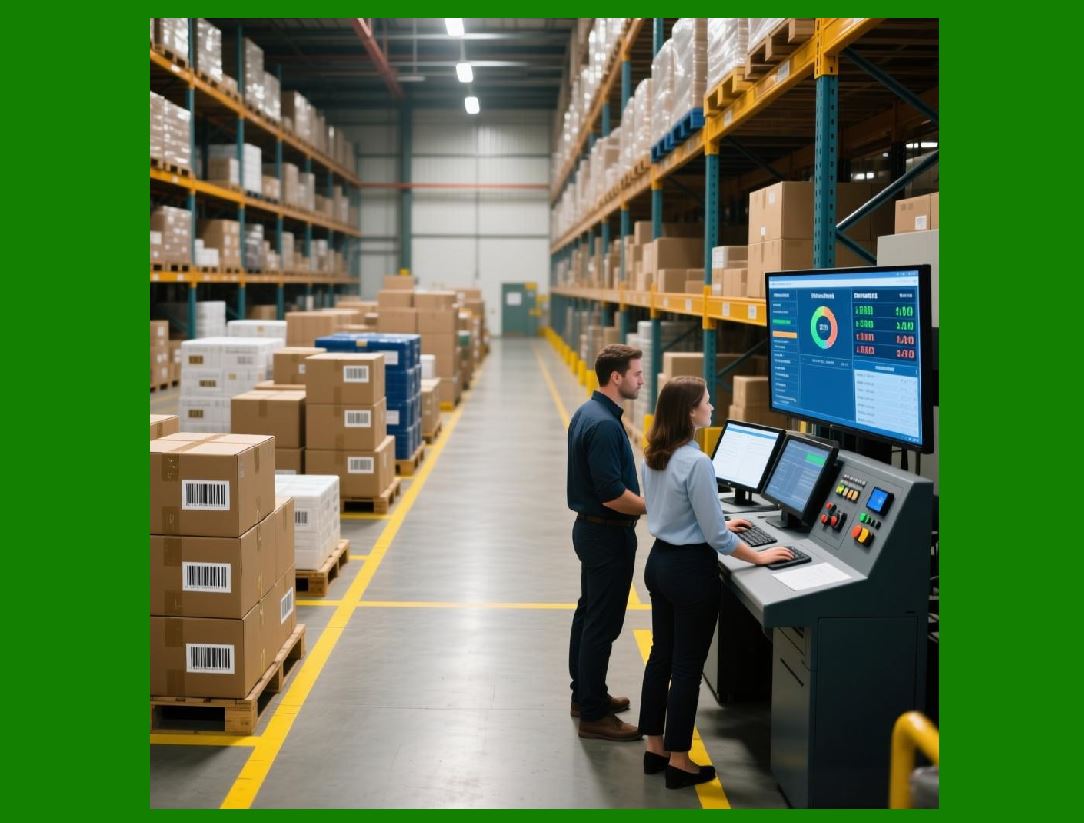
Raw Materials: Materials used in manufacturing processes. |
Work-in-Progress (WIP): Items that are in production but not yet completed. |
Finished Goods: Completed products ready for sale. |
Maintenance, Repair, and Operating (MRO) Supplies: Items needed for the day-to-day functioning of the business but are not part of the finished product. |
|
2. Key Components of Inventory Management |
2.1 Stock Replenishment |
Replenishment is the process of ordering and receiving new stock to replace items that are sold or used. It involves determining reorder points and order quantities to ensure inventory levels stay optimal. |
Economic Order Quantity (EOQ): A mathematical model used to determine the optimal order quantity that minimizes the total cost of ordering and holding inventory. |
Reorder Point: The inventory level at which a new order should be placed to replenish stock before it runs out. |
2.2 Stock Control Systems |
A stock control system is used to track the quantity and movement of inventory, with various methods: |
Periodic Review System: Inventory is checked at regular intervals, and orders are placed to bring stock back to a predetermined level. |
Continuous Review System: Inventory is monitored continuously, and an order is placed as soon as stock reaches the reorder point. |
2.3 Inventory Tracking Methods |
Modern businesses use several tracking systems to manage inventory more efficiently, including: |
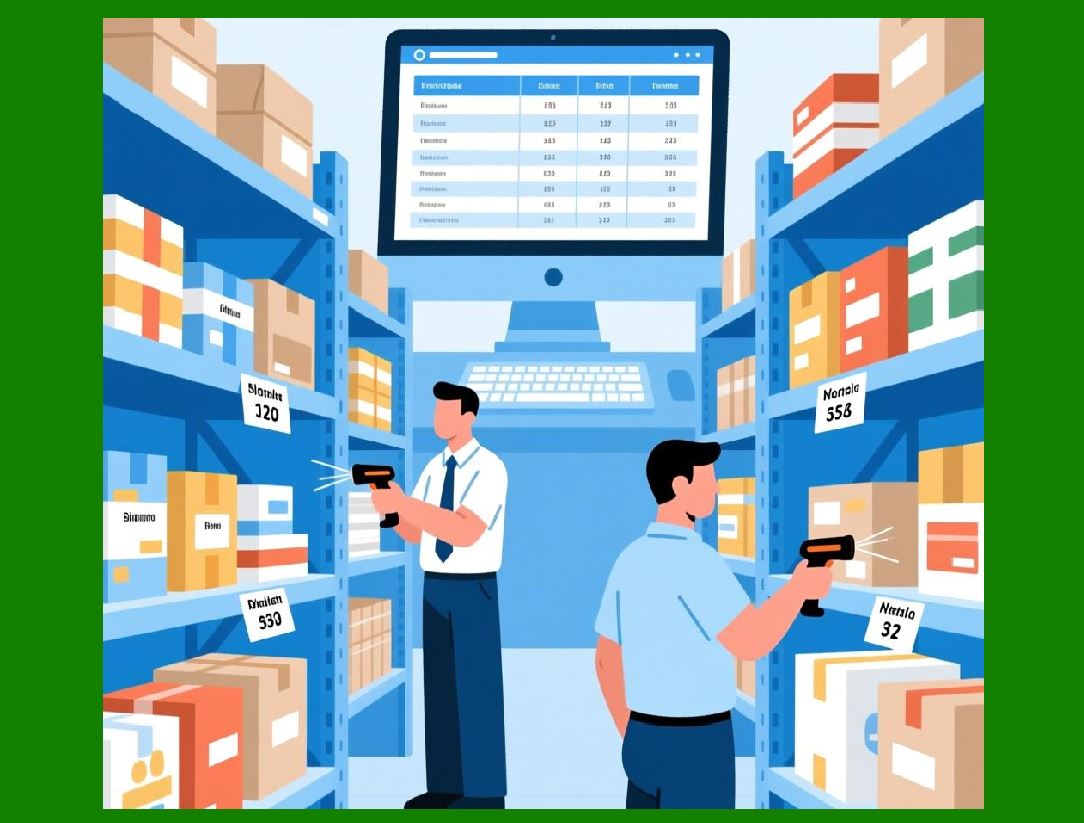
Barcode Systems: Labels containing data that can be scanned to track products. |
RFID (Radio Frequency Identification): Uses radio waves to read tags attached to inventory for automatic tracking. |
Manual Entry: A less efficient method where inventory is manually tracked and updated. |
2.4 Warehouse Management |
Warehouses are the backbone of inventory management. They need to be organized and strategically located to streamline operations. Effective warehouse management involves the following: |
Storage Methods: Proper shelving and storage systems such as pallet racking and bin shelving. |
Picking Strategies: The way items are retrieved from the warehouse to fulfill orders, such as zone picking, wave picking, or batch picking. |
FIFO vs LIFO: First-In-First-Out (FIFO) ensures older inventory is sold first, while Last-In-First-Out (LIFO) assumes that the most recent inventory is sold first, which is common in industries like petroleum. |
2.5 Demand Forecasting |
Accurate demand forecasting is essential for inventory management. This involves predicting future sales based on historical data, seasonal trends, market analysis, and promotional plans. Forecasting helps in adjusting inventory levels and preventing stockouts or overstocking. |
|
3. The Core Process of Inventory Management |
3.1 Receiving Inventory |
The first step in inventory management is receiving inventory from suppliers. This involves: |
Inspection: Checking the quantity and quality of goods to ensure they match the purchase order. |
Documentation: Recording the received goods into the inventory system, often through barcode scanning or RFID tagging. |
Storage: Placing items in appropriate locations in the warehouse, based on their type, size, and demand frequency. |
3.2 Storing and Organizing Inventory |
Proper storage ensures that goods are easy to locate and accessible. Effective inventory management includes: |
Inventory Shelving Systems: Various types, such as bin shelving, racking, and shelving for easy organization. |
Labeling: Clearly labeling products and shelves to ensure quick identification. Barcodes, RFID tags, and color-coding are common methods. |
Temperature Control: For perishable goods, temperature-controlled environments like cold storage are critical. |
3.3 Inventory Control and Monitoring |
Inventory needs to be constantly monitored to prevent shrinkage, overstocking, or stockouts. This involves: |
Regular Audits: Periodic checks of inventory to ensure accuracy and prevent loss. |
Cycle Counting: A process where a portion of the inventory is counted at regular intervals, instead of a full audit. |
Stock Rotation: Ensuring that older stock is used or sold first, particularly in perishable goods, to minimize wastage. |
3.4 Order Management |
When customers place orders, inventory must be checked to ensure that sufficient stock is available. The steps involved include: |
Order Verification: Ensuring the availability of items and checking for discrepancies between customer orders and inventory records. |
Picking: Collecting the items from storage. |
Packing: Preparing items for shipment, ensuring they are packaged appropriately for transportation. |
Shipping: Ensuring timely dispatch and tracking of shipments to customers. |
3.5 Stock Replenishment |
Based on demand forecasting and real-time stock levels, stock replenishment ensures the inventory remains at optimal levels. This involves: |
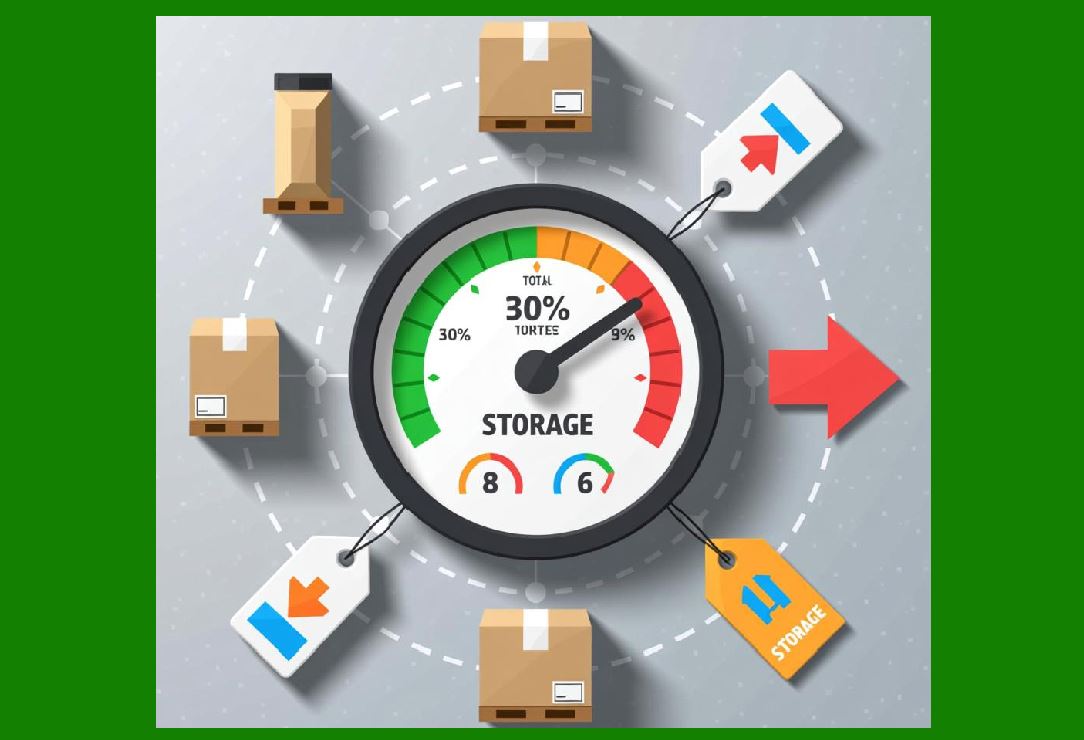
Replenishment Triggers: Automatic ordering based on predetermined reorder points. |
Supplier Lead Times: Managing supplier relationships and understanding lead times to avoid stockouts during replenishment cycles. |
|
4. Inventory Optimization and Efficiency |
4.1 Inventory Turnover Ratio |
This ratio measures how often inventory is sold and replaced over a period. A higher turnover indicates efficient inventory management, while a low turnover suggests slow-moving stock. Aiming for optimal turnover ratios can help businesses optimize working capital and minimize storage costs. |
4.2 Just-In-Time (JIT) Inventory |
JIT is an inventory strategy where stock is received only when needed for production or sales. This minimizes the need for holding large inventories but requires precise demand forecasting and reliable suppliers to avoid stockouts. |
4.3 Safety Stock |
Safety stock is additional inventory kept to mitigate the risk of stockouts due to unforeseen spikes in demand or delays in supply. The optimal amount of safety stock balances carrying costs and the risk of shortages. |
4.4 Lean Inventory Management |
Lean inventory management focuses on minimizing waste, improving flow, and increasing value to the customer. Lean practices involve reducing overproduction, unnecessary inventory, and waiting times, and emphasizing continuous improvement. |
4.5 Automated Inventory Management Systems |
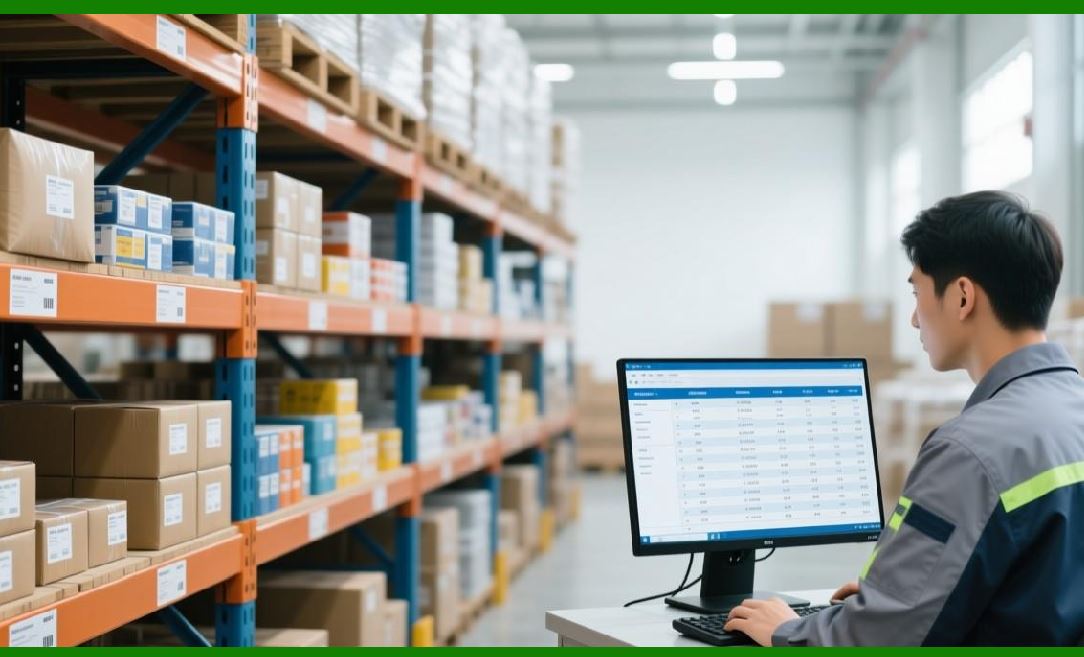
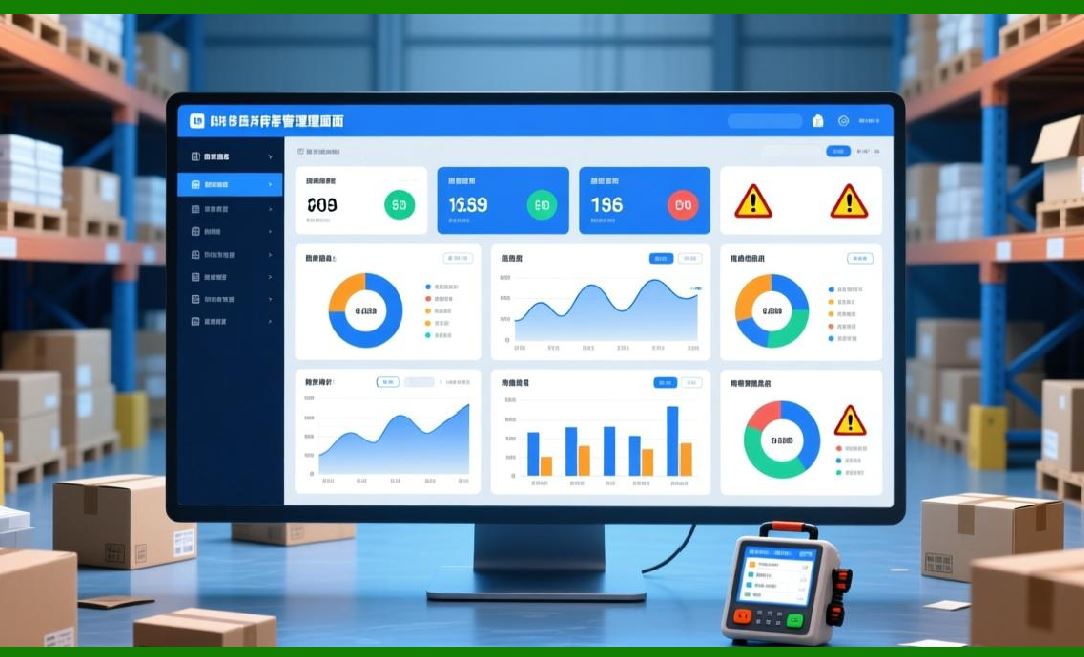
Technological advancements have enabled automated inventory management systems that use software to track stock levels, reorder points, and other key data. These systems can integrate with ERP (Enterprise Resource Planning) software for seamless data flow. |
|
5. Key Performance Indicators (KPIs) for Inventory Management |
5.1 Inventory Accuracy |
Tracking the accuracy of stock records by comparing actual inventory to the recorded data. High accuracy ensures the integrity of the inventory system and reduces discrepancies during audits. |
5.2 Fill Rate |
The percentage of customer orders that are fulfilled without delay. A higher fill rate indicates better stock availability and inventory management. |
5.3 Lead Time |
The time taken from placing an order with a supplier to receiving the goods. Reducing lead times helps businesses maintain lean inventory levels and reduces the chances of stockouts. |
5.4 Stockout Rate |
The frequency at which products are unavailable for customers. This metric helps businesses understand the efficiency of their replenishment and demand forecasting systems. |
5.5 Carrying Costs |
The costs associated with holding inventory, including warehousing, insurance, and depreciation. Minimizing carrying costs is key to optimizing inventory management. |
|
6. Challenges in Inventory Management |
6.1 Overstocks and Stockouts |
Balancing between having too much inventory (leading to high holding costs) and not enough inventory (leading to missed sales and customer dissatisfaction) is one of the most common challenges in inventory management. |
6.2 Shrinkage and Theft |
Loss of inventory due to theft, damage, or mismanagement is a significant issue, requiring constant vigilance and effective security measures. |
6.3 Supply Chain Disruptions |
External factors such as global shipping delays, political instability, or natural disasters can disrupt the supply chain, affecting inventory availability. |
6.4 Technology Integration |
Integrating different technologies such as barcode systems, RFID, and inventory management software with existing business systems can be complex and costly, especially for smaller businesses. |
|
7. Future Trends in Inventory Management |
7.1 Artificial Intelligence (AI) and Machine Learning |
AI and machine learning are expected to play a more significant role in inventory management by providing advanced forecasting models, automating replenishment, and optimizing stock levels in real-time. |
7.2 Blockchain Technology |
Blockchain can provide better transparency and traceability in inventory management, particularly for industries requiring high levels of security, such as pharmaceuticals or food. |
7.3 Robotics and Automation |
Robotic systems are increasingly being used in warehouses for tasks such as picking, packing, and sorting, making inventory management faster and more accurate. |
7.4 Internet of Things (IoT) |
IoT-enabled devices are improving real-time monitoring of inventory. RFID tags and sensors integrated with IoT can provide real-time location and status of inventory, ensuring greater control over stock levels. |

|
8. Conclusion |
Inventory management is an essential process for businesses to ensure the smooth flow of goods, minimize costs, and meet customer demand efficiently. By utilizing proper inventory tracking, forecasting, and optimization strategies, businesses can avoid the risks of overstocking and stockouts, resulting in better customer satisfaction, higher efficiency, and improved profitability. |
This outline gives a comprehensive overview of inventory management processes, challenges, and future trends, providing insights into its crucial role in business operations. |

|
Deep Dive into Stock Replenishment |
Stock replenishment is a critical aspect of inventory management that ensures an organization maintains optimal inventory levels to meet customer demand while minimizing overstocking and understocking. It involves a systematic approach to reordering goods based on real-time inventory levels, historical demand data, and various other factors. |
In this detailed dive, we will cover the key components, methodologies, systems, and strategies involved in stock replenishment. |
1. Definition of Stock Replenishment |
Stock replenishment is the process of restocking inventory when it reaches a predetermined threshold, known as the reorder point. It ensures that a company’s inventory remains at sufficient levels to meet consumer demand without overstocking. The goal is to balance supply and demand, avoid stockouts (where demand exceeds available stock) and reduce excess inventory that leads to storage costs. |

|
2. Types of Stock Replenishment |
There are several approaches to stock replenishment, each suited to different types of businesses and their unique inventory needs. The two most common systems are: |
2.1 Push Replenishment (Periodic Replenishment) |
In the push replenishment system, inventory is replenished at regular intervals, regardless of the inventory levels or demand fluctuations. This method is typically used in businesses where demand is relatively predictable and stable. |
How It Works: Inventory is reviewed periodically (e.g., weekly, monthly) and replenished based on forecasted demand for that period. |
Advantages: Simple to implement, especially for businesses with steady demand patterns. |
Disadvantages: Risk of overstocking or understocking if demand fluctuates or if forecasting is inaccurate. |
2.2 Pull Replenishment (Demand-Based Replenishment) |
Pull replenishment is driven by actual demand. The inventory is replenished only when stock reaches a specific reorder point, directly responding to real-time consumption or sales data. This system is more responsive and minimizes the risk of overstocking. |
How It Works: Replenishment orders are triggered when the stock level falls below the reorder point, based on actual sales data. |
Advantages: Reduced risk of overstocking, better alignment with actual demand. |
Disadvantages: Can result in stockouts if demand spikes unexpectedly before the next replenishment order is placed. |

|
3. Key Metrics for Stock Replenishment |
Effective stock replenishment relies on accurate data and key metrics that help in decision-making. Some of the most important metrics include: |
3.1 Reorder Point (ROP) |
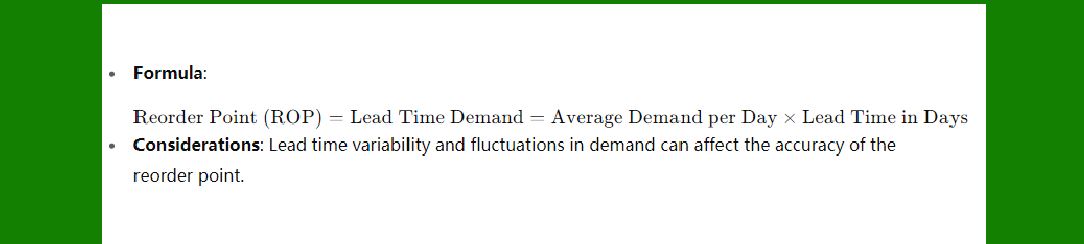
The reorder point is the stock level at which an order should be placed to replenish inventory before it runs out. It takes into account the lead time (the time between placing the order and receiving the stock) and the demand during lead time. |
Formula: |
|
3.2 Economic Order Quantity (EOQ) |
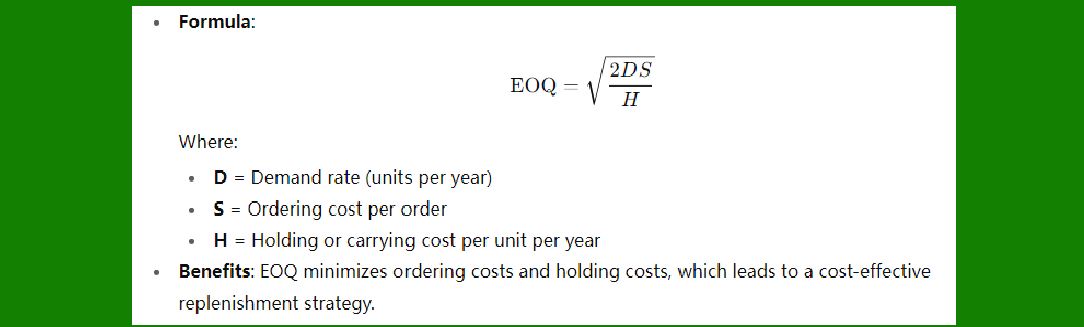
EOQ is a formula that determines the optimal order quantity that minimizes the combined costs of ordering and holding inventory. The goal is to order the most cost-effective quantity that balances these two costs. |
Formula: |
|
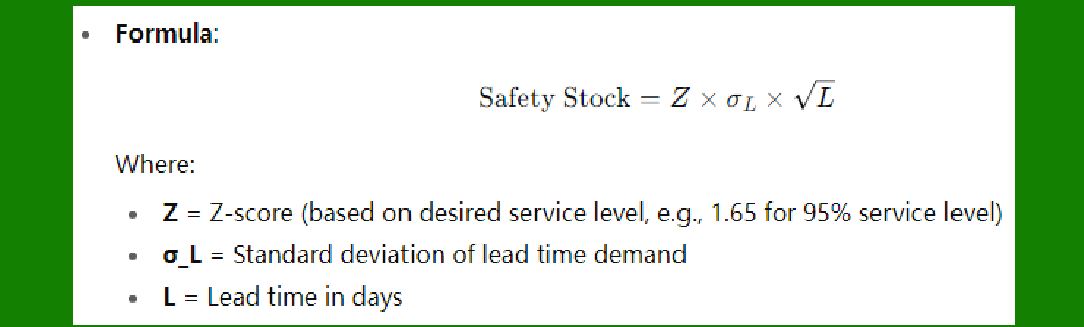
3.3 Safety Stock |
Safety stock is additional inventory kept to account for unexpected fluctuations in demand or delays in supply. It acts as a buffer to avoid stockouts due to variations in lead time or demand. |
Formula: |
|
4. Methods of Stock Replenishment |
Various methods are used to automate and optimize stock replenishment. These methods depend on the complexity of the business, the level of automation in the inventory system, and the demand patterns. |
4.1 Manual Replenishment |
In small businesses or less complex environments, replenishment may be manually triggered based on the inventory manager’s judgment and periodic reviews. This method, while simple, is highly dependent on accurate inventory records and effective demand forecasting. |
Pros: Low cost, easy to implement for small operations. |
Cons: Prone to human error, requires constant monitoring, and may lead to inefficiency in larger operations. |
4.2 Automated Replenishment Systems (ARS) |
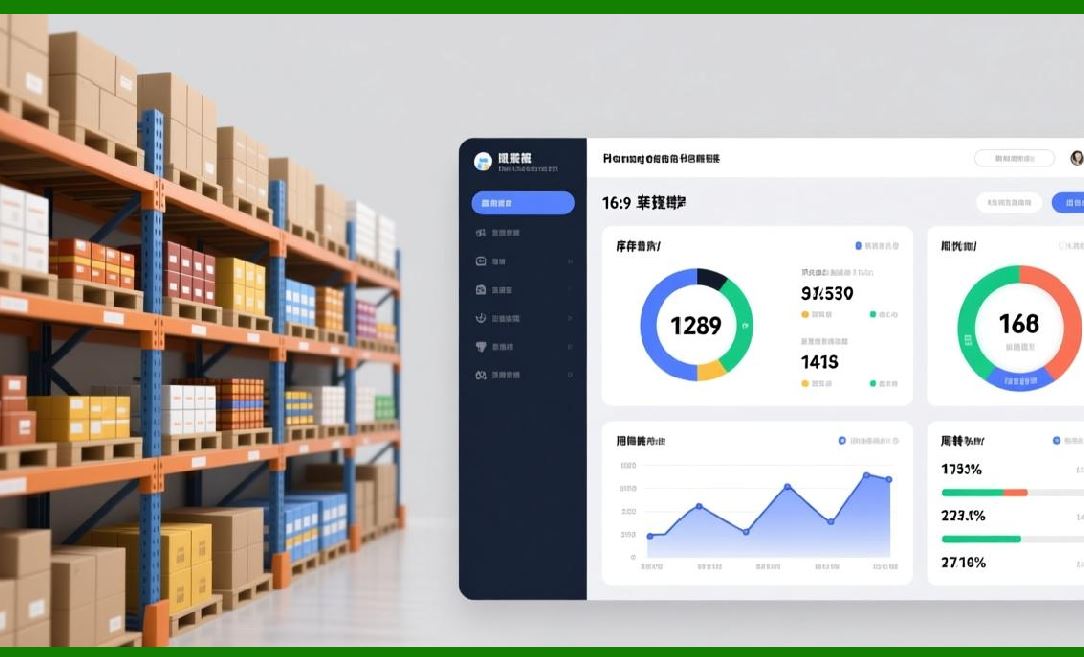
An automated replenishment system uses software to track inventory levels and automatically trigger orders when stock reaches the reorder point. These systems rely on real-time data from sales, stock levels, and supplier lead times to optimize inventory management. |
Pros: Minimizes human error, ensures stock levels are consistently monitored, and improves efficiency. |
Cons: Implementation can be expensive, and systems require regular maintenance and updates. |
4.3 Just-In-Time (JIT) Replenishment |
The JIT replenishment method ensures that inventory is replenished only when it is needed, minimizing storage costs and avoiding overstocking. It is most effective in lean manufacturing and industries where demand is predictable and suppliers are reliable. |
Pros: Reduces carrying costs, minimizes waste, and aligns stock levels with actual demand. |
Cons: High risk of stockouts if demand is not accurately forecasted or if suppliers experience delays. |
4.4 Vendor-Managed Inventory (VMI) |
In Vendor-Managed Inventory, the supplier is responsible for managing inventory levels at the customer’s location. The supplier monitors inventory and automatically replenishes it based on predefined parameters, such as reorder points and minimum stock levels. |
Pros: Reduces stockouts and order errors, and allows businesses to focus on core operations. |
Cons: Supplier dependency and potential issues with information sharing. |
|
5. Factors Influencing Stock Replenishment |
Stock replenishment strategies must consider various factors that influence the demand for inventory and the lead time from suppliers: |
5.1 Demand Forecasting |
Accurate demand forecasting is crucial to stock replenishment. It uses historical sales data, seasonality, promotions, and market trends to predict future demand. The better the demand forecasting, the more accurate the reorder points and the less the risk of stockouts or overstocking. |
5.2 Lead Time |
Lead time is the amount of time it takes from placing an order with a supplier until the inventory is received and ready for sale. Shorter lead times allow for more frequent replenishment orders and reduce the need for large safety stock levels. |
5.3 Supplier Reliability |
The reliability of suppliers in terms of delivering goods on time and in the correct quantities directly impacts stock replenishment. Supplier delays or quality issues can result in stockouts, which are detrimental to customer satisfaction. |
5.4 Order Quantity |
Determining the correct order quantity is vital to effective stock replenishment. Ordering too much leads to overstocking and increased holding costs, while ordering too little leads to stockouts and missed sales. Tools like EOQ help optimize order quantities. |

|
6. Strategies to Improve Stock Replenishment |
To improve stock replenishment, businesses can adopt a variety of strategies: |
6.1 Use of Real-Time Data |
Real-time data tracking allows businesses to monitor inventory levels, sales trends, and order statuses instantly. By integrating barcodes, RFID systems, and inventory management software, businesses can make replenishment decisions based on up-to-date information. |
6.2 Cross-Department Collaboration |
Collaboration between the sales, marketing, and procurement teams helps ensure that stock replenishment aligns with promotional plans, upcoming sales events, and customer demand. |
6.3 Supplier Relationship Management |
Building strong relationships with suppliers can improve lead times and ensure that stock replenishment is more reliable. This can involve negotiating better terms, improving communication, or implementing collaborative planning systems like VMI. |
6.4 Implementing Multi-Location Replenishment |
For businesses with multiple warehouses or retail locations, replenishment needs to be optimized for each location based on specific demand patterns. This involves distributing inventory efficiently across locations and ensuring that stock is replenished based on regional requirements. |

|
7. Challenges in Stock Replenishment |
Stock replenishment can present several challenges that need to be carefully managed: |
7.1 Demand Volatility |
Fluctuating demand can make it difficult to accurately predict reorder points. High demand variability increases the risk of stockouts or excess inventory, which can negatively impact profits. |
7.2 Supplier Delays |
Dependence on suppliers for timely deliveries can cause delays in stock replenishment, especially if lead times are not well-managed. This is particularly problematic for businesses that rely on just-in-time inventory practices. |
7.3 Inventory Inaccuracy |
Poor inventory tracking, manual errors, or outdated inventory systems can lead to inaccurate stock levels, which affect replenishment decisions. |
|
8. Conclusion |
Stock replenishment is a vital process in inventory management that ensures businesses maintain the right levels of stock to meet customer demand without overstocking or understocking. By employing the right methods, using technology, and considering key factors like demand forecasting, lead times, and supplier reliability, businesses can optimize replenishment and improve overall inventory efficiency. Effective stock replenishment helps reduce costs, enhance customer satisfaction, and ensure smooth operations. |
|
Deep Dive into Stock Control Systems |
Stock control systems are critical components of inventory management, enabling businesses to monitor and manage their inventory efficiently. These systems help track stock levels, manage stock movement, minimize costs, and ensure that the right products are available to meet customer demand without overstocking or understocking. There are various types of stock control systems, each suited to different business needs, ranging from small businesses to large enterprises. |
In this detailed analysis, we will explore the various types of stock control systems, their methodologies, components, benefits, and challenges, as well as how technology has enhanced their functionality. |
1. Definition of Stock Control Systems |
A stock control system is a process or methodology used by businesses to monitor, manage, and regulate the movement, storage, and replenishment of inventory. These systems can help automate processes, reduce human error, increase operational efficiency, and ensure that a company does not over or understock its products. |
Stock control systems are essential for: |
Keeping track of inventory levels in real-time. |
Managing the movement of stock within warehouses or stores. |
Automating reordering processes. |
Ensuring inventory is available when needed without excessive holding costs. |
|
2. Types of Stock Control Systems |
Stock control systems can be categorized into several types based on how inventory levels are monitored, reviewed, and replenished. The two main categories of stock control systems are manual systems and automated systems. |
2.1 Manual Stock Control System |
A manual stock control system relies on paper-based records, spreadsheets, or simple databases to track inventory. It is typically used by small businesses or companies that have low inventory turnover or limited resources. |
How it works: Employees manually update stock records after each sale, restocking, or inventory audit. |
Advantages: Low cost and easy to implement for small-scale operations. |
Disadvantages: Time-consuming, prone to human error, lack of real-time data, and scalability issues. |
2.2 Automated Stock Control System (Stock Management Software) |
An automated stock control system uses specialized software and digital tools to track inventory in real-time. These systems integrate with other business processes like sales, order fulfillment, procurement, and accounting. |
How it works: Inventory movements (sales, purchases, returns) are recorded automatically through software connected to barcode scanners, RFID, or other data capture technologies. |
Advantages: Real-time tracking, automated reorder triggers, reduced human error, and improved scalability. |
Disadvantages: High initial setup costs, dependency on software and hardware infrastructure. |
2.3 Perpetual Inventory System |
The perpetual inventory system continuously tracks inventory levels in real time. Every time a sale, purchase, or return occurs, the inventory record is automatically updated. This system relies heavily on technology, such as barcode scanning or RFID. |
How it works: Inventory levels are updated instantaneously, reflecting any changes in stock quantity, so businesses always know their current stock position. |
Advantages: Real-time updates, accurate inventory records, and reduced stockouts or overstocking. |
Disadvantages: Requires investment in technology, including hardware (scanners, RFID) and software integration. |
2.4 Periodic Inventory System |
In a periodic inventory system, businesses physically count their inventory at regular intervals (e.g., monthly, quarterly). During these intervals, inventory records are updated based on the count. |
How it works: Inventory is reviewed periodically and any discrepancies are adjusted at the time of the physical count. |
Advantages: Simple to implement and less expensive compared to perpetual systems. |
Disadvantages: Does not provide real-time inventory tracking, leading to potential stockouts or discrepancies between actual stock and recorded stock. |
2.5 Just-In-Time (JIT) Inventory System |
The JIT inventory system is a lean inventory control method where inventory is ordered and replenished only when it is needed for production or customer orders. This minimizes inventory levels and reduces the need for large storage spaces. |
How it works: Replenishment orders are triggered based on real-time demand, with minimal stock held on hand. |
Advantages: Reduced holding costs, minimized waste, and improved cash flow. |
Disadvantages: Highly dependent on reliable suppliers, potential risk of stockouts during demand spikes. |
2.6 Vendor-Managed Inventory (VMI) System |
In a VMI system, the supplier manages the inventory levels at the customer’s location. The supplier tracks inventory and automatically sends replenishment orders based on pre-established parameters. |
How it works: The supplier has visibility into the customer’s stock levels and places orders when inventory reaches predefined reorder points. |
Advantages: Reduced administrative costs, better supplier-customer relationships, and more efficient stock replenishment. |
Disadvantages: Less control for the customer, potential dependency on the supplier. |
|
3. Key Components of Stock Control Systems |
A fully functional stock control system consists of several components that work together to track and manage inventory efficiently. |
3.1 Inventory Tracking Methods |
Modern stock control systems rely on various tracking methods to ensure real-time updates and minimize errors: |
Barcode Scanning: Barcodes are scanned using handheld devices to track inventory movements. Each item has a unique barcode, which is scanned when it’s sold, purchased, or moved within the warehouse. |
RFID (Radio Frequency Identification): RFID technology uses tags embedded with microchips that store data. RFID tags are scanned automatically as they pass through RFID readers, providing real-time tracking of inventory movement. |
Manual Entry: Manual data entry involves employees logging inventory changes into the system. It’s often used for low-turnover or small operations but is prone to human error. |
3.2 Reorder Points and Safety Stock |
Effective stock control systems use reorder points and safety stock calculations to determine when to reorder inventory: |
Reorder Point (ROP): The inventory level at which a replenishment order should be placed to avoid stockouts before new stock arrives. |
Safety Stock: A buffer stock kept to account for fluctuations in demand or supply chain disruptions, ensuring that inventory is available even in unexpected situations. |
3.3 Integration with Other Business Systems |
For seamless stock management, stock control systems are often integrated with other business systems, such as: |
Enterprise Resource Planning (ERP): ERP systems consolidate data from various business functions, such as procurement, sales, finance, and HR, into a single platform, providing real-time inventory information. |
Customer Relationship Management (CRM): A CRM system can help forecast demand based on customer data, promotions, and seasonal trends, ensuring accurate replenishment decisions. |
Order Management Systems (OMS): Integration with OMS helps businesses coordinate order fulfillment with stock levels and demand, ensuring timely shipping and inventory updates. |
|
4. Methods of Stock Control |
There are several strategies and methods businesses use within their stock control systems to optimize inventory levels and maintain operational efficiency. |
4.1 First-In-First-Out (FIFO) |
The FIFO method ensures that the first items to enter inventory are the first to be sold or used. This method is especially important for perishable goods and industries like food, pharmaceuticals, and chemicals. |
How it works: Older inventory is sold first, ensuring that products with shorter shelf lives don’t expire. |
Benefits: Reduces the risk of obsolete or expired inventory. |
Challenges: Requires diligent inventory rotation and management. |
4.2 Last-In-First-Out (LIFO) |
The LIFO method assumes that the last items to enter inventory are the first to be sold or used. It’s typically used in industries where the cost of inventory is rising (e.g., raw materials) and where older inventory is not necessarily perishable. |
How it works: Newer inventory is used first, which may have a higher cost basis. |
Benefits: Can reduce taxable income during periods of inflation (due to higher cost of goods sold). |
Challenges: Not suitable for businesses with perishable goods, and it may result in inventory obsolescence. |
4.3 Batch Control |
Batch control involves grouping items in batches based on common characteristics such as manufacturing date or production run. This method allows businesses to track groups of items rather than individual ones. |
How it works: Products are grouped and assigned batch numbers, which are used to track movement and expiration. |
Benefits: Useful for manufacturing industries and businesses dealing with large quantities of homogeneous items. |
Challenges: Requires strict adherence to batch labeling and tracking procedures. |
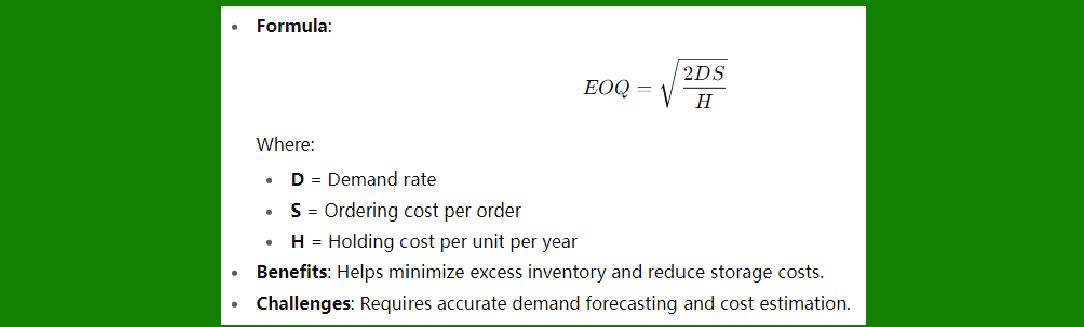
4.4 Economic Order Quantity (EOQ) |
The EOQ model calculates the optimal order quantity that minimizes total inventory costs, including ordering costs and holding costs. |
Formula: |
|
5. Benefits of Stock Control Systems |
Improved Efficiency: Stock control systems streamline inventory management, reducing the need for manual intervention and improving the accuracy of stock records. |
Cost Savings: By reducing stockouts, overstocking, and shrinkage, businesses can lower inventory-related costs. |
Real-Time Data: Automated systems provide up-to-date data on stock levels, enabling businesses to make better decisions regarding ordering and sales. |
Better Customer Satisfaction: Efficient stock control ensures products are available when needed, improving customer service and satisfaction. |
Scalability: Automated systems can scale with a growing business, allowing for more complex inventory management as the company expands. |
|
6. Challenges in Stock Control Systems |
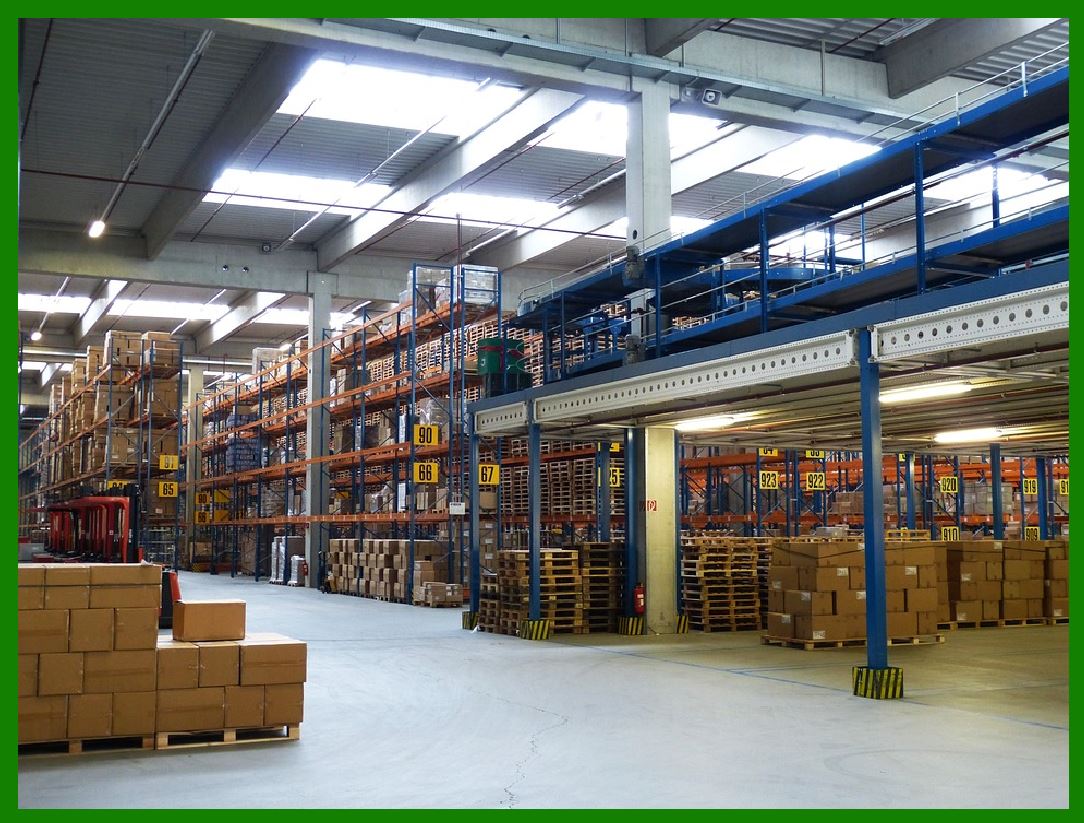
Implementation Costs: The initial investment in software, hardware (e.g., barcode scanners, RFID tags), and training can be significant. |
System Downtime: Reliance on technology means that any system malfunction or downtime can halt inventory management, leading to disruptions in operations. |
Data Accuracy: While automated systems reduce human error, inaccurate data input, incorrect scanning, or mislabeling can lead to inventory discrepancies. |
Supplier Dependence: Some stock control methods, like JIT and VMI, heavily depend on the reliability and accuracy of suppliers, making them vulnerable to supply chain disruptions. |
|
7. Conclusion |
Stock control systems are essential for managing inventory efficiently, reducing costs, and ensuring that businesses can meet customer demand without overstocking or understocking. The evolution of stock control systems, particularly with the integration of automation and real-time tracking technologies, has dramatically improved operational efficiency across industries. However, businesses must carefully choose the most appropriate system and strategy for their needs to reap the maximum benefits and overcome the challenges. |
|
Deep Dive into Inventory Tracking Methods |
Inventory tracking methods are fundamental components of modern inventory management systems. They help businesses monitor the movement, storage, and status of their stock in real-time, ensuring accurate records and efficient operations. The choice of inventory tracking method depends on the business model, inventory turnover, technology infrastructure, and the specific requirements of the business. |
In this deep dive, we will explore the various inventory tracking methods, their advantages, challenges, and use cases, as well as how they fit into broader inventory management strategies. |
1. Overview of Inventory Tracking Methods |
Inventory tracking is the process of monitoring the quantity and status of goods as they move through the supply chain, from procurement to storage, to sale. Effective inventory tracking allows businesses to maintain accurate stock levels, optimize warehouse space, and streamline order fulfillment. |
There are several methods of tracking inventory, ranging from manual to fully automated solutions. The choice of tracking method is influenced by factors such as the size of the business, the volume of inventory, and the type of goods being handled. |
|
2. Manual Inventory Tracking |
2.1 Paper-Based Systems |
In smaller businesses or organizations with minimal inventory, manual tracking often involves paper records, such as logbooks or inventory sheets, where transactions like purchases, sales, returns, and stock levels are written down by employees. |
How it works: Inventory levels are updated manually by employees, typically after every transaction or inventory audit. |
Advantages: Low initial cost, easy to implement, no technology dependency. |
Disadvantages: Prone to human error, time-consuming, difficult to scale, and lacks real-time data. Manual tracking is highly inefficient for businesses with high transaction volumes or large inventories. |
2.2 Spreadsheets (Excel or Google Sheets) |
In businesses that need a more structured and scalable approach than paper records but are still not ready for advanced software, spreadsheets like Microsoft Excel or Google Sheets are used to track inventory. These tools allow for more detailed tracking and can be easily customized with formulas, pivot tables, and charts. |
How it works: Data is manually entered into a spreadsheet after each transaction, and formulas are used to update inventory counts. Employees might also track reorder points, safety stock levels, and sales trends. |
Advantages: Low-cost solution, easy to use, and flexible for small to medium-sized businesses. |
Disadvantages: Error-prone, lacks automation, and can become unwieldy as inventory volume increases. Additionally, spreadsheets do not provide real-time updates and require continuous manual input to maintain accuracy. |
|
3. Barcode-Based Inventory Tracking |
Barcode-based inventory tracking is one of the most common and widely used methods for businesses of all sizes. It involves using barcodes—simple, machine-readable representations of product data—scanned by barcode readers or mobile devices to track inventory items. |
3.1 Barcode Scanning System |
In a barcode scanning system, each product is assigned a unique barcode label containing essential product information like the product ID, description, price, and stock keeping unit (SKU). These barcodes are scanned using a handheld scanner or mobile device, which automatically updates inventory records in a database or system. |
How it works: Products are labeled with barcodes, which are scanned at various stages—during receipt, storage, picking, shipping, and sales. Each scan updates the central inventory system. |
Advantages: Fast, accurate, and easy to implement. Barcodes allow for real-time tracking and reduce the need for manual entry, decreasing errors. |
Disadvantages: Requires barcode labels, scanners, and software integration, which may involve upfront costs. It also does not track the product's real-time location in more complex environments like large warehouses. |
3.2 Barcode Labeling |
Barcodes typically come in two forms: |
1D Barcodes: The traditional linear barcode, which is most commonly used in retail, logistics, and shipping. |
2D Barcodes (QR codes, Data Matrix): More advanced barcodes that can hold more data and can be read from any angle. 2D barcodes are increasingly used for tracking products with greater granularity and in environments where higher information density is required. |
Advantages of 2D Barcodes: Hold more data, can be scanned from any orientation, and provide greater detail about product attributes. |
Disadvantages of 2D Barcodes: More expensive to print and scan than 1D barcodes, and require specialized scanners or software. |
|
4. Radio Frequency Identification (RFID) Tracking |
RFID is an advanced inventory tracking method that uses radio waves to transmit data between RFID tags attached to products and RFID readers to track inventory in real time. |
4.1 RFID Tags |
RFID tags consist of two parts: |
RFID Tag: Contains a microchip that stores data (such as the product ID, serial number, and other relevant details) and an antenna that allows the data to be transmitted wirelessly. |
RFID Reader: A device that sends radio waves to the tag to retrieve data. The reader then sends this data to a central inventory system for real-time tracking. |
There are two main types of RFID tags: |
Active RFID Tags: Have an internal power source and can broadcast signals over a greater distance. They are used for high-value items or large warehouses. |
Passive RFID Tags: Do not have an internal power source and rely on the signal from the reader to power them. They are commonly used for lower-cost items or smaller operations. |
How it works: RFID tags are attached to products or pallets, and as products pass through RFID readers (usually at entry/exit points of warehouses or retail locations), the system automatically updates inventory data without requiring manual scanning. |
Advantages: Provides real-time inventory tracking without requiring line-of-sight. It reduces human error and increases the speed and accuracy of inventory tracking. RFID also allows for batch scanning and automatic data capture. |
Disadvantages: High initial cost for RFID infrastructure (tags, readers, and software). Tags can also be expensive for some products, and environmental factors (metal, liquids) can interfere with RFID signals. |
|
5. Wireless Sensor Networks (WSN) and IoT-Based Tracking |
Wireless sensor networks (WSNs) and the Internet of Things (IoT) are emerging technologies in inventory tracking, particularly in industries like logistics, healthcare, and manufacturing. These methods involve embedding sensors or IoT devices in products, pallets, or storage locations to monitor inventory status in real-time. |
5.1 IoT Sensors for Tracking |
IoT devices or sensors are attached to inventory items, and these devices communicate data (e.g., temperature, humidity, location, stock count) via wireless networks to cloud-based platforms. The IoT-based tracking system continuously monitors the condition and location of the inventory. |
How it works: Sensors send data about inventory movements, environmental conditions, and other relevant metrics to a central system. This data can be accessed in real-time, providing a more holistic view of the inventory. |
Advantages: Real-time monitoring, ability to track inventory in complex environments (e.g., temperature-sensitive goods, high-value items). Also useful in asset tracking, where location and condition are crucial. |
Disadvantages: High cost for setting up the necessary infrastructure. IoT devices also require proper management and regular maintenance. |
|
6. Manual Counting and Stock Audits |
While manual counting is generally considered outdated in high-transaction businesses, it is still relevant in certain industries and for certain purposes, such as annual stock audits or cycle counting. |
6.1 Cycle Counting |
Cycle counting is a process where a portion of inventory is counted at regular intervals (e.g., weekly, monthly) rather than performing a full physical inventory count. This method is often integrated with perpetual inventory systems to reconcile discrepancies. |
How it works: A set number of items or product categories are counted on a rotating basis. After each cycle, discrepancies are reconciled, and stock levels are updated. |
Advantages: Frequent checks can catch discrepancies early, and businesses do not need to shut down operations for a full physical count. |
Disadvantages: Requires careful planning and coordination to ensure that all items are counted periodically, and is less effective in environments with highly volatile inventory. |
|
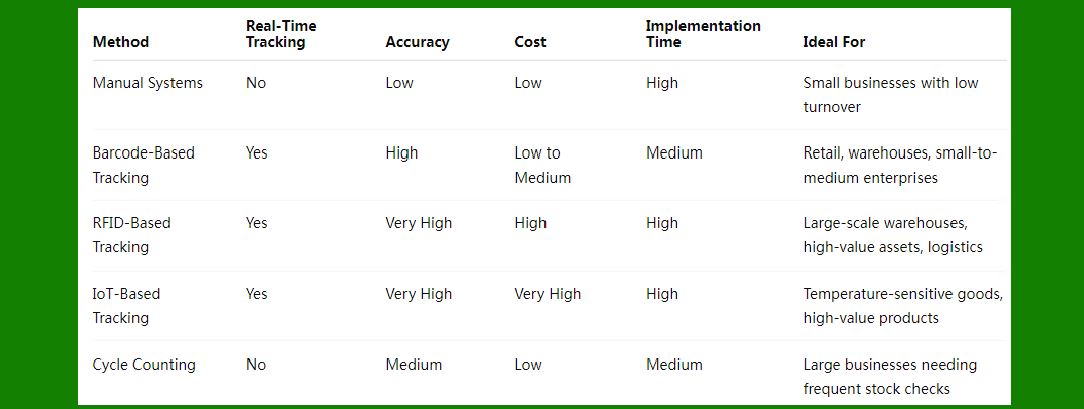
7. Comparison of Inventory Tracking Methods |
|
8. Conclusion |
Effective inventory tracking is essential for optimizing stock levels, reducing costs, and improving operational efficiency. The choice of tracking method depends on factors such as the scale of operations, the value of the goods, transaction volume, and available resources. |
Barcode-based systems are the most popular and cost-effective solution for small to medium-sized businesses, offering fast, accurate tracking. |
RFID and IoT solutions, although expensive, are invaluable in large-scale operations or for businesses handling high-value, perishable, or sensitive goods. |
Manual methods such as stock audits and cycle counting are still relevant in certain contexts, but they are less efficient and prone to errors. |
As technology continues to evolve, businesses are increasingly adopting automated, real-time tracking systems that improve efficiency, accuracy, and scalability. |
|
Deep Dive into Warehouse Management |
Warehouse management is a critical component of the broader supply chain, responsible for the efficient storage, handling, and movement of goods within a warehouse. A well-managed warehouse is essential for businesses to meet customer demands promptly, maintain inventory accuracy, reduce operational costs, and ensure smooth order fulfillment. |
In this deep dive, we will explore the core concepts, strategies, technologies, best practices, challenges, and trends in warehouse management. |
1. Definition of Warehouse Management |
Warehouse Management (WM) refers to the activities involved in overseeing the movement and storage of goods within a warehouse. It encompasses receiving, storing, tracking, and shipping products, as well as managing warehouse operations such as layout optimization, inventory control, labor management, and order picking. |
Effective warehouse management ensures that goods are available when needed, inventory is accurate, and resources (space, labor, equipment) are used efficiently to minimize operational costs. |
|
2. Core Functions of Warehouse Management |
Warehouse management is a multi-faceted function that involves several critical operations to ensure smooth and effective logistics. These core functions include: |
2.1 Receiving |
Receiving is the process of accepting goods into the warehouse. This involves checking incoming shipments for accuracy, inspecting for damage, and updating inventory records. Efficient receiving processes ensure that products are available for sale or further distribution without delay. |
Key Steps in Receiving: |
Dock Scheduling: Coordinating with suppliers to schedule the arrival of goods and optimize dock usage. |
Inspection and Verification: Ensuring that the quantity and quality of received items match the purchase order and identifying discrepancies. |
Barcode Scanning/Labeling: Scanning barcodes or RFID tags for easy identification and tracking in the warehouse management system (WMS). |
Put-away: After inspection, items are moved to appropriate storage locations. |
2.2 Storing and Organizing Inventory |
Storage is a vital component of warehouse management. Proper storage and organization of goods enable efficient retrieval and minimize the risk of stockouts or overstocking. |
Storage Methods: |
Rack Storage: Shelves or racks that hold items in an organized manner. Ideal for bulky, non-perishable items. |
Bin Storage: Small items or parts are stored in bins, often used in smaller warehouses or for inventory that is frequently accessed. |
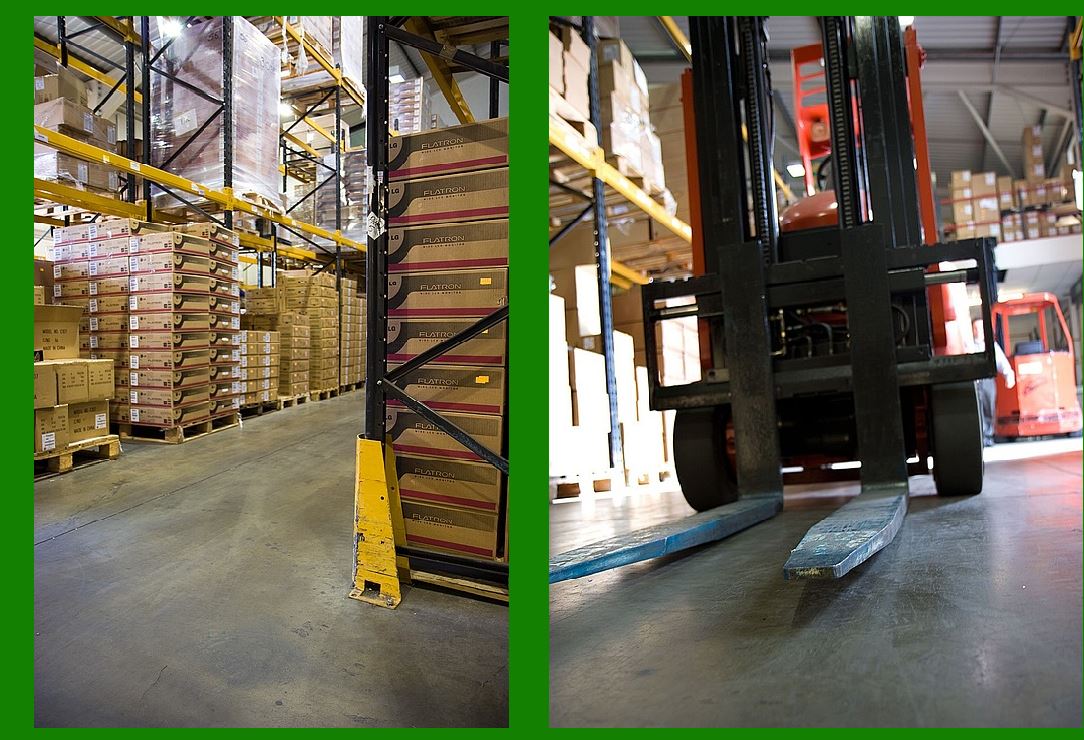
Pallet Storage: Pallets are used for large quantities of items that are handled with forklifts or pallet jacks. |
Temperature-Controlled Storage: For perishable items (e.g., food or pharmaceuticals), temperature-controlled spaces (coolers, freezers) are essential. |
Key Considerations: |
Product Classification: Grouping similar items together based on size, type, or order frequency to improve accessibility. |
Inventory Layout: Optimizing the physical arrangement of goods to reduce picking time and labor costs. |
Storage Density: Balancing space utilization with accessibility to ensure efficient use of warehouse floor space. |
2.3 Order Picking |
Order picking is the process of retrieving items from their storage locations based on customer orders. This is a crucial aspect of warehouse operations, directly impacting order accuracy and fulfillment speed. |
Picking Strategies: |
Single Order Picking: Picking items for a single order at a time, typically done in small warehouses or when the volume of orders is low. |
Batch Picking: Picking multiple orders at once, which can increase efficiency by grouping orders that contain similar items. |
Zone Picking: Dividing the warehouse into zones, with pickers responsible for picking items within their designated zone before passing the order to another zone. |
Wave Picking: Orders are grouped into 'waves' based on specific criteria (e.g., order priority, shipment date) and picked together. |
Picking Methods: |
Manual Picking: Human workers manually pick items using handheld devices, such as barcode scanners. |
Automated Picking: Robotic systems or automated conveyor belts retrieve items based on preset criteria. Automated storage and retrieval systems (ASRS) can optimize the picking process. |
2.4 Packing and Shipping |
Once orders have been picked, the next step is packing and preparing for shipment. Effective packing ensures that items are protected during transit and that the right products are sent to the right customers. |
Key Steps in Packing: |
Labeling: Generating shipping labels with customer information, delivery addresses, and tracking numbers. |
Packing Optimization: Determining the right packaging materials (e.g., boxes, pallets, bubble wrap) to minimize damage and shipping costs. |
Consolidation: Ensuring that multiple items in a single order are packed together and ready for shipping. |
Shipping Methods: |
Third-Party Logistics (3PL): Many warehouses use third-party carriers (e.g., FedEx, UPS, DHL) for the final leg of delivery. |
Direct-to-Customer Shipping: Shipments are sent directly to customers, often in e-commerce businesses. |
2.5 Inventory Control and Management |
Effective inventory control is essential to maintaining accurate stock levels, ensuring that stockouts or overstocking do not occur. This involves monitoring inventory levels in real-time, forecasting demand, and making informed decisions about restocking. |
Inventory Management Techniques: |
FIFO (First-In, First-Out): Ensuring that older stock is sold or used before newer stock, particularly important for perishable goods. |
LIFO (Last-In, First-Out): Selling or using the most recently received inventory first. Common in industries like oil and gas. |
ABC Analysis: Categorizing inventory into three groups (A, B, C) based on value and turnover. Group A items are high-value, low-volume products, while C items are low-value, high-volume items. |
Inventory Tracking Methods: |
Barcode Scanning: Using barcode scanners to track inventory movements, enabling real-time data updates. |
RFID: Using radio frequency identification to track and trace products automatically, providing real-time visibility into inventory levels. |
|
3. Warehouse Management Systems (WMS) |
A Warehouse Management System (WMS) is a software solution designed to optimize and automate the processes within a warehouse, such as inventory tracking, order picking, and shipment. WMS provides real-time data and enhances decision-making, improving operational efficiency. |
3.1 Key Features of WMS |
Inventory Tracking: WMS tracks stock levels and locations in real time, helping to minimize stockouts and ensure inventory accuracy. |
Order Management: Automates order picking, packing, and shipping, ensuring the fastest and most efficient fulfillment. |
Task Optimization: Prioritizes tasks and optimizes routes for pickers, reducing travel time and increasing efficiency. |
Labor Management: Monitors worker performance, ensuring that labor resources are utilized effectively. |
3.2 Benefits of WMS |
Increased Efficiency: Automating processes such as inventory tracking and order fulfillment leads to faster, more accurate operations. |
Improved Accuracy: Real-time tracking and automated processes reduce human error, increasing order accuracy. |
Cost Savings: Optimized use of warehouse space, reduced labor costs, and faster order fulfillment lead to overall cost reductions. |
Better Visibility: WMS provides real-time data on stock levels, orders, and shipments, allowing for better decision-making and forecasting. |
3.3 Integration with Other Systems |
Enterprise Resource Planning (ERP): WMS integrates with ERP systems to ensure that inventory levels are synchronized with production, sales, and procurement data. |
Transportation Management Systems (TMS): Integration with TMS allows warehouses to optimize shipping routes and reduce transportation costs. |
Customer Relationship Management (CRM): Linking WMS with CRM systems helps ensure that customer orders are fulfilled accurately and on time. |
|
4. Advanced Technologies in Warehouse Management |
The warehouse industry is rapidly adopting advanced technologies to improve efficiency, accuracy, and safety. Some of the most important innovations include: |
4.1 Automated Storage and Retrieval Systems (ASRS) |
ASRS are robotic systems designed to automatically store and retrieve products within a warehouse. These systems consist of automated cranes, conveyors, and robots that optimize the movement of goods, significantly reducing the need for manual labor. |
Benefits: Increases storage density, reduces labor costs, and speeds up order fulfillment. |
4.2 Robotics and Autonomous Vehicles |
Robots and autonomous vehicles (such as Automated Guided Vehicles or AGVs) are used for material handling within the warehouse. Robots can perform tasks such as picking, packing, sorting, and transporting items, while AGVs can move goods autonomously within the warehouse. |
Benefits: Reduces labor costs, increases speed, and enhances safety by limiting human interaction with heavy equipment. |
4.3 Drones in Warehouses |
Drones are being used in some warehouses to automate inventory checks, cycle counting, and stocktaking. Drones are equipped with cameras and sensors to scan barcodes or RFID tags in hard-to-reach areas. |
Benefits: Fast, accurate inventory counts, and the ability to reach high or confined spaces without requiring manual labor. |
4.4 Internet of Things (IoT) |
IoT devices, such as smart shelves and sensors, help track the condition and location of goods in real time. These devices can transmit data regarding stock levels, temperature, humidity, and other environmental conditions. |
Benefits: Provides real-time insights into inventory health and environmental conditions, reducing losses and improving product quality. |
|
5. Warehouse Layout and Optimization |
Optimizing the layout and design of a warehouse is crucial for efficient operations. The layout should minimize unnecessary movements and maximize |
|
Deep Dive into Demand Forecasting |
Demand forecasting is the process of predicting future customer demand for products or services based on historical data, market trends, and other variables. It plays a critical role in supply chain management, inventory management, and production planning. Accurate demand forecasting helps businesses optimize inventory levels, minimize stockouts or overstocking, improve cash flow, and align production with market demand. |
In this deep dive, we will explore the importance of demand forecasting, the methods used, the data inputs required, the challenges faced, and the technologies and tools available for effective forecasting. |
1. Importance of Demand Forecasting |
Effective demand forecasting provides numerous benefits for businesses, particularly in supply chain management and inventory control: |
1.1 Inventory Optimization |
Forecasting demand accurately allows companies to maintain optimal inventory levels, ensuring that they neither overstock (which increases storage costs and the risk of obsolescence) nor understock (which can lead to stockouts and missed sales). |
1.2 Production and Capacity Planning |
By understanding future demand, companies can plan production schedules and optimize capacity. This ensures that manufacturers can meet demand without overextending their resources or underutilizing their production capacity. |
1.3 Improved Customer Service |
Accurate demand forecasting leads to better stock availability, which translates into higher customer satisfaction. When customers find the products they want in stock, it results in improved brand loyalty and reduced lead times. |
1.4 Cost Reduction |
By predicting demand, companies can reduce excess inventory, minimize holding costs, and avoid the costs associated with stockouts, such as expedited shipping or lost sales. Accurate forecasting also helps in reducing the risk of waste (e.g., in perishable goods) and excess capacity. |
1.5 Financial Planning and Budgeting |
Demand forecasts provide valuable input for financial planning, helping companies estimate revenues, plan cash flows, and manage working capital. Accurate forecasts also help to make better-informed decisions regarding investments in infrastructure, technology, or personnel. |
|
2. Methods of Demand Forecasting |
There are two primary types of forecasting methods: qualitative and quantitative. Both have their advantages and are often used in conjunction, depending on the data available, the forecasting horizon, and the industry. |
2.1 Qualitative Methods |
Qualitative methods are subjective and typically used when historical data is unavailable, or when the market is volatile or new. These methods rely on expert judgment, market insights, or consumer opinions to predict future demand. |
2.1.1 Delphi Method |
The Delphi method involves gathering input from a panel of experts, who provide their forecasts independently. Their responses are then aggregated and analyzed, and the process is repeated until a consensus is reached. |
Advantages: Useful for new products or in situations where historical data is insufficient. |
Disadvantages: Time-consuming and potentially biased by the experts’ perspectives. |
2.1.2 Market Research (Surveys and Focus Groups) |
Market research involves directly collecting data from consumers through surveys, interviews, or focus groups. This method is often used to understand customer preferences, perceptions, and purchasing behaviors. |
Advantages: Direct insights from the target market, useful for new product introductions. |
Disadvantages: Time-consuming and expensive. Responses may be influenced by biases or inaccurate recollections. |
2.1.3 Expert Judgment |
Expert judgment relies on the knowledge and experience of individuals within the company or industry. These experts use their insights to predict future demand, especially in cases where historical data is limited. |
Advantages: Quick and relatively inexpensive. |
Disadvantages: Subject to bias, personal assumptions, and lack of objectivity. |
2.2 Quantitative Methods |
Quantitative methods use historical data, statistical analysis, and mathematical models to forecast future demand. These methods are more objective and are widely used in industries with a steady flow of data. |
2.2.1 Time Series Analysis |
Time series forecasting is one of the most common quantitative methods. It uses historical sales data, where past demand patterns are projected into the future. Key techniques used in time series forecasting include: |
Moving Average: A simple method where the forecast for the next period is the average of past demand data over a fixed time period. It's often used for stable demand patterns. |
Advantages: Simple and effective for short-term forecasting in stable markets. |
Disadvantages: Does not account for seasonal variations or trends. |
Exponential Smoothing: A more sophisticated version of moving averages, where recent data points are given more weight than older ones. This method is useful for data with consistent trends and seasonality. |
Advantages: Can handle trends and seasonality better than a simple moving average. |
Disadvantages: Requires some historical data and may not handle significant volatility or sudden market changes well. |
ARIMA (AutoRegressive Integrated Moving Average): ARIMA is a statistical model used for forecasting time series data that exhibit trends, seasonality, and noise. |
Advantages: Effective for data with patterns like trend and seasonality. |
Disadvantages: Complex to implement and requires a deep understanding of the model's parameters. |
2.2.2 Causal (Explanatory) Models |
Causal forecasting methods attempt to establish cause-and-effect relationships between demand and other variables, such as economic indicators, marketing campaigns, or competitor actions. These methods are more complex but can provide more accurate forecasts when external factors significantly influence demand. |
Multiple Linear Regression: A statistical model that explains demand based on several independent variables (e.g., price, promotions, seasonality). |
Advantages: Captures the impact of multiple factors on demand. |
Disadvantages: Requires detailed data on relevant factors, and model accuracy depends on the quality of input data. |
2.2.3 Machine Learning and Artificial Intelligence (AI) |
Machine learning (ML) and AI-based forecasting methods use advanced algorithms to predict demand based on historical data and patterns that may not be evident through traditional statistical methods. These systems can identify hidden patterns in large datasets and adjust in real-time as new data comes in. |
Types of ML Models Used: |
Regression Analysis: Predicts demand based on continuous variables. |
Decision Trees: Uses decision rules to predict demand based on multiple input features. |
Neural Networks: Mimic human brain processes to recognize patterns in complex, non-linear data. |
Advantages: High accuracy, especially in environments with complex and dynamic data. |
Disadvantages: Requires significant data and computing power, as well as specialized expertise to develop and maintain the models. |
|
3. Data Required for Demand Forecasting |
The accuracy of demand forecasting is heavily dependent on the data used. Key data sources and factors influencing demand forecasting include: |
3.1 Historical Sales Data |
Sales Volume: The quantity of products sold over a specific period, often broken down by product category, region, or time of year. |
Seasonality Patterns: Demand fluctuations that occur at regular intervals (e.g., monthly, quarterly, or annually). For example, demand for winter clothing typically spikes in colder months. |
Sales Trends: Long-term changes in demand, such as growth, decline, or fluctuations due to new product launches or market conditions. |
3.2 External Factors |
Economic Indicators: Factors like GDP growth, unemployment rates, inflation, and consumer confidence can affect demand. |
Market Trends: Trends like shifts in consumer behavior, changes in tastes, or technological advancements can influence future demand. |
Competitor Actions: New product releases, promotions, or pricing strategies from competitors can impact demand for your products. |
Weather Patterns: In industries like retail, agriculture, and energy, weather conditions significantly influence demand (e.g., increased demand for umbrellas during rainy seasons). |
3.3 Promotional and Marketing Data |
Promotions, advertising, and marketing campaigns directly affect consumer demand, and understanding these effects is crucial for accurate forecasting. Historical data on past campaigns can help predict the demand uplift caused by future marketing efforts. |
3.4 Lead Times and Supply Chain Data |
Understanding the lead times for procurement, manufacturing, and delivery is crucial for demand forecasting. Long or variable lead times require more accurate forecasting to avoid stockouts or overstocking. |
3.5 Customer Behavior Data |
Consumer preferences, loyalty program data, website analytics, and social media interactions can provide valuable insights into demand trends and help refine forecasts. |
|
4. Challenges in Demand Forecasting |
Despite its benefits, demand forecasting can be challenging due to several factors: |
4.1 Data Quality and Availability |
Accurate demand forecasting depends on high-quality, reliable data. Missing, incomplete, or inaccurate data can lead to poor forecasts and costly mistakes. |
4.2 External Uncertainty |
Unpredictable events—such as economic downturns, political instability, natural disasters, or pandemics—can disrupt demand patterns, making accurate forecasting more difficult. |
4.3 Changing Consumer Behavior |
Consumer preferences are constantly evolving, driven by factors such as technological advancements, cultural shifts, or global trends. Capturing these changes in forecasts requires continuous adjustment of forecasting models. |
4.4 Seasonality and Market Trends |
Seasonal products or demand spikes during holidays require careful attention to ensure that the forecast accounts for both short-term fluctuations and long-term growth trends. |
|
5. Technologies and Tools for Demand Forecasting |
Advances in technology have made demand forecasting more accurate, faster, and accessible. Some key tools and platforms include: |
5.1 Advanced Forecasting Software |
Software solutions like SAP Integrated Business Planning (IBP), Oracle Demantra, and Kinaxis RapidResponse offer advanced forecasting capabilities, integrating with ERP systems to provide real-time data and predictive analytics. |
5.2 Cloud-Based Tools |
Cloud platforms like Microsoft Azure Machine Learning and Google Cloud AI enable businesses to harness machine learning models and artificial intelligence without the need for complex infrastructure. |
5.3 Predictive Analytics |
Tools like Tableau, Power BI, and Qlik provide data visualization and predictive analytics capabilities, helping businesses gain actionable insights into demand trends. |
 cs@easiersoft.com