Single-Board Computer Program Design for the Control Circuit of the Barcode Reader |
1. Introduction |
In the era of automation, barcode readers have become essential tools for inventory management, point-of-sale systems, and other applications that require quick and accurate data input. The barcode reader's primary function is to scan and decode information from barcode labels, which typically represent product details or other essential information. A single-board computer (SBC), such as the Raspberry Pi or Arduino, is a compact and cost-effective platform for controlling the barcode reader system. This article provides a comprehensive guide to designing the program for a control circuit that manages the operation of a barcode reader using an SBC. |
The objective of this project is to design an efficient program on a single-board computer that can interface with a barcode reader, capture the barcode data, and process it for further actions, such as displaying information, storing data, or triggering other processes. The design approach includes hardware considerations, software development, and communication protocols necessary to make the system functional. |
|
2. Overview of Components and Hardware Requirements |
2.1. Single-Board Computer (SBC) |
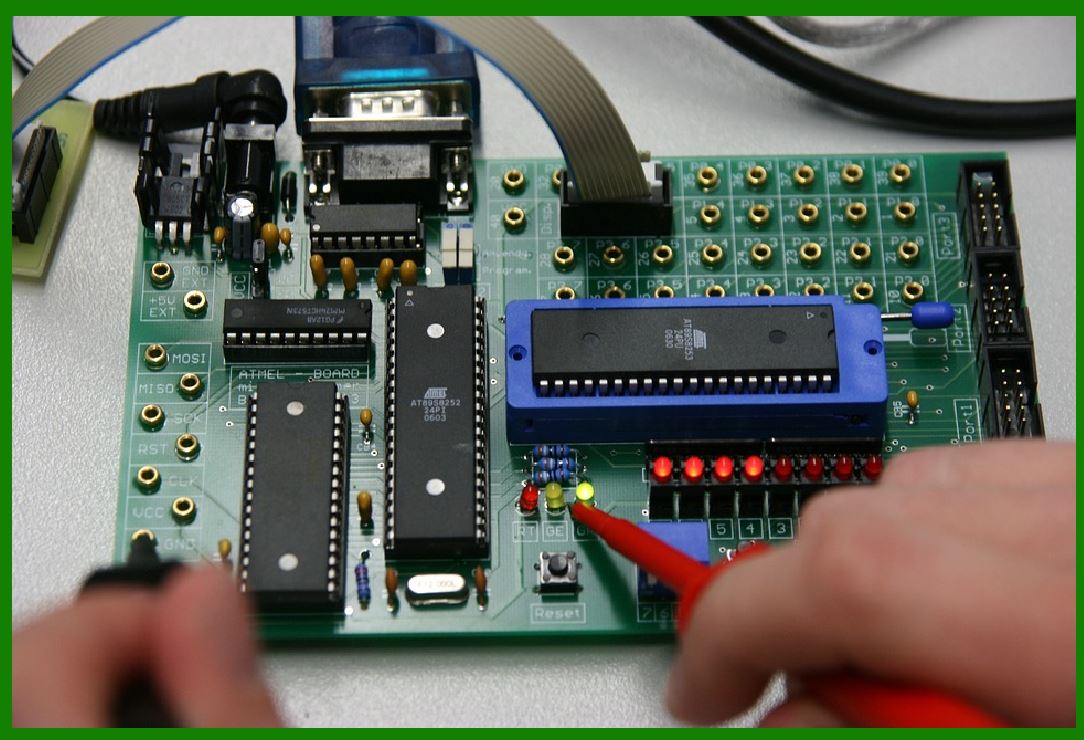
The SBC will serve as the heart of the system, performing data acquisition, processing, and communication with other components. For the purpose of this design, we can use popular SBCs like Raspberry Pi or Arduino, though Raspberry Pi is more suitable for complex software operations due to its processing power and ability to run a full operating system (OS). Raspberry Pi 4, for instance, has adequate processing power for handling barcode scanning operations with the necessary libraries and interfaces. |
2.2. Barcode Reader |
Barcode readers come in various types, such as laser scanners, CCD (charge-coupled device) scanners, or image-based scanners. The type of scanner influences the interface with the SBC. Most barcode scanners today connect to an SBC using serial communication protocols like USB or RS-232. |
USB Barcode Scanner: This is the most common interface for modern barcode readers. It acts as a keyboard input device when plugged into the USB port of the SBC, sending decoded data directly to the SBC. |
RS-232 Interface: Older barcode scanners may use RS-232 (serial communication). In this case, the SBC will need a USB-to-serial adapter or a dedicated UART (Universal Asynchronous Receiver/Transmitter) port. |
2.3. Power Supply |
Powering the SBC and the barcode scanner is a critical consideration. Most SBCs like the Raspberry Pi are powered by 5V DC, and the barcode reader typically requires 5V as well. An appropriate power supply or a USB power bank can be used to ensure the system operates without interruptions. |
2.4. Display/Output Interface |
An optional display, such as an LCD or LED screen, may be used to show the scanned data or status messages. The SBC can interface with a small display module to visually indicate to the user the successful scanning or processing of the barcode. |
|
3. System Architecture and Design |
The design of the control circuit for the barcode reader involves several key components, including hardware connections, the communication protocol, and the program structure. The system architecture consists of the following stages: |
3.1. Data Acquisition |
Once the barcode reader is powered and ready, it begins capturing data. The barcode reader scans the barcode, converts the light patterns reflected from the barcode into electrical signals, and then decodes the data into a readable format (such as a string of characters). |
In the case of a USB barcode scanner, the reader functions like a keyboard, sending the decoded data through the USB interface to the SBC. The program running on the SBC can detect this input as if the user typed the data from a keyboard. |
3.2. Data Processing |
After receiving the scanned data, the SBC processes it for further actions. The program on the SBC can be designed to: |
Validate the barcode data (e.g., check if it matches a certain format or if the data is correct). |
Query a database or file to fetch product details associated with the barcode. |
Trigger specific actions, such as updating inventory records, printing receipts, or controlling other devices (e.g., opening a door or activating a motor). |
3.3. Data Output |
The processed data can be output in various ways, depending on the application's requirements. For example, the SBC could display the product information on a screen, store it in a database, or trigger an action (like logging the scan into a file). |
|
4. Hardware Design and Interface |
The hardware design of the barcode reader control circuit is relatively simple but requires careful consideration of how the SBC will communicate with the barcode reader and any other peripherals. |
4.1. Connecting the Barcode Reader to the SBC |
USB Barcode Reader: The easiest connection method is using a USB barcode reader. It directly plugs into one of the USB ports on the SBC. The barcode scanner is typically recognized by the operating system as a keyboard input device. Therefore, no specialized hardware interface is needed. |
RS-232 Barcode Reader: If the barcode reader uses an RS-232 interface, the SBC will need a USB-to-serial adapter, which connects the barcode reader to the serial port of the SBC. This setup requires configuring the SBC to receive data via the serial port and decode the incoming signals. |
4.2. Optional Display and Additional Peripherals |
If the application requires a display, the SBC can be connected to an LCD or LED screen via GPIO pins, HDMI, or SPI (Serial Peripheral Interface). Additional peripherals like keyboards or printers can be connected via USB or GPIO, depending on the specific needs of the system. |
|
5. Software Design |
The software design consists of developing a program that interfaces with the barcode reader, processes the scanned data, and controls the output. The programming language used depends on the SBC's operating system and libraries available. Python is commonly used with Raspberry Pi due to its simplicity and wide range of libraries. Below is a step-by-step breakdown of the program's structure. |
5.1. Initialize the Barcode Reader Interface |
The program begins by initializing the barcode reader interface. For a USB barcode reader, this is typically automatic, and the reader acts as a keyboard input device. For an RS-232 connection, the program must open a serial communication port (e.g., using Python's serial library). |
python |
import serial |
Open the serial port (assuming USB-to-serial adapter connected to /dev/ttyUSB0) |
ser = serial.Serial('/dev/ttyUSB0', 9600, timeout=1) |
5.2. Capture Barcode Data |
Once the barcode reader is ready, the program continuously listens for input. For a USB barcode reader, the system will listen for keystrokes. For an RS-232 scanner, it will wait for data from the serial port. |
def read_barcode(): |
Read a line of data from the barcode reader |
barcode_data = ser.readline().decode('utf-8').strip() |
return barcode_data |
5.3. Process Barcode Data |
After capturing the barcode data, the program processes the scanned data. This could involve validating the barcode, querying a database, or triggering an action based on the barcode content. |
def validate_barcode(barcode): |
Basic validation: check if barcode is of a valid length |
if len(barcode) < 6: |
print('Invalid barcode.') |
return False |
return True |
def process_barcode(barcode): |
Example: Query a database for product information |
In practice, this would involve querying a database or external API. |
print(f'Product information for barcode {barcode}: [Product details]') |
5.4. Output Results |
The processed data can be displayed on a screen, stored in a file, or used to trigger other actions. This can be achieved through the Raspberry Pi's GPIO pins or a connected display. |
def display_result(data): |
Display the result on an LCD screen |
print(f'Scanned Barcode: {data}') |
Optionally, write to a file or update a database |
|
6. Communication Protocols |
Communication between the SBC and the barcode reader typically involves either USB or RS-232. Both protocols require proper handling in the software. The USB communication can be handled using built-in libraries, while serial communication requires setting the correct baud rate, data bits, and parity. |
6.1. USB Communication |
USB barcode readers typically operate in HID (Human Interface Device) mode. When a barcode is scanned, it sends the data as if it were typed on a keyboard. Most SBCs will recognize the barcode reader as a keyboard device, and the program can capture input via standard input functions. |
6.2. RS-232 Communication |
For serial communication, the program must use a serial port interface library to communicate with the barcode reader. The communication settings (baud rate, parity, stop bits) must match those of the barcode reader. |
|
7. Debugging and Error Handling |
Error handling is crucial for ensuring that the system operates reliably. Common errors include: |
Incorrect barcode format: The program should check that the barcode data conforms to the expected format and provide an error message if not. |
Scanner not detected: The program should check whether the barcode reader is properly connected and respond appropriately. |
Timeouts or data loss: Ensure that the program accounts for possible communication errors and retries as needed. |
|
8. Conclusion |
Designing a control program for a barcode reader using a single-board computer is a relatively straightforward task that involves setting up the hardware interface, writing the software to capture and process barcode data, and managing communication protocols. With the right combination of SBC, barcode reader, and software, a functional and efficient barcode scanning system can be built. The system can be extended with additional features such as database integration, cloud syncing, or advanced error handling for industrial-grade use cases. |
|
Related Program Design Technologies for Barcode Reader Control Systems |
Designing a program to control a barcode reader, especially with the integration of a single-board computer (SBC), involves leveraging several technologies and methodologies that play a key role in system functionality. These technologies span areas like hardware communication, software frameworks, libraries, user interface development, database management, and error handling, among others. |
Below, we'll discuss the related program design technologies that are often employed when designing systems for barcode reader control circuits. These technologies help ensure that the barcode scanning system is efficient, reliable, and scalable. |
1. Communication Protocols |
1.1. USB (Universal Serial Bus) |
USB-based barcode readers are the most widely used in modern systems due to their plug-and-play capability. When a barcode scanner is connected via USB, it generally emulates a keyboard, sending the scanned data as keystrokes. The primary technology here is USB HID (Human Interface Device). |
USB Drivers and Libraries: In the case of SBCs like Raspberry Pi, most Linux distributions automatically detect USB barcode scanners as keyboard input devices. However, for advanced features like controlling the scanner programmatically, libraries such as libusb or PyUSB (for Python) may be used. |
Data Capture: Once the scanner sends data, the program captures the keyboard input in a way that it can be processed as a string. |
1.2. RS-232 / Serial Communication |
For barcode scanners that communicate over RS-232 (serial), the technology used is serial communication, where the barcode reader sends the scanned data as a series of electrical signals. On SBCs, this typically requires an RS-232 to USB adapter or direct UART interfaces available on the board. |
Serial Port Libraries: In programming, you would use serial communication libraries such as PySerial (Python) or SerialPort (C) to read from and write to the serial port. These libraries allow you to configure the connection, set baud rates, and interpret the incoming data. |
|
2. Programming Languages and Environments |
2.1. Python |
Python is one of the most popular programming languages for controlling SBCs like the Raspberry Pi due to its readability, ease of integration with libraries, and wide community support. Python's flexibility makes it an ideal choice for managing barcode scanners, processing data, and controlling peripherals. |
Libraries: Python has several libraries that support the functionalities needed for barcode reader control: |
PySerial: Used for serial communication (e.g., RS-232 connected barcode scanners). |
PyUSB: Used to interface with USB barcode readers. |
Pygame: A library for handling GUI and input events, useful for creating custom displays or UIs for barcode scanning. |
OpenCV: For advanced image-based barcode readers (camera-based scanning), OpenCV can process images to extract and decode barcode data. |
GPIO Libraries: Python libraries like RPi.GPIO allow interaction with the GPIO pins on Raspberry Pi, which can be used for triggering physical devices or sensors upon scanning a barcode. |
2.2. C/C++ |
For more performance-critical applications, C or C++ is often used in SBC environments. These languages are used when low-level access to hardware or real-time performance is required, or when the barcode scanning system needs to be embedded into industrial-grade solutions. |
Libraries: On SBCs, WiringPi (for Raspberry Pi) provides a C library to interact with GPIO pins. Additionally, for serial communication, libserial or direct access to OS-level serial communication APIs may be employed. |
2.3. JavaScript (Node.js) |
For web-based or IoT applications, JavaScript with Node.js can be employed to handle barcode data, especially if the system involves connecting to a server or cloud-based database. Node.js allows easy handling of events and asynchronous I/O, which is important when working with hardware like barcode scanners. |
Libraries: Libraries such as SerialPort allow Node.js to interact with serial devices, including barcode readers. |

|
3. Database and Data Management Technologies |
3.1. SQLite / MySQL / PostgreSQL |
Many barcode reader systems need to query a database to retrieve product information, process inventory, or log scanning events. This requires the use of database management systems (DBMS). The type of database chosen depends on the size of the data and system scalability. |
SQLite is a lightweight, serverless, file-based DBMS commonly used in SBC applications due to its simplicity. It's ideal for applications with smaller-scale, local databases (e.g., product catalog stored on the device itself). |
MySQL or PostgreSQL is preferred for larger-scale, more robust applications, where the barcode data is part of a larger enterprise system. |
3.2. ORMs (Object-Relational Mapping) |
To simplify database interaction, ORMs like SQLAlchemy (for Python) or Sequelize (for Node.js) can be used. These tools allow developers to interact with the database using objects, which abstracts away raw SQL queries, making it easier to work with data and simplifying CRUD (Create, Read, Update, Delete) operations. |
|
4. Barcode Scanning Technologies |
4.1. 1D and 2D Barcode Scanning |
Barcode readers can be either 1D (linear) or 2D (matrix) barcode scanners. The software needs to handle different types of barcodes and integrate them accordingly. |
1D Barcodes (e.g., UPC, EAN): These are the traditional linear barcodes that can be scanned by laser or CCD-based readers. Processing 1D barcode data typically involves extracting strings or numeric codes. |
2D Barcodes (e.g., QR Codes, Data Matrix): These barcodes store more information than 1D barcodes and can be scanned with image-based scanners, such as camera-based systems or specialized 2D barcode scanners. The software design for this type of barcode includes using image processing libraries to detect and decode the 2D patterns. |
Libraries for 2D Barcode Scanning: |
Zxing (Java): A popular library for decoding 1D and 2D barcodes. |
OpenCV (Python, C++): OpenCV can be used to capture images from cameras and process those images to extract and decode 2D barcodes. |
4.2. Image Processing |
If the barcode scanning system involves cameras or image-based scanners, image processing becomes a critical technology. OpenCV is a widely used computer vision library that can be used to process camera images, detect barcodes, and decode them in real-time. |
Barcode Detection Algorithms: Image processing libraries allow for techniques like edge detection, thresholding, and contour detection to identify barcodes in images. |
Barcode Decoding: Libraries like Zxing and ZBar decode barcode patterns from the processed images, converting them into usable data. |
|
5. User Interface (UI) Technologies |
5.1. Graphical User Interface (GUI) |
If the barcode reader is part of a system with a user interface, technologies like Qt, Tkinter, or Kivy (for Python) are often used to create desktop applications for displaying scanned results, managing inventory, and offering user interaction. |
Tkinter: A built-in Python library that can be used to quickly develop GUI applications with widgets (buttons, text fields, labels) for the user to interact with the system. |
Kivy: A framework for developing multi-touch applications with rich user interfaces, ideal for touch-screen-based devices. |
5.2. Web-based Interface |
For systems that require remote monitoring or access, a web-based interface can be employed, where barcode data is transmitted to a server and displayed through a browser. |
HTML/CSS/JavaScript: The front-end interface is typically built with web technologies, allowing for dynamic displays of scanned barcode data. |
Web Frameworks (e.g., Flask or Django for Python): These frameworks allow for the rapid creation of web applications where the barcode reader can communicate with the back-end server. |
|
6. Error Handling and Debugging Tools |
A reliable barcode reader system must have robust error handling to account for issues like invalid barcodes, connection problems, or timeouts. Common technologies and techniques for error handling include: |
6.1. Logging Libraries |
Python Logging: The logging module is commonly used in Python to log errors, information, and debugging messages. |
Node.js Winston: A logging library for Node.js applications that can log information, warnings, and errors to a file or a remote server. |
6.2. Exception Handling |
Try-Except blocks (Python) or Try-Catch blocks (JavaScript, C++) help prevent the program from crashing and allow for graceful handling of unexpected scenarios (e.g., barcode scan errors, communication failures). |
|
Conclusion |
The design of a barcode reader control system involves an integrated approach that uses various program design technologies. By understanding the required communication protocols, choosing the right programming languages, selecting appropriate libraries, and handling databases and user interfaces efficiently, you can build a robust and scalable barcode scanning solution. Each piece of the puzzle-from hardware interfaces and programming languages to error handling and UI technologies-contributes to making the barcode reader system both functional and efficient. |
 cs@easiersoft.com