| |
|
|
|
|
Download: Free Bulk Barcode Generator
and Barcode Labels Printing Software
Three steps to download and install this software: |
|
Step 1 |
Step
2 |
Step
3 |
|
Download:
From CNET
From Softonic
Version 6.8.22
Stronger functionality
On Windows 11 systems, due to strict security settings, you may not be able to run the downloaded EXE installation file directly.
Therefore, please follow Steps 2 and 3.
>>>>
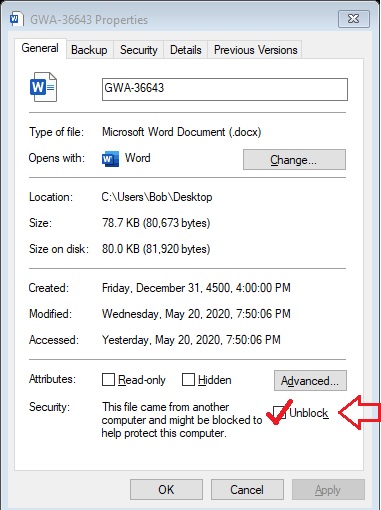
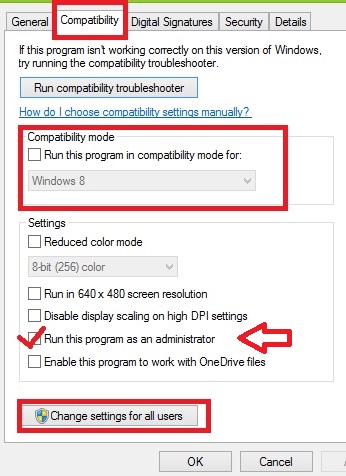
1. Right-click the downloaded .exe file and select Properties from the menu.
2. In the "General" tab, Check the box next to "Unblock" .
3. In the "Compatibility" tab, Check the
box next to "Run this program as an administrator".
5. Double-click the EXE file again. It should now run normally. |
 |
 |
|
|
|
|
The following are
detailed instructions and videos.
Please feel free to
contact us if you encounter any problems during installation:
cs@easiersoft.com
|
New
Version Including:
Barcode Label Designer:
Design and print more complex barcode labels that
incorporate text, logos, and other graphics, offering a
versatile solution for creating professional-quality
labels.
Permanently Free Version
Software Download
The free version includes most of the
essential features, while the full version offers advanced
functionalities, such as the ability to print barcode labels in bulk
using data from Excel.
The free version can be upgraded to the full version by entering the
registration code.
New features:
1. Improved support for
non-English operating systems.
2. Improved support for virtual
PDF printers.
It
is recommended to use:
Black Ice PDF Virtual Printer
We
only need to use its free virtual PDF printer function
and no other paid functions.
We are a legally
registered company.
D-U-N-S Number
554420014 |
This software has been published on CNET
the most trusted download platforms
worldwide

Download From CNET:
Download Now
YouTube
Video Tutorials
How to Fix EXE File Not Opening
in Win 11/10
*****
When downloading and installing software, Windows may
display a routine risk warning.
*****
This
software is guaranteed to be completely clean and
risk-free. You can
simply choose to keep the downloaded installation files
and continue the installation.
*****
On Windows 10 or later,
double-clicking the downloaded .exe installation file
may not run.
The reasons and
solutions
>>>
If the download or installation is
unsuccessful
Please feel free to contact us — we are
available 24/7
cs@easiersoft.com
The CNET website may display a pop-up window
recommending other software for download. If you do not
need these, simply close the window, then click "Download
Now"
again to proceed with downloading the "Free Barcode
Generator."
Once the
download is complete, you may also need to
Unlock the
installer
within the Windows operating system before you can
properly install the software. See below and right for
details.
>>> |
Tips:
On Windows 10 or later,
double-clicking the downloaded .exe installation file
may not run.
This issue occurs because Windows Server has a built-in
security feature called the "Mark of the Web." When you
download an executable file (.exe) from the internet
(via a browser, email attachment, or messaging app),
Windows automatically marks it as potentially unsafe.
This is done to protect your computer from running files
that might contain malware or viruses without your
explicit consent.
----------------------------
How to Download and
Install the Software:
1. Right-click the downloaded .exe file and select
Properties from the menu.
2. In the General tab,
look at the very bottom of the window. You will see a
security warning message stating: "This file came from
another computer and might be blocked to help protect
this computer."
3. Check the box next to
"Unblock" .
4. Click Apply, then
click OK.
5. Double-click the file
again. It should now run normally.
Download From Local
Download
V.6.8.20
Download
V.6.8.19
Download
Link B
Download
Link
C |
|
Bulk Barcode
generator
Software
( Free Edition )
The free version includes most of the
essential features, while the full version offers advanced
functionalities, such as the ability to print barcode labels in bulk
using data from Excel.
The free version can be upgraded to the full version by entering the
registration code. |
This software has been released on the
most trusted download platforms worldwide:
Download From CNET
V. 6.8.18
Download From CNET
Download From Uptodown
Download From Softonic
Download From Filehippo
Download From Softpedia
(8.5M)
|
Generate Barcode Images in Batches: Easily
create and export barcode images in bulk, saving them to designated
folders for convenient access.
Overprint Barcodes on Existing Documents: Seamlessly add barcodes to
existing forms, shipping labels, invoices, reports, and more,
ensuring a streamlined workflow without the need for redesign.
Batch Print Barcodes on a Single Sheet: Print a variety of barcodes
on a single sheet of paper or export them to graphic files in
popular formats such as PNG, JPG, and SVG.
Command-Line Support: Run barcode generation and printing tasks
directly from the command line for automated and efficient
processing. |
|
Please download
the free version first.
The free version can be upgraded to the full version by entering the license key. |
From Softonic
V. 6.6.28
|
CNET, Softpedia, Softonic is the famous
software download site in the
world, they can ensure the
software is clean and secure. |
|
|
|
|
|
File Backup Guy
Automatic Back up files
as original
files
or zip compressed |
Download From CNET |
File Backup Guy is for Incremental backup files, the
backup destination can be original Files or zip
compressed files. It can trace multiple backup files
version. It runs quietly in the background and only uses
a little resources. It can auto run backup job
scheduling. |
|
Network Test Guy
Test the network devices
generate analysis summary report |
Download From CNET |
Ping, tracer and scan multiple
network devices at the same time, then generator the
analysis summary reports, or export the test result data
to MS Access or Excel to make analysis report, or make
chart. When doing ping test, it can set different
interval and different send buffer size per packets,
this let you know the performance of network devices.
Network Test Guycan also ping test the internet
connection and export the test results to text file, if
the internet connection is frequently interrupted
continuously, you can provide this ping test results
file as evidence of the interruption to your ISP. |
|
|
Boost
your online presence:
Choose Our professional SEO
services
|
SEO
Search Engine Optimization
|
|
| |
|
Privacy Policy |
| |
|
Buy The Full Professional Edition
Permanent License - No Annual Fee
The full edition can import data from Excel to print bulk barcode labels.
If you have any questions, please email to us:
autobaup@aol.com
|
| |
|
*
We accept
multiple method of payment: Credit Card
online, by fax, by phone, electronic
funds transfer, wire transfer,
check, etc.
* The unit price is
dependent on the order quantity.
* The Registration Code
will be sent to you from two of our email accounts:
cs@easiersoft.com and
autobaup@aol.com |
| |
|
The full version software has more convenience on
input data.
*****
Barcode Generator supports large batch of bar code
labels' input and print. It requires you to input the
contents of the hundreds of thousands of labels at one
time, instead of one by one, then, bar code labels are
printed with batches. The contents of bar code labels
can also be input in Excel in advance, then, it is input
in Barcode Generator software, and bar code labels are
printed with batches. It makes your job more simple and
more efficient.
|
|
(1) This
program can import Excel data, so you can edit the
barcode抯 data in MS Excel.
|
|
 |
| |
|
(2) Print
multiple different barcodes in one page from multiple
line text.
|
|
 |
| |
|
(3)
Generate multiple barcode labels of a sequence barcode
numbers.
|
|
 |
| |
|
Download From Local
You can also download Barcode Generator
Software on CNET, click this link:
http://download.cnet.com/Free-Barcode-Generator/3000-2067_4-75940914.html
If you need to over
print a barcode on existing forms, shipping labels, invoices,
reports, etc. Barcode Generator & Overprinter can satisfy your
requirement, just need a few quick mouse motions to set the
print position, you can print barcodes on any existing forms.
You also can print batch various barcodes on one paper, or
export to many popular formats graphic files, or copied to the
windows clipboard, they can be paste to the shipping label,
invoice, etc. or import into desktop publishing software, word
processing software or the reports program of the ERP, MIS
system, or insert barcodes to MS Word, Excel file and Avery
label templates.
Barcode Generator supports all the most popular bar code types,
the barcode抯 data can be import from text or Excel file.
Barcode Generator gives you the flexibility to meet your most
demanding labeling needs, it is a good choice for those who want
an easy way to print bar codes. |
| |
| |
| |
|
CONTACT |
|
 autobaup@aol.com cs@easiersoft.com
 |
|
If you have any question, please
feel free to email us,
we will reply as soon as
possible. |
|
|
|
D-U-N-S Number:
554420014 |
|
|
|
Privacy Policy |
|
|
|
<< Back to Home << |
|
|
Technologies:
>> Barcode Since
their invention more than 50 years ago, barcode have been
enablers for accurate data capture, the rapid movement of goods,
and all types of automation. Whether at the Point-of-Sale, in a
hospital, or in a manufacturing environment these little black
and white images deliver incredible value.
>> There are many
different bar code symbologies, or languages. Each symbology has
its own rules for encoding characters (e.g., letter, number,
punctuation), printing, decoding requirements, and error
checking.
>> Barcode
symbologies differ both in the way they represent data and in
the type of data they can encode: some encode numbers; others
encode numbers, letters, and a few punctuation characters; still
others offer encodation of the 128 or 256 ASCII character sets.
Recently unveiled symbologies include options to encode
characters in any language as well as specialized data types.
>> Barcode in
common use are covered by international standards. International
standards also cover print quality measurements and equipment.
Bar code technology
standards define:
*** Rules for
representing data in an optically readable format,
*** Rules and
techniques for printing or marking,
*** Reading and
decoding techniques,
*** Rules for
measuring the quality of printed/marked symbols |
|